Our readers keep the lights on and my smoothie glass nicely filled. As an Amazon Associate, I earn from qualifying purchases.
Choosing an affordable printer that actually delivers reliable, low-cost printing is one of the trickiest purchases you can make—get it right and you save hundreds over the life of the machine; get it wrong and you are stuck with expensive cartridges that cost more than the printer itself.
I’m Mohammad Maruf — the founder and writer behind WellFizz. I spend my days analyzing market trends, comparing technical specifications, and reading thousands of customer reviews to separate genuinely good value from marketing hype.
After analyzing dozens of models, I created this guide to find the best affordable printers that deliver real value without hidden costs or surprises.
How To Choose The Best Affordable Printer
Finding a printer that balances upfront cost with long-term affordability requires looking beyond the sticker price. The real expense lives in the ink or toner you will buy over the next few years.
Ink System and Long-Term Cost
Standard cartridge-based printers have the lowest upfront cost but the highest per-page expense. Supertank or INKvestment models cost more initially but include enough ink for thousands of pages, slashing your cost per page dramatically. If you print frequently, the extra upfront investment pays for itself within a year.
Connectivity and Ease of Use
Dual-band Wi-Fi, Apple AirPrint, and a dedicated mobile app make daily printing effortless. Look for models that support wireless direct printing so you can print even when your router is down. A color display or touchscreen simplifies navigation and reduces setup frustration.
Print Speed and Duty Cycle
For occasional home use, speeds around 8–10 pages per minute black are sufficient. Home offices handling more volume should aim for 15 ppm or higher. The monthly duty cycle tells you the printer’s recommended workload—exceeding it regularly leads to mechanical wear and paper jams.
Quick Comparison
On smaller screens, swipe sideways to see the full table.
| Model | Type | Best For | Key Feature | Amazon |
|---|---|---|---|---|
| Canon PIXMA TS6520 | Inkjet | Home & hybrid work | Auto duplex, 1.42″ OLED display | Amazon |
| HP Envy 6555e | Inkjet | Everyday home printing | 2.4″ color touchscreen, AI print assist | Amazon |
| Brother INKvestment 1365 | Inkjet | Home office value | 1,200-page black cartridge included | Amazon |
| Canon PIXMA TR160 | Portable Inkjet | Travel & small spaces | 4.5 lbs, battery-capable, 5-color ink | Amazon |
| HP OfficeJet Pro 8125e | Thermal Inkjet | Professional home office | 225-sheet tray, 20 ppm black | Amazon |
| Canon Megatank G3290 | Supertank | High-volume, low ink cost | 6,000 B&W / 7,700 color pages per fill | Amazon |
| Epson WF-2930 | Inkjet | Compact home office | Auto document feeder, fax, color display | Amazon |
| Canon PIXMA TS3720 | Inkjet | Budget-conscious users | 1.5″ LCD, 60-sheet rear tray | Amazon |
| HP DeskJet 2755e | Inkjet | Basic occasional printing | 6-month Instant Ink trial included | Amazon |
| Brother MFC-J6555DW | INKvestment Tank | Ledger-size (11×17) printing | Up to 1 year of ink in-box | Amazon |
| Epson EcoTank ET-3850 | Supertank | Extreme low-cost per page | Cartridge-free, refillable ink tanks | Amazon |
In-Depth Reviews
1. Canon PIXMA TS6520

The Canon PIXMA TS6520 strikes an exceptional balance between upfront affordability and everyday performance. Its 2-cartridge hybrid ink system produces sharp black text and vivid color photos, making it a versatile companion for both document printing and creative projects. The compact white chassis fits neatly on a desk without dominating the space.
Setup is genuinely straightforward — the 1.42-inch monochrome OLED display guides you through wireless configuration, and dual-band Wi-Fi ensures a stable connection whether you are on 2.4GHz or 5GHz. Automatic duplex printing saves paper without manual flipping, and the integrated scanner handles copying and digitizing with minimal fuss.
Customer feedback consistently highlights the easy installation, quiet operation, and excellent print quality for the price. A few users noted that starter cartridges run out sooner than expected, but the overall value remains compelling for anyone seeking a reliable all-in-one for light to moderate use.
Why it’s great
- Excellent print quality for documents and photos
- Automatic 2-sided printing saves time and paper
- Compact design with intuitive OLED display
Good to know
- Starter ink cartridges have limited yield
- No automatic document feeder for multi-page scans
2. HP Envy 6555e

The HP Envy 6555e is designed for homes that want crisp color prints and borderless photos without complexity. Its 2.4-inch color touchscreen makes navigation intuitive, and HP’s AI-powered print assist automatically removes unwanted content from web pages and emails so you get clean, formatted prints every time.
Wireless connectivity is reliable with dual-band Wi-Fi that self-heals connection issues, and the HP Smart app lets you print, scan, and copy directly from your smartphone. The 35-sheet auto document feeder is a welcome addition for multi-page copying or scanning, and automatic 2-sided printing reduces paper waste.
Users praise the easy setup and sharp print quality, though some express frustration with HP’s Instant Ink subscription model and the printer’s firmware updates that restrict third-party cartridges. If you stick with HP’s ink plan or use original cartridges, the experience is smooth and the output is impressive for the price.
Why it’s great
- Intuitive color touchscreen makes operation simple
- AI web-print feature saves paper and ink
- Auto document feeder for multi-page jobs
Good to know
- Firmware blocks non-HP cartridges
- Instant Ink subscription may not suit all users
3. Brother INKvestment 1365

The Brother INKvestment 1365 redefines value by including a 1,200-page black cartridge and 500-page color cartridges right in the box. That is enough ink to last most home users several months before the first replacement. The 1.8-inch color display makes menu navigation clear, and the 20-page automatic document feeder simplifies multi-page copying and scanning.
Wireless connectivity is flexible with Wi-Fi Direct for printing without a network, and the Brother Mobile Connect app gives you full control from your phone. Print speeds of 16 ppm black and 9 ppm color are respectably fast for this class, and automatic duplex printing comes standard.
Reviews note that setup can be a bit involved and the printer nudges you toward Brother’s Refresh subscription, but once configured the output is laser-like in quality and the ink investment pays off quickly. The stationary print head design delivers consistent, high-speed printing with minimal maintenance.
Why it’s great
- Generous ink included out of the box
- Fast print speeds with excellent quality
- Wi-Fi Direct for network-free printing
Good to know
- Setup process is slightly involved
- Menu screen is small despite being color
4. Canon PIXMA TR160

The Canon PIXMA TR160 is a lightweight portable printer that slips into a backpack or bag with room to spare. Weighing just 4.5 pounds, it is designed for people who need to print on the go — whether you are in an RV, a coffee shop, or a client’s office. The 5-color hybrid ink system delivers rich, vibrant prints with sharp black text and detailed color.
Connectivity is simple with the Canon PRINT app, Apple AirPrint, and Mopria Print Service. Wireless Direct Mode lets you connect your device to the printer even without a router, and a 1.44-inch monochrome OLED display keeps you informed about ink levels and settings. An optional battery pack enables truly cordless operation.
Users love the compact size, easy Bluetooth setup, and excellent print quality for a portable device. The power button can be temperamental on some units, and the ink packs are small, but for mobile professionals and RV travelers, the TR160 is a game-changer that fits a full-size 8.5×11 print capability into an ultra-portable frame.
Why it’s great
- Extremely portable at only 4.5 pounds
- 5-color ink system produces vibrant prints
- Battery-capable for true wireless operation
Good to know
- Print-only function — no scanner or copier
- Battery pack sold separately
5. HP OfficeJet Pro 8125e
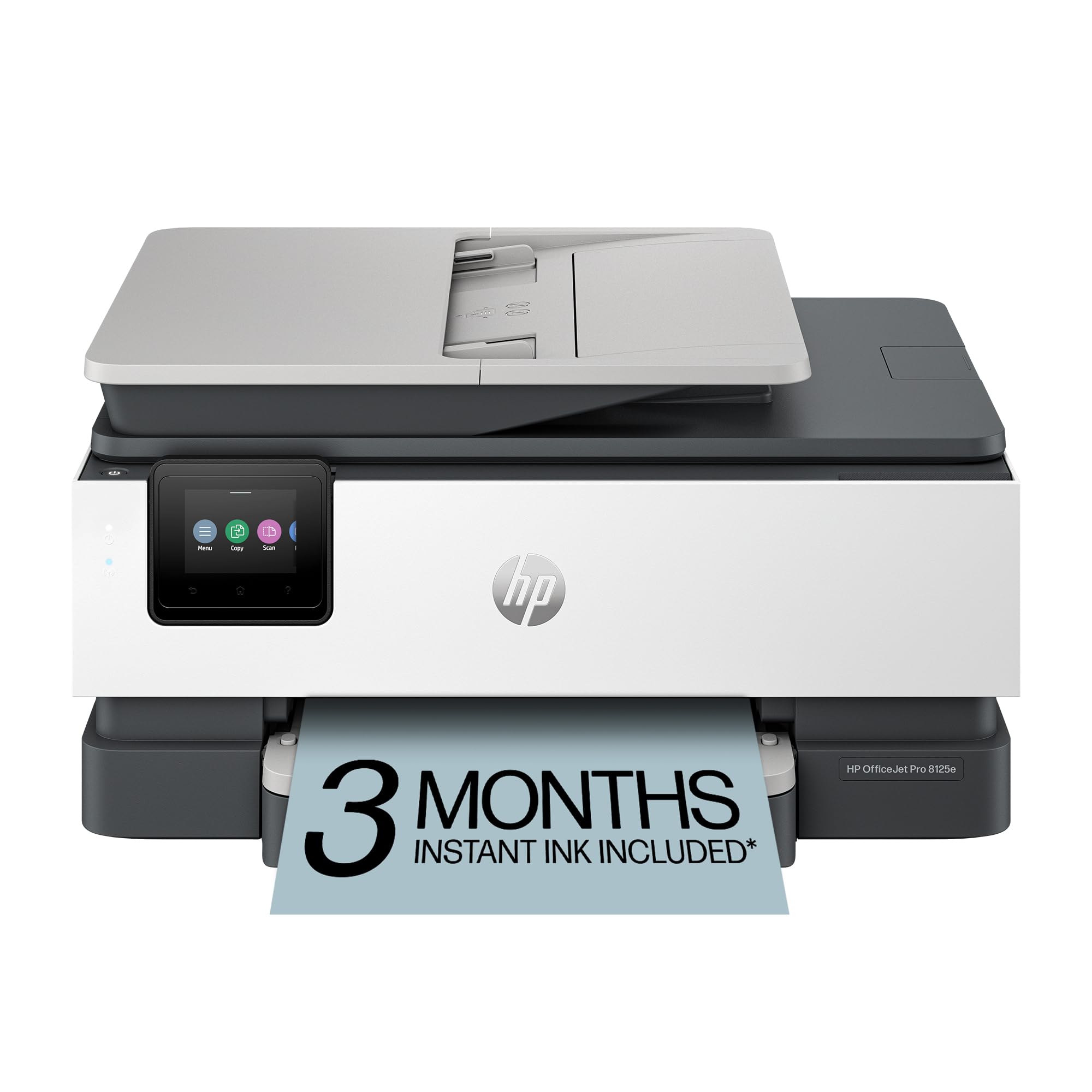
The HP OfficeJet Pro 8125e is built for home offices that demand professional-quality color documents, reports, and presentations. With print speeds of 20 ppm black and 10 ppm color, it keeps pace with a busy workflow. The 225-sheet input tray reduces the need for frequent paper refills, and the auto document feeder handles multi-page jobs efficiently.
HP’s AI-powered print assist automatically removes unwanted content from web pages and emails, saving ink and paper. Dual-band Wi-Fi with self-healing keeps you connected reliably, and the HP Smart app provides full mobile control. The printer supports Ethernet networking as well, making it suitable for more demanding office setups.
Customer feedback highlights the quiet operation and good print quality, though some users report frustration with HP’s ink subscription requirements and the printer’s large footprint. The included 3-month Instant Ink trial gives you a taste of the subscription model, but you can opt out if you prefer to buy cartridges as needed.
Why it’s great
- Fast print speeds ideal for home office use
- Large 225-sheet paper capacity
- Ethernet and dual-band Wi-Fi connectivity
Good to know
6. Canon Megatank G3290

The Canon Megatank G3290 eliminates the cartridge cycle entirely with refillable ink tanks that print up to 6,000 black-and-white pages or 7,700 color pages per full set of bottles. That translates to roughly two years of typical home printing without buying a single new ink container. The 2.7-inch color touchscreen makes setup and daily operation straightforward.
Wireless connectivity is reliable, and the printer supports automatic duplex printing, borderless photo printing, and mobile printing via the Canon PRINT app. The supertank design dramatically reduces cost per page — Canon estimates savings of up to compared to traditional cartridge-based printers over the printer’s life.
Users consistently praise the easy setup and excellent print quality for the price, though some note the printer is not the fastest (11 ppm black, 6 ppm color) and that the rear paper tray requires manual size changes when switching between paper types. A few artists reported color accuracy issues with glossy paper, but for general home and office use the G3290 is a standout value.
Why it’s great
- Extremely low cost per page with refillable tanks
- Includes enough ink for thousands of pages
- Color touchscreen simplifies operation
Good to know
- Print speed is moderate, not fast
- No separate tray for different paper sizes
- USB cable not included in the box
7. Epson WF-2930

The Epson WorkForce WF-2930 packs print, scan, copy, and fax capabilities into a compact black chassis that fits easily on a small desk. Its 1.4-inch color display and Epson Smart Panel app make setup and daily use simple. The automatic document feeder handles multi-page copying and scanning without manual intervention, and automatic 2-sided printing saves paper.
Heat-free PrecisionCore technology delivers sharp text and vibrant color graphics while consuming less energy than traditional inkjets. Individual ink cartridges let you replace only the color that runs out, reducing waste. Voice-activated printing via Alexa and Siri adds a layer of convenience for hands-free operation.
Reviews highlight the easy setup and good value, though some users caution about firmware updates that lock out third-party ink cartridges. The build quality feels a bit flimsy to some, but for basic home office tasks — especially if you need fax capability — the WF-2930 is a solid, affordable choice.
Why it’s great
- Auto document feeder for multi-page jobs
- Individual ink cartridges reduce waste
- Voice-activated printing with Alexa/Siri
Good to know
- Firmware may block third-party ink
- Build quality feels somewhat flimsy
- Photo quality may not match dedicated photo printers
8. Canon PIXMA TS3720

The Canon PIXMA TS3720 is a no-frills all-in-one that does exactly what most households need: print, copy, and scan without fuss. Its 1.5-inch segmented LCD screen and simple buttons make navigation easy, and the 60-sheet rear tray reduces the need for frequent paper refills. Setup is quick, with wireless connectivity via USB or Wi-Fi.
Print speeds are modest at 7.7 ppm black and 4 ppm color, but for occasional document printing and basic photo output the quality is perfectly acceptable. The hybrid ink system uses pigment black for sharp text and dye-based colors for vivid photos up to 8.5×11 inches.
Customers appreciate the straightforward setup and reliable performance for the price. Some had issues with wireless setup and occasional blank pages, but the majority find it a great value for light home use. If you need a simple, cheap printer for basic tasks and don’t want to deal with subscriptions or complex software, the TS3720 is a solid choice.
Why it’s great
- Very affordable with simple operation
- Easy wireless setup and mobile printing
- Compact footprint fits small spaces
Good to know
- Print speeds are slow for larger jobs
- No automatic duplex printing
- Starter ink cartridges have low yield
9. HP DeskJet 2755e

The HP DeskJet 2755e is designed for basic everyday printing — recipes, forms, travel documents, and school assignments. It prints at 1200 DPI resolution and supports a variety of media types including labels, envelopes, cards, and photo paper. The 60-sheet input tray handles most small jobs without constant refilling.
Wireless connectivity is reliable with dual-band Wi-Fi that automatically resets connection issues. The HP Smart app guides you through setup and lets you print from anywhere in your home. The included 6-month Instant Ink trial gives you a taste of automatic ink delivery, though you can cancel if you prefer to buy cartridges traditionally.
Users praise the easy setup and lightweight design, though some report that ink runs out quickly with the starter cartridges (as is typical). The printer works well with mesh Wi-Fi systems and supports AirPrint, making it a convenient option for Apple households. For occasional printing without high volume demands, the DeskJet 2755e delivers solid value.
Why it’s great
- Very affordable upfront cost
- Easy setup via HP Smart app
- Works with mesh Wi-Fi systems
Good to know
- Starter ink cartridges run out quickly
- No automatic duplex printing
- Limited to 1,000 pages per month duty cycle
10. Brother MFC-J6555DW

The Brother MFC-J6555DW is a powerhouse for anyone who needs to print, copy, scan, or fax documents up to ledger size (11×17 inches). Its INKvestment Tank technology includes up to one year of ink in the box, dramatically reducing the frequency of cartridge replacements. The 3.5-inch color touchscreen provides intuitive access to all functions.
Brother’s Maxidrive inkjet engine delivers fast print speeds of up to 30 ppm black and color, making it suitable for busy home offices or small businesses. Connectivity options are comprehensive: dual-band wireless, Wi-Fi Direct, Ethernet, USB, and full mobile app support. Triple-layer security features help protect sensitive data.
Users switching from HP appreciate the instant printing without software delays and the significantly lower ink consumption. The printer handles CAD drawings and large-format scans with ease, though some note that photo quality on glossy paper is not as strong as dedicated photo printers. For those who need 11×17 capability without breaking the bank, the MFC-J6555DW is a top contender.
Why it’s great
- Prints up to 11×17 inches for CAD and layouts
- Up to one year of ink included
- Fast 30 ppm print speed in black and color
Good to know
- Heavier at 44.5 pounds
- Photo quality on glossy paper is average
- Higher upfront investment
11. Epson EcoTank ET-3850

The Epson EcoTank ET-3850 is the ultimate solution for high-volume printing with the lowest possible long-term cost. Its cartridge-free design uses refillable ink tanks that come with enough ink to last years — many users report not needing to add ink for over a year even with regular printing. The printer supports wireless, Ethernet, and mobile printing with an auto document feeder and duplex printing.
Setup is quick and network connectivity is flawless according to most users. The printer handles various media types including cardstock and vellum, making it versatile for different projects. The included bonus black ink bottle and USB cable add extra value.
Reviews are overwhelmingly positive from heavy users — students, home offices, and small businesses — who appreciate the dramatic ink savings. Some users note that the color red can be slightly off, and the software experience is not as polished as competitors. However, for sheer cost efficiency and reliability, the EcoTank ET-3850 is a standout that pays for itself over time.
Why it’s great
- Extremely low cost per page with refillable tanks
- Ink lasts years for moderate users
- Reliable wireless and Ethernet connectivity
Good to know
- Color accuracy on reds may be off
- Software experience could be better
- Higher upfront investment required
Understanding the Specs
Print Technology
Inkjet printers use liquid ink sprayed onto paper through tiny nozzles. Standard inkjets are cheap upfront but have higher per-page costs. Supertank printers use refillable ink reservoirs that dramatically lower cost per page — ideal if you print frequently. Thermal inkjet (HP) and piezo inkjet (Epson/Brother) differ in print head design but both produce excellent results.
Connectivity Options
Dual-band Wi-Fi (2.4GHz and 5GHz) ensures stable connections even in crowded wireless environments. Wi-Fi Direct lets you print without a router, useful for travel or temporary setups. Ethernet is best for office networks where reliability matters. Apple AirPrint and Mopria Print Service enable direct printing from phones and tablets without installing apps.
Duty Cycle & Paper Handling
The monthly duty cycle indicates the recommended maximum pages per month — exceeding it regularly can cause jams and wear. Auto document feeders (ADF) let you copy or scan multiple pages without manual feeding. Automatic duplex printing saves paper and time by printing on both sides. Paper tray capacity affects how often you need to refill.
Ink Economics
Standard cartridges have yields of 200–600 pages and cost around 5–15 cents per page. High-yield cartridges and INKvestment models double that to 1,200+ pages per cartridge. Supertank systems drop cost per page to under 1 cent for black and 2–3 cents for color. Always check page yield and cost per page — not just the printer’s purchase price.
FAQ
What is the best affordable printer for occasional home use?
How much ink do I need for a year of printing?
Can I use third-party ink in these printers?
What connectivity should I look for in an affordable printer?
Is it worth buying a supertank printer?
Final Thoughts: The Verdict
For most people, the best affordable printer winner is the Canon PIXMA TS6520 because it offers the perfect balance of print quality, features, and affordability with its auto duplex, OLED display, and compact design. If you want to minimize long-term ink costs, grab the Canon Megatank G3290 for its supertank savings. And for portable printing on the go, nothing beats the Canon PIXMA TR160.

Mo Maruf
I created WellFizz to bridge the gap between vague wellness advice and actionable solutions. My mission is simple: to decode the research and give you practical tools you can actually use.
Beyond the data, I am a passionate traveler. I believe that stepping away from the screen to explore new environments is essential for mental clarity and physical vitality.