Our readers keep the lights on and my smoothie glass nicely filled. As an Amazon Associate, I earn from qualifying purchases.
Finding a photo printer that delivers vibrant, lasting prints without draining your wallet can feel like searching for a needle in a haystack. The wrong choice can lead to disappointing colors, frustrating ink costs, and a device that gathers dust. Let’s cut through the marketing and find the real performers.
I’m Mohammad Maruf — the founder and writer behind WellFizz. My focus is on deep market research and analyzing product specifications and consumer data to identify which features truly translate to value and reliability for the average user.
We’ve scrutinized specs and thousands of data points to present a clear roadmap, separating the versatile workhorses from the specialized gems. Our guide cuts through the noise to reveal the truly reliable best budget photo printer that balances cost, quality, and long-term value.
How To Choose The Best Budget Photo Printer
Selecting the right photo printer isn’t just about the lowest sticker price. It’s about understanding the trade-offs between technology, convenience, and ongoing costs. A well-informed choice here can save you hundreds and bring your memories to life beautifully.
Print Technology: Inkjet vs. Dye-Sublimation
This is the most critical decision. Inkjet printers are versatile all-in-ones, handling documents and photos up to letter size. Photo quality can be excellent, but prints may be susceptible to smudging before drying and can fade faster if not using archival inks. Dye-sublimation (dye-sub) printers are specialized for 4×6 photos. They produce durable, laminated prints that are water and fingerprint-resistant right out of the machine, with colors that last for decades. However, they only print photos.
The True Cost of Ownership
Always look beyond the box. For inkjets, investigate the cost of replacement cartridges and their page yield. Printer subscription plans can offer predictability. For dye-sub models, calculate the cost per print based on the paper/ink combo packs. Refillable tank systems, like EcoTank, offer the lowest cost per page for high-volume users but have a higher initial cost.
Connectivity and Workflow
Consider how you’ll send prints. Built-in Wi-Fi is essential for printing from phones and tablets. Some dedicated photo printers create their own Wi-Fi hotspot for a direct, reliable connection anywhere. Look for support for Apple AirPrint, Mopria, and a dedicated mobile app with editing features. SD card slots and USB ports are valuable bonuses for direct printing from cameras or flash drives.
Quick Comparison
On smaller screens, swipe sideways to see the full table.
| Model | Type | Best For | Key Feature | Amazon |
|---|---|---|---|---|
| Canon PIXMA TS6520 | Inkjet | Home & document versatility | 2-sided printing, OLED display | Amazon |
| HP Envy 6555e | Inkjet | AI-assisted smart printing | Touchscreen, Instant Ink trial | Amazon |
| YOTON Photo Printer | Dye-Sub | Portable, fun AR videos | Built-in Wi-Fi hotspot | Amazon |
| HPRT 4×6 Photo Printer | Dye-Sub | Desktop photo printing | Includes 108 sheets of paper | Amazon |
| Liene M100 | Dye-Sub | On-the-go printing | Built-in Wi-Fi, 5-device connect | Amazon |
| HP OfficeJet Pro 8125e | Inkjet | Home office productivity | Fast print speeds, 225-sheet tray | Amazon |
| KODAK Dock Plus | Dye-Sub | Home printing station | Phone docking & charging | Amazon |
| Epson XP-7100 | Inkjet | Creative projects & CDs | 4.3″ touchscreen, CD/DVD printing | Amazon |
| Epson EcoTank ET-2400 | Inkjet Tank | Ultra-low cost per page | Cartridge-free, 2 years of ink | Amazon |
| Canon Selphy CP1500 | Dye-Sub | Lab-quality 4×6 prints | 100-year print life, 3.5″ screen | Amazon |
| Liene PixCut S1 | Dye-Sub/Cutter | Crafters & sticker makers | All-in-one print & AI cutting | Amazon |
In‑Depth Reviews
1. Canon PIXMA TS6520

The Canon PIXMA TS6520 earns our top spot because it perfectly embodies what a budget photo printer should be: a versatile, reliable hub for all your home printing needs. It’s an all-in-one inkjet that doesn’t compromise on essential features, offering scanning, copying, and automatic two-sided printing. This makes it a true workhorse for families, students, and hybrid workers who need to print documents just as often as they print photos.
Photo quality is impressive for this category, thanks to Canon’s hybrid ink system which delivers sharp text and vibrant colors. The 1.42-inch OLED display provides a clear, intuitive interface for checking ink levels and printer status, a premium touch often missing at this point. Its compact design ensures it fits comfortably on a desk without dominating the space.
Setup is consistently praised as straightforward, with stable dual-band Wi-Fi ensuring reliable connections from anywhere in your home. While it won’t match the archival durability of a dedicated dye-sub printer, for producing everything from school reports to beautiful 4×6 and 8×10 borderless photos, it offers exceptional daily value and flexibility.
Why it’s great
- Exceptional all-around versatility for documents and photos.
- Automatic two-sided printing saves significant paper.
- Clear OLED display offers better control than basic LED lights.
- Compact and space-efficient design.
Good to know
- Standard ink cartridge costs can add up with very high photo volume.
- Photo prints may need a moment to dry completely.
2. HP Envy 6555e

The HP Envy 6555e is a smart, modern inkjet designed to make home printing more intelligent and less wasteful. Its standout feature is HP’s AI-powered formatting, which automatically cleans up web pages and emails before printing, removing ads and awkward layouts to give you clean, perfect pages. This is a game-changer for avoiding frustrating, half-printed documents.
It boasts a vibrant 2.4-inch color touchscreen, which is far more intuitive to navigate than button-based panels. For photos, HP’s True-to-Screen P3 technology aims to match the vibrancy you see on your device. The printer also comes with a three-month trial of HP Instant Ink, a subscription service that can manage ink delivery for you, offering potential savings and convenience.
Built with sustainability in mind, it uses recycled plastics and supports HP’s forest-friendly initiatives. The auto document feeder and two-sided printing round out a feature set that’s thoughtfully designed for the modern, connected home where ease-of-use is paramount.
Why it’s great
- AI-powered smart formatting eliminates print waste.
- Bright, responsive color touchscreen is easy to use.
- Includes a trial of ink subscription for hassle-free management.
- Eco-conscious design using recycled materials.
Good to know
- HP+ activation is required for advanced features, which may lock you into HP’s ecosystem.
- Some users report initial setup can be finicky with the app.
3. YOTON Photo Printer

The YOTON photo printer brings a fun, innovative twist to personal printing with its Augmented Reality (AR) video printing feature. This allows you to print a 15-second video clip as a still photo; when you scan the photo with the app, it comes to life on your phone screen. It’s a unique way to preserve moving memories in a physical format.
As a dedicated dye-sublimation printer, it produces durable, laminated 4×6 prints that are water and smudge-resistant. Its compact size and built-in Wi-Fi hotspot mean you can connect your phone directly to the printer for printing anywhere, without needing an external internet connection—perfect for parties or travel. The print quality is noted for vivid colors and fine detail.
Setup via the app is generally straightforward, though some users note the permissions required can be extensive. It’s a device that prioritizes a fun, social printing experience and portability over raw speed or document functionality.
Why it’s great
- Unique AR video printing creates magical, interactive photos.
- Truly portable with a reliable built-in Wi-Fi hotspot.
- Dye-sub technology delivers durable, instantly dry prints.
- Very compact and sleek desk-friendly design.
Good to know
- The companion app may require significant permissions.
- Printing relies solely on the mobile app (no direct USB/SD).
- Build quality feels lightweight to some.
4. HPRT 4×6 Photo Printer
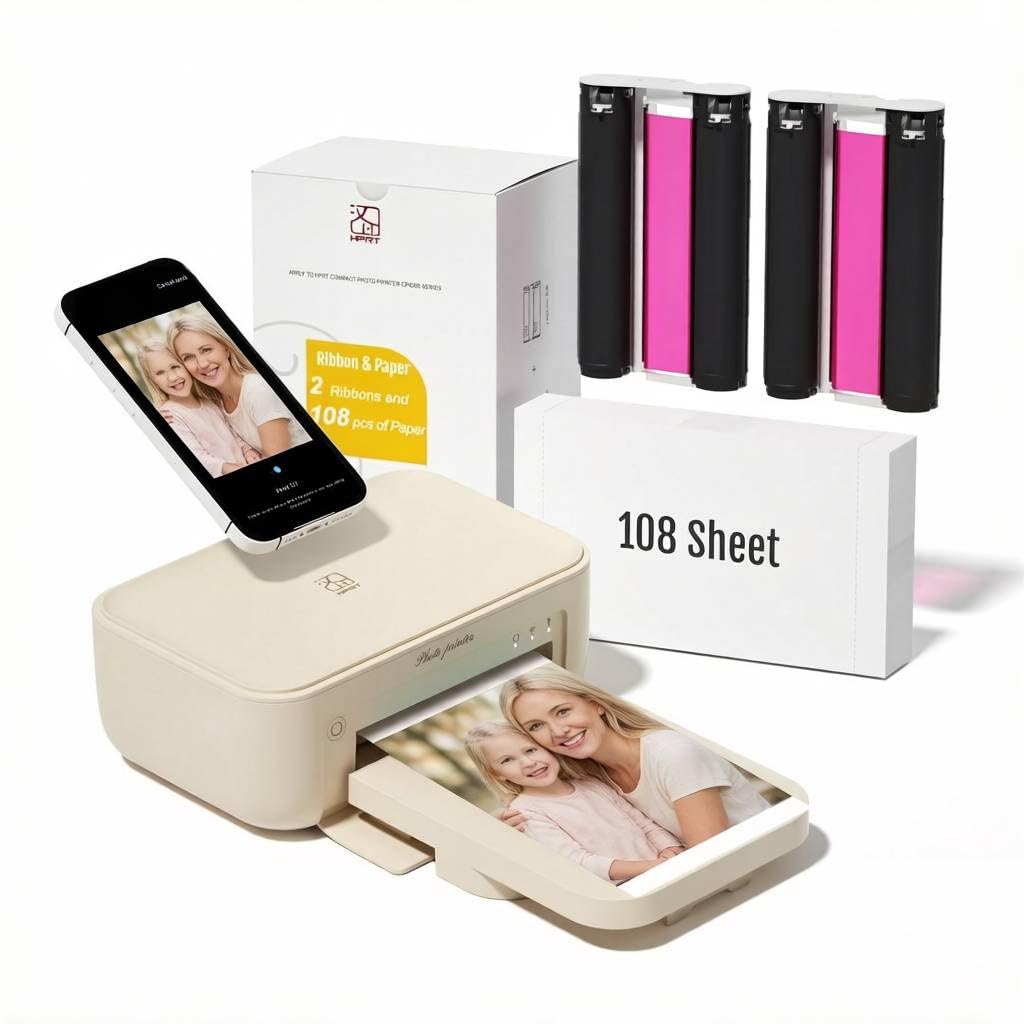
The HPRT photo printer is a fantastic entry point into dedicated photo printing, largely because of its generous starter bundle. It comes with 108 sheets of 4×6 photo paper and two ink ribbons, meaning you can start printing a sizable album right out of the box without an immediate extra purchase.
It uses reliable thermal dye-sublimation technology with automatic lamination, producing photos that are protected from dust, fingerprints, and water. The image quality is praised for its clarity and vibrant color reproduction, with many users finding it comparable to local drugstore prints. The design is straightforward and desktop-oriented, with a foldable design that aids in portability.
Connection is via standard Wi-Fi through the Heyphoto app. While the app functionality is basic and some find it occasionally unstable, the core printing process is simple and effective. This printer is all about delivering a high volume of quality prints from the start with minimal fuss.
Why it’s great
- Outstanding value with a huge supply of paper and ink included.
- Produces lab-quality, durable laminated prints.
- Simple, no-frills operation perfect for frequent photo printing.
- Foldable design adds a degree of portability.
Good to know
- The companion app is functional but can be buggy or crash.
- Printing speed is on the slower side.
- Relies entirely on the mobile app for control.
5. Liene M100 Photo Printer

The Liene M100 is engineered for reliable, on-the-go printing. Its key advantage is a robust built-in Wi-Fi hotspot that allows up to five devices to connect directly to the printer simultaneously. This eliminates dependency on sometimes-unreliable home networks and lets you print from phones or laptops anywhere—in a car (with an inverter), at a park, or in a hotel room.
It uses thermal dye-sublimation to produce vibrant, laminated 4×6 prints. The app includes helpful features like ID photo templates and basic editing tools, adding to its utility. Users report that the print quality is excellent for the price, with accurate colors and sharp details that rival more expensive brands.
The printer is designed to be user-friendly, with an app that provides clear guidance if paper jams or errors occur. For those who value independence from a fixed network and want a truly portable solution that doesn’t sacrifice print quality, the Liene M100 is a compelling choice.
Why it’s great
- Superior portable connectivity with a multi-device Wi-Fi hotspot.
- Produces excellent, durable dye-sub print quality.
- Helpful app with ID photo templates and error guidance.
- Can be used completely offline, anywhere.
Good to know
- Small included paper pack (20 sheets).
- Some manual adjustments may be needed for perfect color matching.
- Printing is not the fastest.
6. HP OfficeJet Pro 8125e
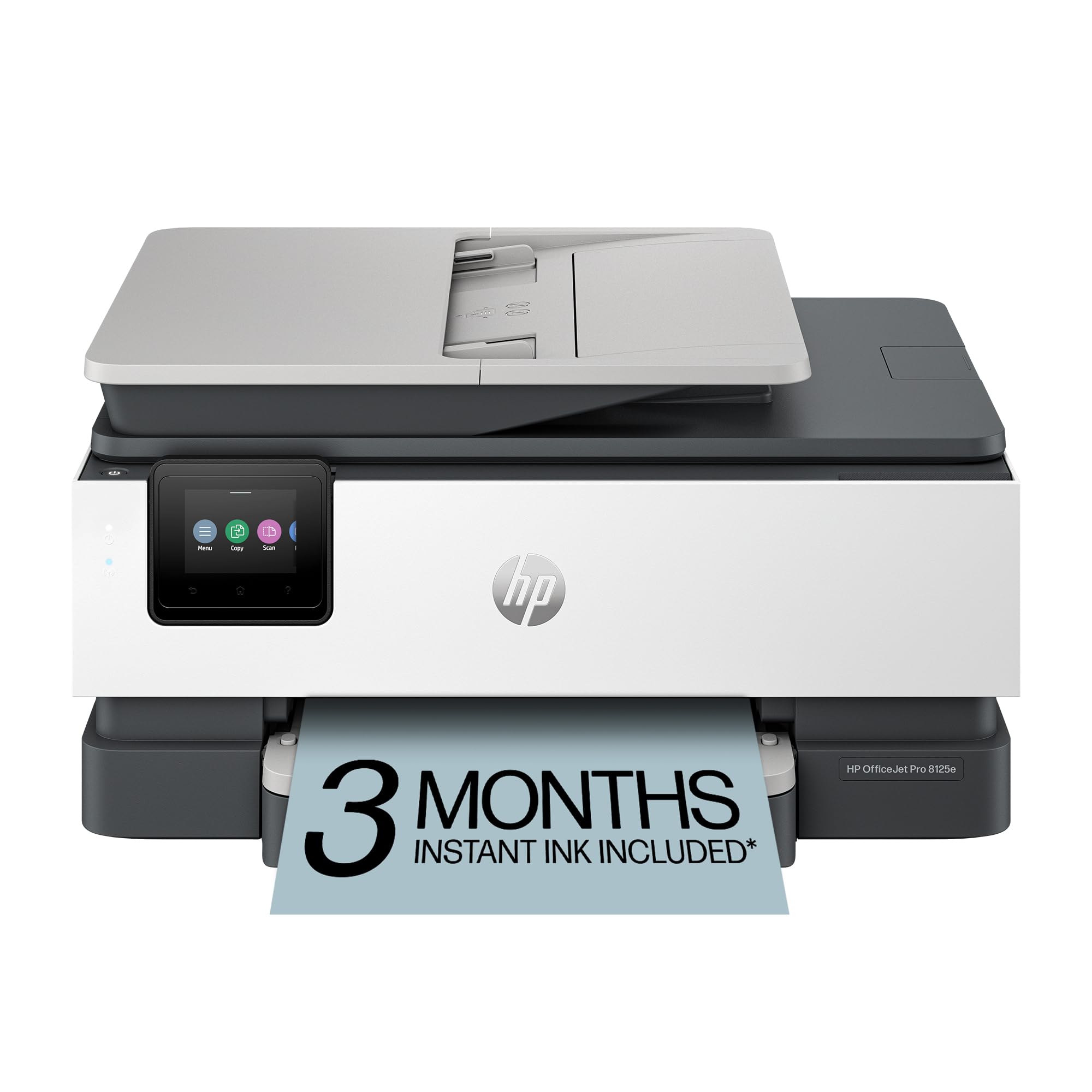
If your budget photo printing needs are intertwined with serious home office work, the HP OfficeJet Pro 8125e is built for you. It bridges the gap between a consumer and small business printer, offering speeds up to 20 pages per minute in black and 10 in color. The large 225-sheet input tray means you can tackle big print jobs without constant refills.
It incorporates the same helpful AI formatting as the Envy series and includes a three-month Instant Ink trial. The auto document feeder and automatic two-sided printing enhance productivity for scanning and copying multi-page documents. This model is designed for users who print professional reports, presentations, and flyers regularly but still want the ability to print quality photos.
Be aware that as an HP+ enabled printer, it’s designed to work seamlessly with HP’s ecosystem, including their ink subscription. This can offer cost predictability but may limit third-party cartridge options for some users.
Why it’s great
- Much faster print speeds for high-volume document tasks.
- Large paper capacity reduces reloading frequency.
- Robust feature set for scanning/copying multi-page documents.
- AI-powered smart printing features.
Good to know
- HP+ ecosystem may restrict non-HP ink use.
- Bulkier footprint than standard home printers.
- First-page-out time can be slower than older models.
7. KODAK Dock Plus

The KODAK Dock Plus reimagines the photo printer as a dedicated home printing station. Its integrated docking pad is the standout feature, allowing you to place your compatible smartphone on the printer for a stable Bluetooth connection while it charges your device during the print process. It’s a clever, convenient solution that keeps your phone handy and powered.
It uses KODAK’s proprietary 4PASS dye-sublimation technology, which applies color in three layers and adds a protective laminate in a fourth pass. This results in smooth, highly durable prints with excellent color depth that are resistant to fingerprints, water, and fading. The Kodak Photo Printer app is straightforward, offering basic edits and filters.
Designed as a stable desktop unit, it’s less portable than battery-operated models but offers consistent performance for creating photo albums, framing prints, or preserving family memories with a trusted brand name in photography.
Why it’s great
- Innovative docking station charges your phone while printing.
- 4PASS technology produces professional-quality, durable prints.
- Simple, no-fuss operation with a reliable brand heritage.
- Stable desktop design meant for frequent home use.
Good to know
- Printing is relatively slow due to the 4-pass process.
- Setup instructions can be minimal and challenging.
- Relies on Bluetooth connection via the app.
8. Epson Expression Premium XP-7100

The Epson Expression Premium XP-7100 is a feature-packed inkjet designed for the creative enthusiast or small business owner who needs more than just basic printing. Its most unique capability is printing directly onto printable CDs and DVDs, a rare find in this category. It also boasts a large, intuitive 4.3-inch color touchscreen for easy photo viewing and editing directly on the printer.
It supports a wide variety of media, including thick card stock and borderless photos up to 8×10 inches. The 30-page auto document feeder and automatic two-sided printing make it a capable all-in-one for productivity. Photo quality is noted for its vibrancy and sharp text, making it suitable for everything from craft projects to professional-looking documents.
This is a printer that offers premium features from a few years ago at a now very accessible price point, representing great value for users who will leverage its specialized capabilities.
Why it’s great
- Unique ability to print directly onto CDs and DVDs.
- Large, responsive touchscreen for direct photo editing.
- Excellent media handling for creative projects.
- Fast print speeds for a feature-rich inkjet.
Good to know
- Bulky and heavier than modern compact printers.
- Ink costs for the six individual cartridges can be high.
- Some plastic components feel less robust.
9. Epson EcoTank ET-2400

The Epson EcoTank ET-2400 is the definitive answer for anyone terrified of ongoing ink costs. Its initial price is higher, but it includes up to two years’ worth of ink in the box via its refillable supertanks. Each bottle of replacement ink is equivalent to dozens of cartridges, slashing the cost per page by up to 90% compared to standard cartridge printers.
This cartridge-free system eliminates the anxiety of running out of ink mid-job and dramatically reduces plastic waste. As a wireless all-in-one, it handles printing, scanning, and copying with ease. Print quality is sharp and vibrant, suitable for both documents and photos. For families, students, or small offices that print regularly—even in moderate volumes—the long-term savings are immense.
The trade-off is a larger upfront investment and a slightly more involved initial setup. The design is functional, with easy-to-view ink tanks, though they do protrude from the body.
Why it’s great
- Extremely low cost per page, saving massively over time.
- Comes with enough ink for thousands of prints.
- Eco-friendly, drastically reducing cartridge plastic waste.
- Reliable wireless all-in-one functionality.
Good to know
- Higher initial investment than cartridge-based printers.
- Wireless setup can sometimes be finicky.
- Print speed is moderate, not fast.
- Bulky due to the integrated ink tanks.
10. Canon Selphy CP1500

The Canon Selphy CP1500 represents the gold standard for dedicated budget photo printers. It’s where “budget” meets exceptional archival quality. Canon guarantees its dye-sublimation prints to last up to 100 years when stored in an album, making it the ideal choice for preserving irreplaceable memories. The prints are water-resistant and dry instantly to the touch.
It offers versatile connectivity including Wi-Fi, USB, and SD card slots, allowing you to print from virtually any source. The built-in 3.5-inch screen is large and bright, enabling you to preview, edit, and apply filters without using your phone. While compact, it has a solid, premium build quality and can be made truly portable with an optional battery pack.
The print quality is consistently described as lab-grade, with accurate colors and fine detail. It uses convenient all-in-one paper/ink cartridges that simplify reloading. For anyone whose primary goal is to create beautiful, heirloom-quality 4×6 prints with minimal fuss, the Selphy CP1500 is the benchmark.
Why it’s great
- Archival print quality guaranteed to last 100 years.
- Versatile connectivity: Wi-Fi, USB, SD card.
- Large, useful display for on-printer editing.
- Solid build quality and portable option.
Good to know
- Premium pick with a higher initial cost.
- Cost per print is higher than tank systems but competitive.
- Prints one photo at a time, not designed for speed.
11. Liene PixCut S1

The Liene PixCut S1 is a niche powerhouse, completely redefining “budget photo printer” for crafters, small business owners, and DIY enthusiasts. It’s an all-in-one thermal dye-sublimation printer and precision cutting machine. You can design a sticker, label, or photo on your phone, and the PixCut S1 will print it in vibrant color and then automatically cut it out with AI-guided precision, all in one device.
It features impressive AI tools that automatically extract subjects from photos for flawless cut-outs. The 300 DPI print quality is excellent, and the four-layer dye-sub process laminates the stickers, making them waterproof and scratch-resistant. The accompanying app includes a massive library of free templates, fonts, and images with no subscription required.
While it carries a premium price tag, it consolidates the functions of multiple machines into one compact unit. For anyone looking to create custom stickers, labels, phone skins, or intricate paper crafts, it offers unparalleled creative potential and professional results at a accessible price point for the feature set.
Why it’s great
- Unmatched all-in-one functionality: prints, laminates, and cuts.
- Powerful AI for automatic image extraction and precision cutting.
- High-quality, durable laminated outputs.
- Extensive free creative library in the app.
Good to know
- Specialist device with the highest cost on this list.
- Relies on proprietary consumables (paper/cartridge combos).
- Effectively a 4×6 print area within the machine.
- Mobile app is required; no direct PC printing.
Understanding the Specs
DPI (Dots Per Inch)
This measures print resolution. For photos, 300 DPI is the sweet spot for sharp, detailed images without visible dots. Most dedicated photo printers and quality inkjets hit this mark. Higher DPI numbers in marketing for basic printers often refer to the maximum possible, not the typical photo output.
Print Technology
Inkjet: Sprays microscopic droplets of liquid ink. Pros: Versatile, can print documents and large photos. Cons: Prints can smudge, inks may fade faster, ongoing cartridge costs. Dye-Sublimation (Dye-Sub): Uses heat to transfer solid dye from a ribbon into the paper, then adds a protective laminate. Pros: Durable, smudge-proof, archival-quality prints. Cons: Typically only 4×6 size, slower per print.
FAQ
Are budget photo printers actually good for photos?
What is the biggest hidden cost with a photo printer?
Can I print from my phone with all these printers?
Which is better for a family with kids, an all-in-one or a dedicated photo printer?
Final Thoughts: The Verdict
For most people, the best budget photo printer winner is the Canon PIXMA TS6520 because it delivers exceptional versatility, reliable quality, and thoughtful features like automatic duplex printing at a truly accessible point. If you want truly portable, durable 4×6 prints, grab the Liene M100 for its superb built-in Wi-Fi hotspot. And for the absolute lowest long-term cost and high-volume printing, nothing beats the value of the Epson EcoTank ET-2400.

Mo Maruf
I created WellFizz to bridge the gap between vague wellness advice and actionable solutions. My mission is simple: to decode the research and give you practical tools you can actually use.
Beyond the data, I am a passionate traveler. I believe that stepping away from the screen to explore new environments is essential for mental clarity and physical vitality.