If you’re feeling that familiar ache in your wrist, forearm, or shoulder after a day at the computer, your mouse is likely the culprit. Traditional flat mice force your hand into a pronated, palm-down position that strains tendons and compresses the carpal tunnel. Switching to an ergonomic design is one of the most effective, immediate changes you can make for your comfort and long-term health—and it doesn’t require a massive investment.
I’m Mohammad Maruf — the founder and writer behind WellFizz. For years, I’ve analyzed consumer health data and dissected product specifications to identify which affordable ergonomic tools deliver genuine relief versus just marketing promises. My research focuses on translating technical specs into real-world comfort.
This guide cuts through the noise to show you exactly which models offer the best support, precision, and durability without the premium price tag, helping you find the best budget ergonomic mouse for your specific needs and hand size.
How To Choose The Best Budget Ergonomic Mouse
Selecting the right ergonomic mouse is more than just picking a shape you like. It’s about matching the tool to your body’s mechanics and your daily tasks. A mismatch can lead to new discomfort, even with an “ergonomic” device. Focus on these core aspects to make a confident choice.
Ergonomic Design Type
The primary goal is to keep your forearm in a “handshake” position, reducing twist and pressure. Vertical mice accomplish this with a near-90-degree grip. Tilted mice offer a moderate angle for those not ready for a full vertical shift. Trackballs eliminate arm movement entirely, using your thumb or fingers to control a cursor. Your choice depends on your primary pain point: vertical mice target wrist pronation, while trackballs address shoulder and forearm fatigue from swiping.
Connectivity and Power
Wired mice offer guaranteed, lag-free performance and never need batteries. Wireless 2.4G mice via a USB dongle provide desk clutter reduction with strong stability. Bluetooth models are ideal for connecting to multiple devices, like a laptop and tablet, but can sometimes have intermittent connections. Consider your workspace setup and tolerance for battery management or cables.
Hand Size and Grip
This is the most common mistake. An ergonomic mouse that’s too large or too small will cause strain. Measure your hand from the base of your palm to the tip of your middle finger. Many product listings provide recommended hand-length ranges. A proper fit means your fingers rest comfortably on the buttons without overstretching, and your palm is supported without your pinky dragging on the desk.
Quick Comparison
On smaller screens, swipe sideways to see the full table.
| Model | Type | Best For | Key Feature | Amazon |
|---|---|---|---|---|
| Anker USB Wired Vertical | Vertical | Entry-Level Comfort | Natural “Handshake” Grip | Amazon |
| acer Wired Gaming Mouse | Tilted | Gamers & Power Users | 12,800 DPI & 8 Programmable Buttons | Amazon |
| Logitech MX Master 3S | Contoured | Multi-Device Productivity | Track-on-Glass, MagSpeed Scroll | Amazon |
| SABLUTE MAM1 Pro Trackball | Trackball | Desk-Space Savers | 0°/18° Adjustable Angle, 3-Device | Amazon |
| Logitech Lift (Renewed) | Vertical | Small/Medium Hands | 57° Ergo-Certified Design | Amazon |
| ELECOM Wired Ergonomic | Tilted | Quiet Office Environments | Silent Click Switch | Amazon |
| Nulea M510 Wireless Vertical | Vertical | Wireless Simplicity | 57° Angle, ‘Back to Desktop’ Button | Amazon |
| KYSONA 57° Wireless Tower | Vertical | Small to Medium Hands | Dual Bluetooth & 2.4G | Amazon |
| TECKNET Wireless Vertical | Vertical | Silent Operation | 99% Quieter Clicks, 4800 DPI | Amazon |
| TECKNET 2.4G Vertical | Vertical | Carpal Tunnel Relief | 90% Quieter, Long Wireless Range | Amazon |
| PORLEI Wired Trackball | Trackball | Extremely Limited Desk Space | Stationary Use, RGB Lighting | Amazon |
In‑Depth Reviews
1. Anker USB Wired Vertical Mouse

The Anker Vertical Mouse is a standout in the entry-level ergonomic category because it delivers the core benefit—a natural handshake position—through a simple, reliable, and wired design. Its 90-degree vertical orientation is effective at reducing wrist pronation, and users consistently report a significant decrease in strain and carpal tunnel symptoms after a short adjustment period. The build quality feels solid for its tier, offering a no-fuss path to better posture.
It features five buttons, including forward/back navigation, and offers two DPI settings (1000/1600) for basic sensitivity adjustment. The optical sensor provides smooth, precise tracking on most surfaces. The wired connection means zero lag, no batteries, and no pairing hassles, making it a plug-and-play solution for office or home desktop setups.
This mouse tends to suit medium to larger hands best. Some users with smaller hands note it can feel a bit large or require a three-finger grip. The scroll wheel is functional but can be stiff, and the cable is fairly thick. However, for its positioning, it represents a remarkably balanced offering of ergonomic efficacy, durability, and straightforward usability.
Why it’s great
- Highly effective vertical design that genuinely reduces wrist strain.
- Extremely reliable wired connection with no setup required.
- Strong build quality and durable construction for long-term use.
- An exceptional value proposition for first-time ergonomic users.
Good to know
- Best for medium to larger hands; can be bulky for smaller users.
- Scroll wheel lacks premium smoothness and can feel stiff.
- The thick, stiff cable might feel restrictive to some.
- Limited DPI settings compared to more feature-rich models.
2. acer Wired Gaming Mouse
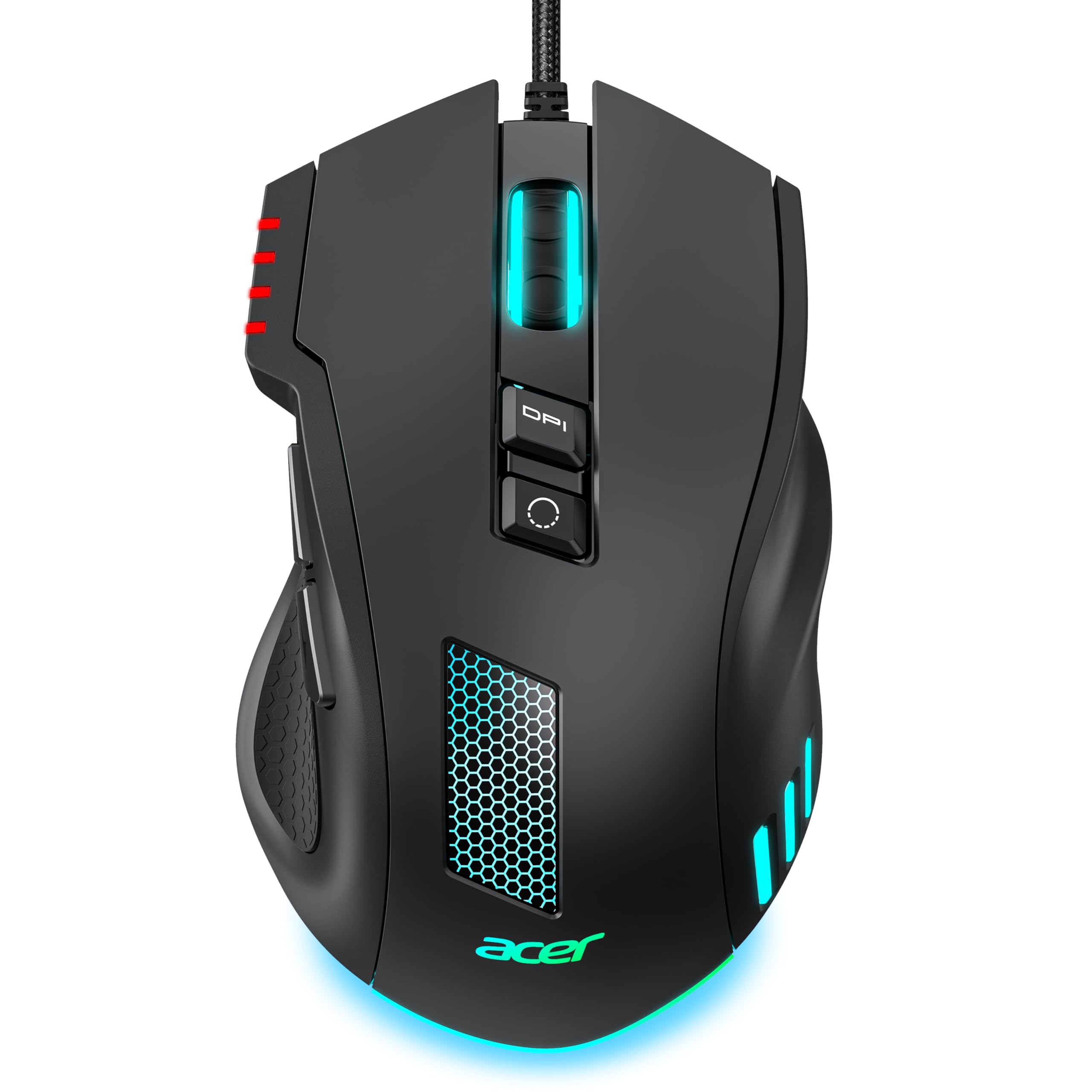
The acer Wired Gaming Mouse is a fascinating hybrid, blending a distinctly ergonomic, right-handed shape with gaming-grade specifications. It features a pronounced, comfortable arch that supports a palm or claw grip, reducing hand cramping during long sessions. This makes it an ideal choice for gamers or power users who need performance but are starting to feel the strain from aggressive, flat gaming mice.
Its technical specs are impressive for the category: a sensor that scales up to 12,800 DPI, eight programmable buttons, a 1000Hz polling rate, and vibrant RGB lighting. The braided cable adds to a premium feel. You can use dedicated software to remap buttons, create macros, and fine-tune the lighting, offering a level of customization rarely seen in traditional ergonomic mice at this price point.
While labeled a gaming mouse, its ergonomic benefits are substantial for any task requiring precision and long hours. The tracking is smooth and responsive with no noticeable lag, and the buttons provide crisp, tactile feedback. It’s a wired mouse, so you trade wireless freedom for guaranteed, low-latency performance, which is a plus for both gaming and focused work.
Why it’s great
- Ergonomic shape that reduces fatigue during marathon gaming or work sessions.
- High-performance sensor with extensive DPI range and customization via software.
- Well-placed, programmable buttons enhance productivity and in-game control.
- Sturdy braided cable and build quality that feels more premium than its tier.
Good to know
- Full customization requires downloading and using separate driver software.
- RGB lighting and gaming aesthetic may not suit a conservative office environment.
- Wired connection might not appeal to those seeking a minimalist desk setup.
3. Logitech MX Master 3S

The Logitech MX Master 3S represents the premium apex of ergonomic productivity mice, now available in a more accessible Bluetooth-only edition. Its contoured shape is expertly designed to support the hand’s natural posture, featuring a prominent thumb rest and intuitively placed controls. The legendary MagSpeed electromagnetic scrolling is a game-changer, allowing for hyper-fast scrolls or precise, notched scrolling with a near-silent operation.
This mouse is a powerhouse for multi-device professionals. It can pair with up to three devices via Bluetooth and switch between them instantly. The 8K DPI Darkfield sensor tracks flawlessly on virtually any surface, including glass. The buttons are almost silent, and the battery life lasts for months on a charge. When paired with Logi Options+ software, every button can be customized with app-specific profiles, and the Flow feature enables seamless control across multiple computers.
While it sits at the top of the budget spectrum, its value lies in its unparalleled combination of comfort, precision, and workflow efficiency. For users who spend all day navigating complex documents, editing media, or managing multiple machines, the MX Master 3S isn’t just a mouse; it’s a productivity multiplier that pays for itself in reduced fatigue and enhanced capability.
Why it’s great
- Superb, contoured ergonomics that fit large hands perfectly for all-day comfort.
- MagSpeed scroll wheel is incredibly fast, precise, and satisfying to use.
- Excellent multi-device Bluetooth support and legendary Logitech build quality.
- Highly customizable via software, with features like cross-computer Flow.
Good to know
- Premium price point within the “budget” category.
- Bluetooth-only version requires a compatible device; no USB dongle is included.
- Its larger size and specific shape may not suit smaller hands.
- Full feature potential is unlocked through software, which must be installed.
4. SABLUTE MAM1 Pro Wireless Trackball

The SABLUTE MAM1 Pro is a sophisticated and versatile wireless trackball that tackles ergonomics from a different angle—literally. Its standout feature is a magnetic tilt plate that lets you switch between a flat (0°) and an inclined (18°) ergonomic position. This adaptability allows you to find the perfect wrist angle for your comfort, making it an excellent choice for those with specific forearm strain issues.
As a thumb-controlled trackball, it requires minimal desk space and eliminates the repetitive arm and shoulder movements associated with a traditional mouse. It connects to three devices simultaneously via dual Bluetooth modes and a 2.4GHz USB receiver. The built-in battery recharges via USB-C, and it features quiet clicks and five adjustable DPI settings up to 4800 for precise cursor control.
This mouse is ideal for users with cramped desks, or those who experience pain from swiping a mouse. The build quality is notably solid and heavy, providing a stable feel. The learning curve for a trackball is real (plan for a 1-2 week adaptation period), but many users find the long-term reduction in overall arm fatigue to be transformative.
Why it’s great
- Unique adjustable tilt offers personalized ergonomic positioning.
- Excellent three-device connectivity (Bluetooth x2 + 2.4G USB).
- Rechargeable battery eliminates the need for disposable batteries.
- Sturdy, premium build quality that feels durable and reliable.
Good to know
- Trackballs have a significant learning curve and aren’t for everyone.
- Some users report the trackball can make a loud “clanking” noise during use.
- Driver software for advanced customization is not compatible with macOS.
- Thumb control may not suit users with certain types of wrist or thumb pain.
5. Logitech Lift Vertical Ergonomic Mouse (Renewed)

The Logitech Lift, available in a certified renewed condition, offers access to Logitech’s renowned ergonomic engineering at a more accessible point. It’s specifically designed for small to medium right hands, with a 57-degree vertical angle that is certified by ergonomists. The shape promotes a natural forearm posture, and the softly textured grip and thumb rest provide exceptional all-day comfort.
This mouse provides flexible connectivity, working via Bluetooth Low Energy or the included Logi Bolt USB receiver for a robust, lag-free connection. The buttons feature quiet clicks, and the SmartWheel allows for both precise notched scrolling and fast, smooth scrolling. Battery life is outstanding, lasting up to two years on a single AA battery. The renewed model typically arrives in like-new condition, offering the full Lift experience.
For those with smaller hands who have found other vertical mice too large or awkward, the Lift is often the perfect solution. It feels lightweight yet premium, and the Logi Options+ software allows for button customization. It’s a thoughtfully designed tool that effectively reduces strain without compromising on the quality and reliability expected from the Logitech brand.
Why it’s great
- Perfectly sized and angled for small to medium right hands.
- Ergonomist-certified design that provides reliable, proven comfort.
- Dual connectivity (Bluetooth & USB receiver) offers great flexibility.
- Incredibly long battery life and whisper-quiet clicks.
Good to know
- Being a renewed product, it may have minor cosmetic blemishes.
- Specifically for right-handed users with smaller hands.
- The thumb buttons are not silent like the main clicks.
- Lacks an infinite scroll wheel feature found on higher-end Logitech mice.
6. ELECOM Wired USB Ergonomic Mouse

The ELECOM EX-G mouse occupies a smart middle ground in ergonomic design. It’s not a full vertical mouse but features a pronounced, comfortable tilt that raises the right side of your hand, reducing wrist pronation significantly compared to a flat mouse. This makes it an excellent “gateway” ergonomic mouse for those not ready to commit to a 90-degree vertical grip.
Its most notable feature is the genuine silent click switches. The main buttons produce almost no audible sound, making this mouse ideal for shared workspaces, libraries, late-night work, or any environment where click noise is disruptive. Despite the quiet operation, the clicks retain a satisfying tactile feedback. The mouse is wired via USB, so it’s always ready to go with no power concerns.
ELECOM provides optional “Mouse Assistant” software that allows for deep customization of the five buttons, letting you assign macros or specific functions. This elevates it from a simple comfort tool to a potential productivity booster. The build is lightweight, and the shape naturally fits a relaxed hand posture, effectively bridging the gap between traditional and vertical mice.
Why it’s great
- Truly silent clicks perfect for noise-sensitive environments.
- Comfortable tilted ergonomic design is easier to adapt to than a full vertical mouse.
- Wired reliability with no batteries or pairing required.
- Optional software allows for useful button customization.
Good to know
- Wired connection limits mobility and adds cable management.
- The tilted design may not provide enough relief for those with severe wrist pain.
- Software is optional for basic use but required for customization.
7. Nulea M510 Wireless Vertical Mouse
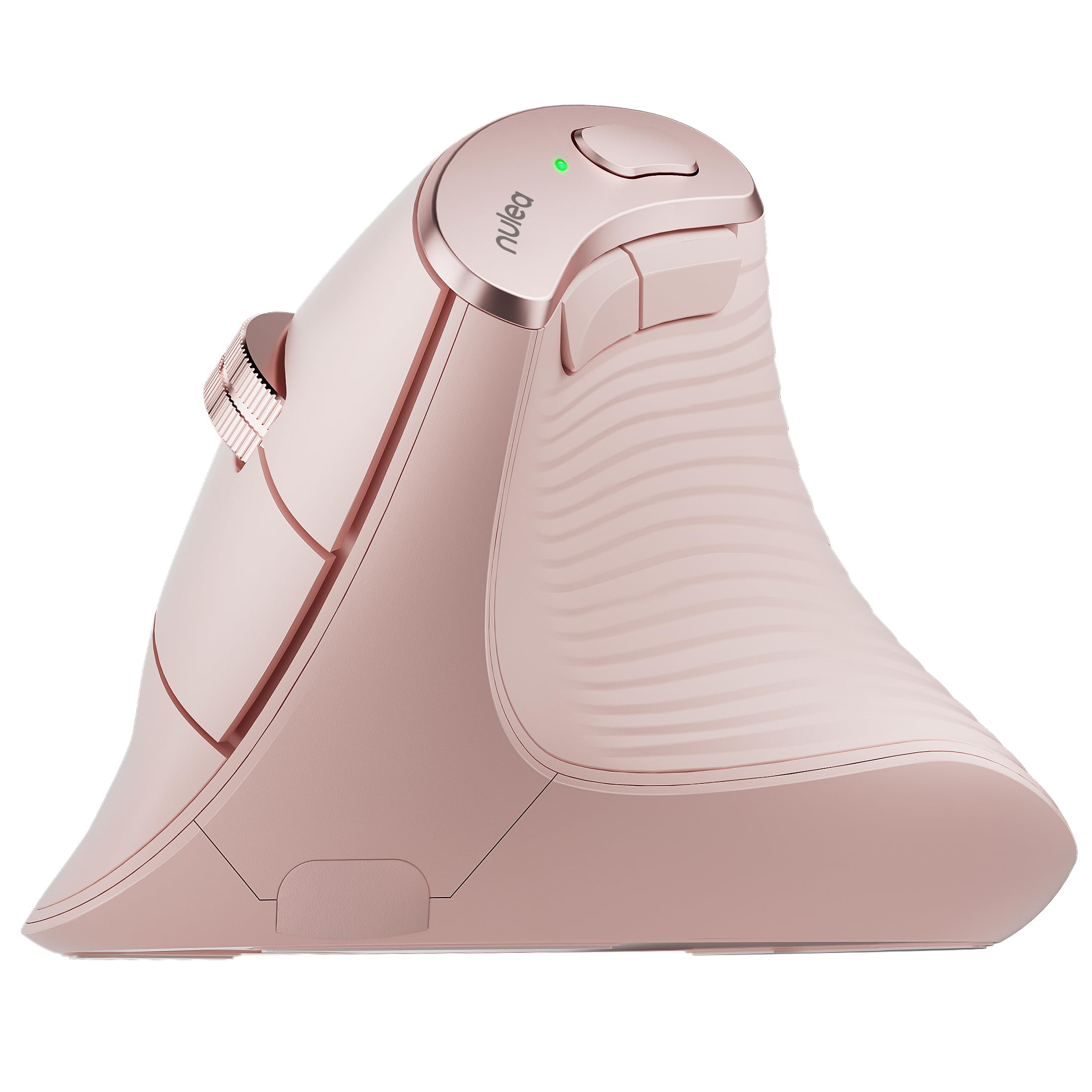
The Nulea M510 is a straightforward and effective wireless vertical mouse that gets the fundamentals right. It features a precise 57-degree angle, aligning with ergonomic best practices to minimize forearm strain. The shape is compact and well-contoured, reportedly fitting medium hands very comfortably and providing good support for the ring and pinky fingers, which can sometimes drag on the desk with other models.
It operates on a stable 2.4GHz wireless connection via a plug-and-play USB dongle. A unique feature is the inclusion of a “Back to Desktop” button alongside the standard forward/back buttons, offering a handy shortcut for productivity. The scroll wheel is metal with a non-slip rubber coating, providing a durable and controlled feel. It runs on a single AA battery, which users report lasts for an exceptionally long time.
This mouse is for those who want a no-nonsense, wireless vertical experience without extra software or complex features. It’s praised for its comfort and reliability in daily office tasks. However, its durability under very heavy, continuous use may be a consideration for some power users.
Why it’s great
- Comfortable 57-degree vertical design that fits medium hands well.
- Stable 2.4GHz wireless with excellent, long-lasting battery life.
- Useful “Back to Desktop” button adds a convenient productivity shortcut.
- Durable metal scroll wheel with a good, non-slip tactile feel.
Good to know
- Some users report the main buttons may develop issues after a year of very heavy use.
- Limited to three DPI settings (800, 1200, 1600).
- Requires a separate AA battery (not included).
- Side buttons are not compatible with macOS for navigation.
8. KYSONA 57° Wireless Tower Mouse

The KYSONA Tower Mouse stands out with its dual-mode wireless connectivity, supporting both Bluetooth (3.0 and 5.0) and a 2.4GHz USB receiver. This makes it incredibly versatile, easily switching between a work laptop (via Bluetooth) and a personal desktop (via the dongle). Its “tower” design is a distinct 57-degree vertical shape that is notably compact, making it an excellent match for small to medium-sized hands.
It features five adjustable DPI levels up to 4000 and uses a silent switch for quiet clicking. The mouse includes a smart auto-sleep function to conserve battery, with claims of up to 12 months of life on two AAA batteries. The white color option offers a clean, modern aesthetic. For users who need to connect to multiple devices or simply prefer the universality of Bluetooth, this mouse provides that flexibility in an ergonomic package.
It’s important to note its smaller size; the manufacturer explicitly recommends it for small to medium hands. For those it fits, it provides a comfortable, natural grip that effectively reduces wrist strain during long browsing or office work sessions.
Why it’s great
- Dual connectivity (Bluetooth & 2.4G) is highly versatile for multiple devices.
- Perfectly sized for small to medium hands, providing a secure, comfortable fit.
- Quiet clicks and a long battery life with auto-sleep conservation.
- Clean, modern design available in a bright white finish.
Good to know
- Definitely too small for users with large hands.
- Some users report occasional lag or disconnection issues, often remedied by re-pairing.
- Requires two AAA batteries (not included).
- The compact shape may not suit those who prefer a fuller palm fill.
9. TECKNET Ergonomic Wireless Vertical Mouse
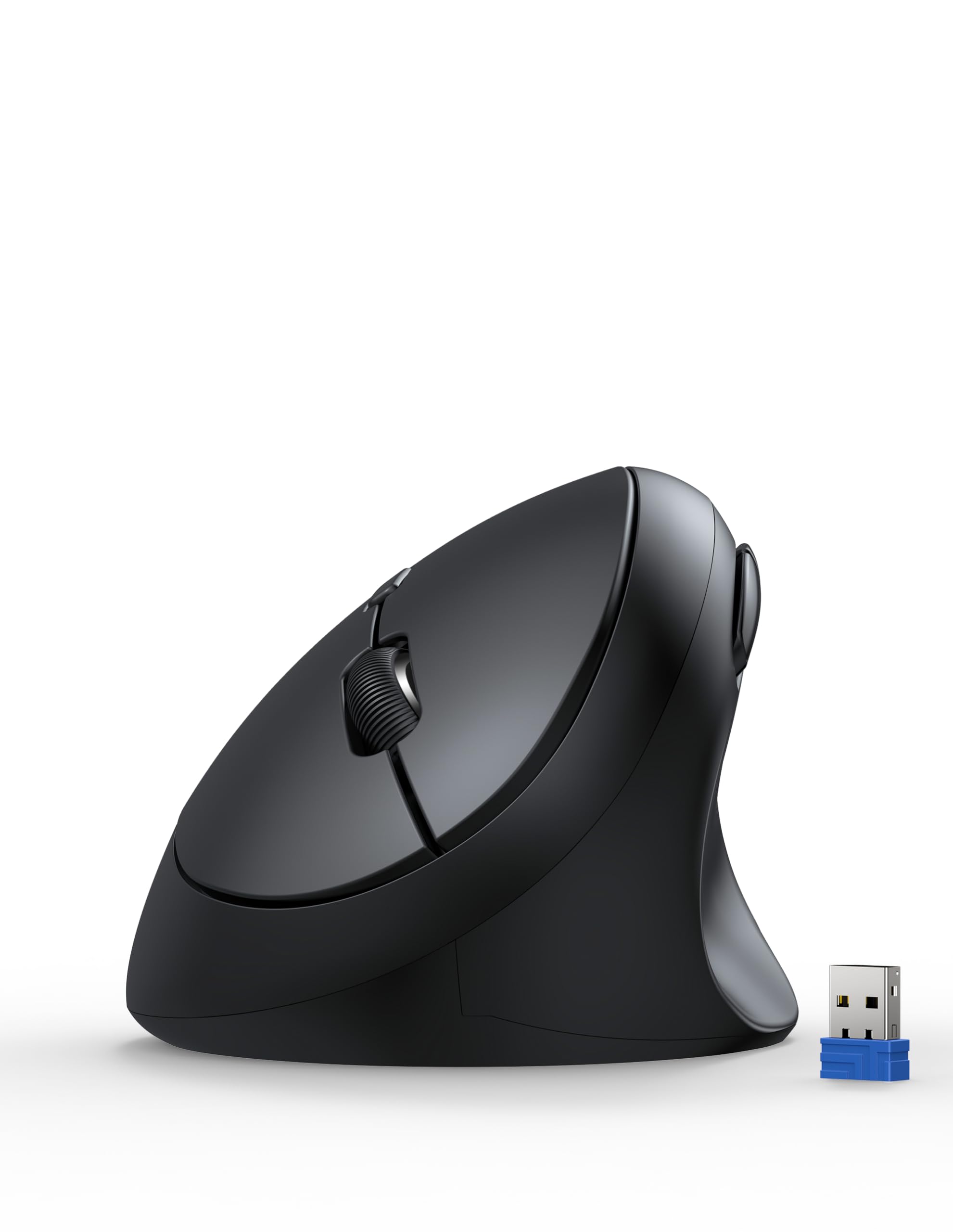
This TECKNET model is another strong wireless vertical contender, emphasizing ultra-quiet operation and a design tailored for smaller hands. It claims to reduce click noise by over99% while maintaining a satisfying tactile feel. The rounded, compact shape is explicitly designed for small to medium hands, with a 52-degree angle that encourages a relaxed handshake position.
It offers five adjustable DPI levels up to 4800 for smooth tracking and a stable 2.4GHz wireless connection with a range of up to 32 feet. The matte black finish has a soft texture that resists fingerprints and oil. The forward and back buttons are a boon for web browsing, though note they are not silent like the main clicks and are not supported on macOS for navigation functions.
This mouse is a favorite among users with smaller hands who have struggled with bulkier vertical models. It’s lightweight, portable, and the quiet clicks make it ideal for shared workspaces. However, its compact size means it may not provide enough support for users with larger hands, and the lack of a wide base can make it feel less stable during aggressive movements.
Why it’s great
- Exceptionally quiet main clicks, reducing noise by over 99%.
- Perfectly sized for small to medium hands, preventing overstretching.
- High 4800 DPI sensor provides smooth, precise cursor control.
- Stable 2.4GHz wireless connection with a good operational range.
Good to know
- Definitely too small for large hands; lacks palm support for bigger users.
- Forward/back buttons are not silent and don’t work on macOS.
- The compact design can feel less stable than models with a wider base.
10. TECKNET 2.4G Ergonomic Vertical Mouse
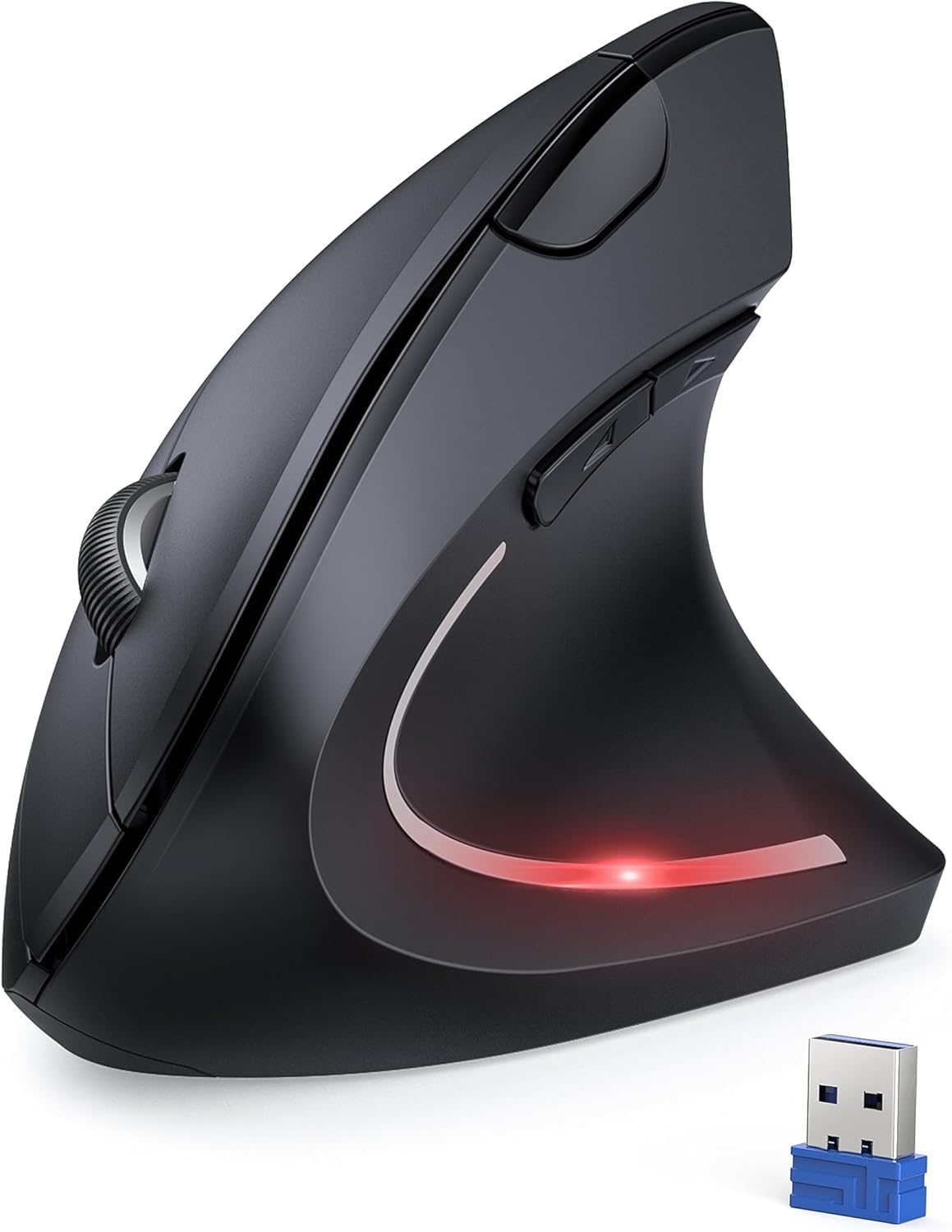
This TECKNET model is a dedicated vertical mouse focused squarely on providing relief for symptoms associated with carpal tunnel syndrome and repetitive strain. It features a classic vertical design that positions the hand in a natural, handshake orientation. Many users report a dramatic reduction in hand and wrist pain after switching to this mouse, though an adaptation period of a few hours to a week is common.
It operates on a 2.4GHz wireless connection with an impressive claimed range of 49 feet, powered by two AAA batteries. The clicks are designed to be over 90% quieter than a standard mouse, and it offers five adjustable DPI settings up to 4800. It includes forward/back side buttons for browsing efficiency and enters a sleep mode after inactivity to conserve battery life.
Be mindful of its size; some users find it too tall or large, which can be problematic for those with very small hands or who prefer a fingertip grip. It’s a functional, no-frills tool that prioritizes ergonomic relief over advanced features, making it a solid choice for anyone seeking an affordable, wireless vertical mouse specifically for pain management.
Why it’s great
- Effective vertical design that significantly reduces wrist strain and pain.
- Long 49-foot wireless range provides excellent mobility.
- Quiet clicks and multiple DPI settings for personalized control.
- Helpful forward/back buttons and auto-sleep power saving.
Good to know
- Can be too large and tall for users with very small hands.
- Requires two AAA batteries (not included).
- The vertical design has a definite learning curve.
- Build quality is functional but leans more towards basic.
11. PORLEI Wired Trackball Mouse

The PORLEI Wired Trackball is an entry point into the world of stationary pointing devices. Instead of moving the mouse, you roll a 34mm ball with your thumb to control the cursor. This eliminates arm and wrist movement entirely, which can be a revelation for those with shoulder or forearm pain, and it’s perfect for extremely tight workspaces where there’s no room to swipe.
It’s a wired USB mouse, ensuring zero lag and no power concerns. It features five adjustable DPI levels (up to 1200), cool RGB lighting, and a sculpted ergonomic shape that supports the hand. The trackball is easily removable for cleaning, which is essential for maintenance. The large forward/back buttons and scroll wheel are conveniently placed.
Be warned: the learning curve for a trackball is steep. Your brain must relearn cursor control, which can feel frustrating initially. It’s not for precision tasks like photo editing right away. However, for general computing, browsing, and data entry in a confined space, it offers a unique and potentially more comfortable alternative to traditional mice.
Why it’s great
- Eliminates arm and shoulder movement, reducing fatigue.
- Ideal for tiny desks or non-standard surfaces (sofa, lap).
- Wired connection guarantees reliable performance.
- Removable trackball makes cleaning and maintenance simple.
Good to know
- Very steep learning curve; requires significant adaptation.
- Lower maximum DPI (1200) than optical mice, which may feel slow on high-resolution screens.
- Thumb-controlled trackballs can cause new strain for some users.
- RGB lighting may not be suitable for all professional settings.
Understanding the Specs
DPI (Dots Per Inch)
DPI measures mouse sensitivity—how far the cursor moves relative to physical movement. A higher DPI means the cursor travels farther with less hand movement. For office work, 800-1600 DPI is typically ideal. High DPI (like 4000+) is useful for large, high-resolution monitors or detailed design work, but can feel twitchy for everyday tasks. Adjustable DPI lets you fine-tune this to your screen and preference.
Connectivity Type
Wired (USB): The most reliable, zero-latency option. No batteries or pairing needed, but the cable can restrict movement and add clutter.
Wireless 2.4G (USB Dongle): Offers clean desk mobility with strong, stable performance similar to wired. Requires a USB port and battery power.
Bluetooth: Connects without a dongle, great for laptops and multi-device switching. Can occasionally suffer from interference or pairing delays.
FAQ
How long does it take to get used to a vertical mouse?
Can an ergonomic mouse really help with carpal tunnel pain?
Are wireless ergonomic mice less responsive than wired ones?
What is the difference between a vertical mouse and a trackball?
Final Thoughts: The Verdict
For most people, the best budget ergonomic mouse winner is the Anker USB Wired Vertical Mouse because it delivers proven ergonomic relief, reliable performance, and exceptional value in a simple, durable package. If you want wireless freedom and quiet operation for a small to medium hand, grab the TECKNET Ergonomic Wireless Vertical Mouse. And for multi-device professionals or those with larger hands seeking premium features, nothing beats the value of the renewed Logitech Lift Vertical Mouse or the unparalleled productivity power of the Logitech MX Master 3S. Your comfort is an investment—start here.

Mo Maruf
I created WellFizz to bridge the gap between vague wellness advice and actionable solutions. My mission is simple: to decode the research and give you practical tools you can actually use.
Beyond the data, I am a passionate traveler. I believe that stepping away from the screen to explore new environments is essential for mental clarity and physical vitality.