Our readers keep the lights on and my smoothie glass nicely filled. As an Amazon Associate, I earn from qualifying purchases.
Building a compact, high-performance PC often means confronting a hard truth: standard cooling simply won’t fit. The solution requires a specialized tool—the 120mm slim fan—but choosing the right one is more than just finding the thinnest option. The wrong choice can leave your components thermally throttled or drowning in annoying motor noise.
I’m Mohammad Maruf — the founder and writer behind WellFizz. My approach is built on deep market research, analyzing technical specifications, airflow data, and thousands of real-user experiences to separate genuine performance from marketing hype. I focus on the data-driven details that actually impact your build’s cooling and acoustics.
After weeks of research, I’ve compiled the definitive guide to help you navigate this niche but critical market, cutting through the confusion to find the perfect fan for your space-constrained project. This guide will help you select the perfect best 120mm slim fan for your specific small-form-factor needs.
How To Choose The Best 120Mm Slim Fan
Selecting a slim fan isn’t just about picking the one with the most colorful lights or the lowest price. In a small form factor (SFF) build, every millimeter and cubic foot of air per minute counts. You need to balance physical constraints, cooling demands, and noise tolerance. Let’s break down the key decision factors.
Thickness: 15mm vs. 25mm
The primary reason for choosing a slim fan is clearance. The standard fan thickness is 25mm. A true “slim” fan is typically 15mm thick, saving you a crucial 10mm of space. This can be the difference between a component fitting or not, especially when mounting fans on a radiator next to tall RAM, or as intake under a thick graphics card in a sandwich-style ITX case. If you have the space, a standard 25mm fan will almost always offer better airflow and static pressure. Only go slim when you absolutely must.
Static Pressure vs. Airflow
This is the most important technical distinction. Airflow (CFM) measures how much air a fan can move in open space, great for unobstructed case intake/exhaust. Static Pressure (mmH₂O) measures the fan’s ability to push air through resistance, like a heatsink fin stack, radiator, or dust filter. For slim fans used on CPU coolers, AIO radiators, or in tightly packed cases with restricted vents, prioritize high static pressure. A high-CFM, low-pressure fan will struggle in these scenarios.
Noise and Bearing Type
Acoustics are a major concern in small, often near-silent builds. The bearing is the heart of a fan’s noise and longevity. Fluid Dynamic Bearings (FDB) and Rifle Bearings are top-tier, offering very low noise and long life. Sleeve Bearings are common in budget fans but can be noisier and have a shorter lifespan. Pay attention to the noise rating (dBA), but remember this is often measured at a specific distance and RPM; a fan with a good bearing will sound smoother and less intrusive even at a similar decibel level.
PWM Control and Connectivity
A 4-pin PWM (Pulse Width Modulation) connector is essential for modern builds. It allows your motherboard to precisely control the fan speed based on temperature, enabling near-silent operation at idle and powerful cooling under load. Some fans also feature daisy-chaining or PST (PWM Sharing Technology), which lets you connect multiple fans to a single motherboard header—a massive benefit for cable management in cramped ITX cases.
Quick Comparison
On smaller screens, swipe sideways to see the full table.
| Model | Type | Best For | Key Feature | Amazon |
|---|---|---|---|---|
| Silverstone Air Slimmer 120 | Slim 15mm | Max performance in tight spaces | Highest CFM for its size | Amazon |
| Noctua NF-A12x15 PWM | Slim 15mm | Quiet, premium ITX builds | Legendary acoustics & quality | Amazon |
| be quiet! Silent Wings Pro 4 | Standard 25mm | High-speed radiator cooling | Speed switch up to 3000 RPM | Amazon |
| Thermalright TL-C12015 | Slim 15mm | Balanced slim performance | S-FDB bearing, great value | Amazon |
| ARCTIC P12 Slim PWM PST | Slim 15mm | Budget-friendly daisy-chaining | PST sharing technology | Amazon |
| be quiet! Pure Wings 3 | Standard 25mm | Quiet, high-pressure airflow | Rifle bearing, 80k hour life | Amazon |
| CORSAIR RS120 ARGB 3-Pack | Standard 25mm | Aesthetic-focused builds | Daisy-chain ARGB & PWM | Amazon |
| Thermalright TL-C12C-S X3 | Standard 25mm | RGB on a budget | 3-pack with ARGB lighting | Amazon |
| Thermalright TL-C12C X3 | Standard 25mm | Multi-fan value packs | 3-pack, no-frills PWM | Amazon |
| Thermalright C12015W-S ARGB | Slim 15mm | Slim fans with lighting | ARGB in a 15mm profile | Amazon |
| ARCTIC P12 PWM PST | Standard 25mm | Best all-rounder value | Pressure-optimized, PST tech | Amazon |
In‑Depth Reviews
1. Silverstone Air Slimmer 120

The Silverstone Air Slimmer 120 represents a significant engineering achievement in the slim fan category. It refuses to accept the typical performance compromise of a 15mm profile, instead delivering airflow and pressure figures that rival many standard 25mm fans. Its secret lies in a unique 9-blade scimitar design and a high-quality, all-copper Fluid Dynamic Bearing (FDB) that aims for both high performance and longevity.
In practical terms, this means it’s the fan you choose when you have a severe space restriction but cannot afford to sacrifice cooling capability. It’s ideal for pushing air through dense radiator fins or providing crucial intake in a sub-10 liter mini-ITX case where every degree matters. The bearing ensures smooth operation, contributing to a noise profile that users describe as reasonable for the amount of air being moved.
While it sits at a higher tier, the value proposition is clear: it delivers near-standard-fan performance in a slim package. For builders who have hit a wall with clearance issues and need the most powerful option available, the Air Slimmer 120 is often the definitive solution, consistently topping performance charts in third-party roundups.
Why it’s great
- Exceptional airflow and pressure for a 15mm fan, breaking the performance barrier.
- High-quality all-copper FDB bearing promises long life and smooth operation.
- The go-to choice for maximum cooling in the absolute tightest of spaces.
Good to know
- Positioned in a more premium segment.
- At very high RPM, noise can become noticeable, as with any high-performance fan.
- Daisy-chain capability requires external dongles rather than built-in connectors.
2. Noctua NF-A12x15 PWM

The Noctua NF-A12x15 is the benchmark for quiet, premium slim fans. Noctua’s reputation is built on obsessive acoustic engineering, and this 15mm fan is a testament to that philosophy. It utilizes their Advanced Acoustic Optimization (AAO) frame and Flow Acceleration Channels to maximize airflow efficiency while minimizing unpleasant tonal noises and turbulence, resulting in a remarkably pleasant sound signature.
This fan isn’t necessarily about hitting the highest raw CFM number; it’s about delivering excellent cooling performance with the lowest possible acoustic footprint. The included accessories, like the Low-Noise Adaptor (LNA) and anti-vibration mounts, underscore this focus. It’s the preferred choice for home theater PCs (HTPCs) or any SFF build where silence is equally as important as thermals.
You’re investing in legendary build quality, a proven 150,000-hour MTTF, and a six-year warranty. For builders who value whisper-quiet operation and uncompromising reliability above all else, and are willing to invest in it, the NF-A12x15 remains the undisputed gold standard.
Why it’s great
- Unmatched acoustic performance with a smooth, non-intrusive sound profile.
- Top-tier build quality, extensive accessory kit, and industry-leading warranty.
- The definitive choice for silent-focused, premium small-form-factor builds.
Good to know
- Commands a significant premium over other options.
- The iconic brown-and-tan color scheme may not suit all aesthetics.
- Raw airflow is slightly less than some high-performance slim competitors.
3. be quiet! Silent Wings Pro 4

The be quiet! Silent Wings Pro 4 is a performance powerhouse disguised as a premium case fan. While it’s a standard 25mm thick fan, its inclusion here is for builders who have the clearance but demand extreme cooling headroom. Its standout feature is a physical speed switch on the fan itself, allowing you to select between medium, high, and ultra-high-speed modes, with the latter pushing an impressive 3000 RPM.
This design philosophy offers incredible flexibility. You can set it to a quiet medium-speed profile for daily use, knowing you have a massive reserve of cooling power available simply by flipping the switch for benchmarking, overclocking, or intensive rendering sessions. The funnel-shaped frame and optimized blades are designed for maximum static pressure, making it an exceptional radiator fan.
If your project allows for a standard-thickness fan and you want a single solution that can be both whisper-quiet and a high-performance workhorse, the Silent Wings Pro 4 delivers that unique duality better than almost any other fan on the market.
Why it’s great
- Unrivaled speed flexibility with a 3-position physical switch.
- Exceptional static pressure and airflow, ideal for restrictive setups.
- Premium build with fluid dynamic bearing and vibration-damping corners.
Good to know
- Premium price point for a single fan.
- At the ultra-high 3000 RPM setting, noise levels are significant (as expected).
- Standard 25mm thickness, so not a solution for clearance-limited builds.
4. Thermalright TL-C12015

The Thermalright TL-C12015 strikes what many builders consider the perfect balance in the slim fan market: reliable performance, good acoustics, and a very accessible price. It features a quality S-FDB bearing, which is a significant step up from basic sleeve bearings, contributing to lower noise and a longer operational life. The four corner vibration pads help isolate motor vibrations from your case, further reducing potential resonance noise.
This fan delivers consistent, dependable cooling for the majority of ITX and SFF scenarios. It moves a respectable amount of air for its size, helping to alleviate heat soak in compact cases without becoming a noise nuisance. Users report it being surprisingly quiet, especially at lower to mid RPM ranges controlled via its 4-pin PWM connector.
For anyone entering the world of small-form-factor building who needs a trustworthy, no-nonsense slim fan that performs well without breaking the bank, the TL-C12015 is arguably the safest and most sensible starting point. It exemplifies the great value Thermalright brings to the cooling market.
Why it’s great
- Excellent price-to-performance ratio with a quality S-FDB bearing.
- Quiet operation with effective vibration-damping pads included.
- A reliable, balanced choice for most clearance-limited builds.
Good to know
- Performance is solid but not class-leading like more premium slim fans.
- Lacks daisy-chaining features, which can add cable clutter in multi-fan ITX setups.
- A purely functional design without lighting options.
5. ARCTIC P12 Slim PWM PST

ARCTIC’s P12 Slim brings the brand’s legendary value and smart design to the 15mm form factor. The key feature here is PST (PWM Sharing Technology). A small connector on the fan allows you to daisy-chain a second fan directly from it, meaning two (or more) fans can be powered and controlled from a single motherboard PWM header. For ITX builds with limited fan headers, this is an absolute game-changer for cable management.
Performance-wise, it’s a pressure-optimized fan designed to handle the resistance of heatsinks and radiators. While its airflow specs are modest compared to standard fans, they are competitive within the slim category. The motor technology is efficient, and the six-year warranty provides outstanding peace of mind for an entry-level fan.
If you need to install multiple slim fans in a cramped case and want to minimize cable spaghetti without buying separate splitters, the P12 Slim PWM PST is the most logical and cost-effective solution on the market.
Why it’s great
- Built-in daisy-chaining (PST) solves cable management headaches in SFF cases.
- Exceptional value backed by a robust six-year warranty.
- Pressure-optimized design is effective for heatsinks and restricted spaces.
Good to know
- Some users note the build can feel less rigid than more expensive options.
- Maximum airflow is lower than some competing slim fans.
- Can produce a slight motor hum at specific RPM ranges for some units.
6. be quiet! Pure Wings 3 120mm PWM High-Speed

The be quiet! Pure Wings 3 High-Speed is a masterclass in delivering what the brand promises: quiet, high-quality cooling. It uses a long-life rifle bearing rated for 80,000 hours and features seven airflow-optimized blades designed to move air efficiently with minimal noise generation. The frame is also optimized for use on radiators, giving it good static pressure capabilities.
This fan excels in the mid-range segment, offering a noticeable step up in acoustic refinement over budget fans while remaining more accessible than the flagship Silent Wings Pro line. Users consistently report being impressed by how quiet it is, even under load, with a pleasant sound profile that lacks whine or grating motor noise.
It’s an ideal choice for builders who want reliable, quiet cooling from a reputable brand but don’t need the extreme speed flexibility or ultimate premium finish of the top-tier models. It simply does its job exceptionally well without fanfare.
Why it’s great
- Superb acoustic performance, living up to the “be quiet!” name.
- High-quality rifle bearing with an 80,000-hour lifespan.
- Excellent balance of noise, performance, and value.
Good to know
- Lacks anti-vibration pads, which are now common on competitors.
- No daisy-chaining or special connectivity features.
- Standard 25mm thickness, not a slim fan.
7. CORSAIR RS120 ARGB 3-Pack
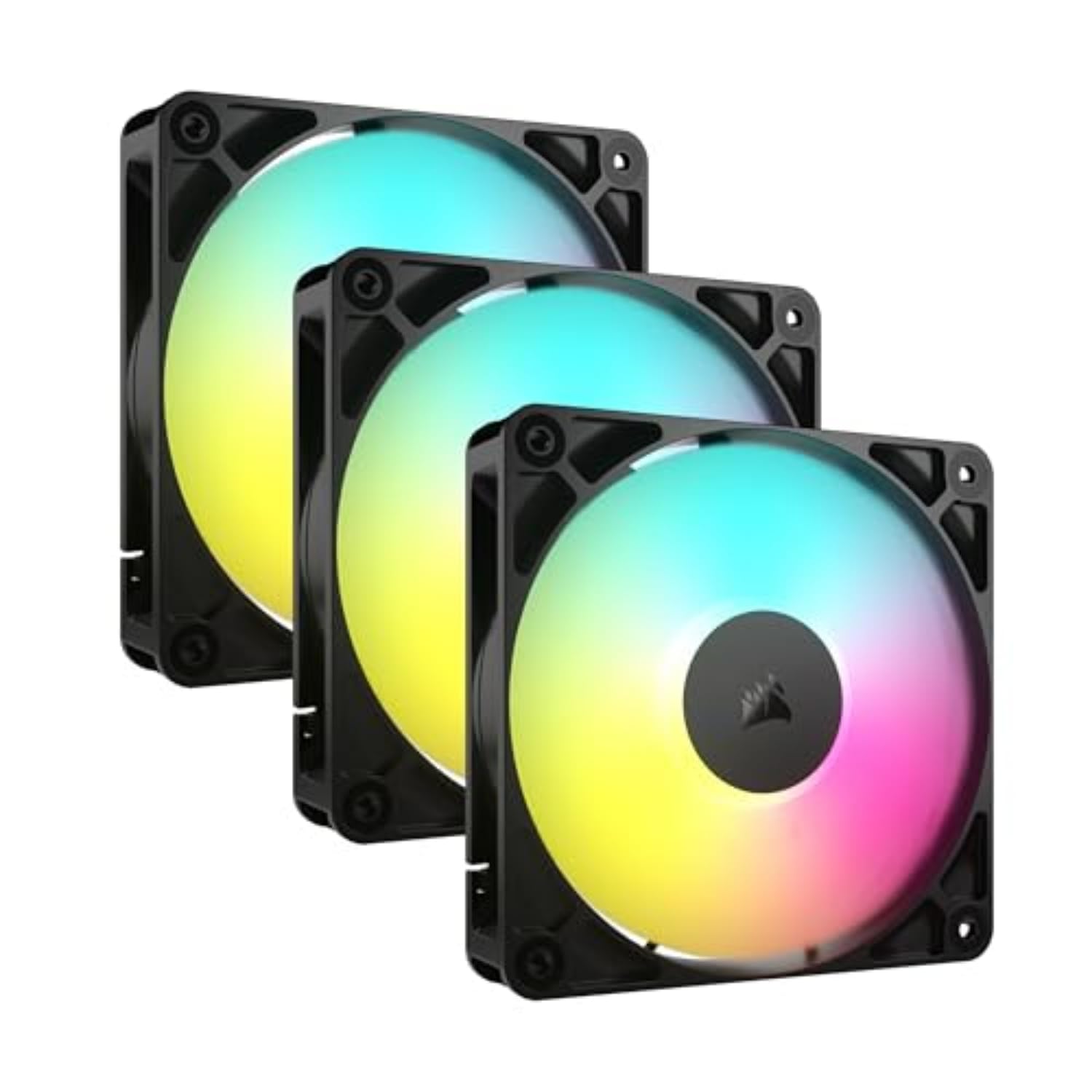
The CORSAIR RS120 ARGB 3-pack is for builders who view their PC as a centerpiece and want integrated, hassle-free lighting. The key innovation is the built-in daisy-chain connections for both PWM and ARGB. You can connect up to three fans together, resulting in only two cables (one for power, one for lighting) to manage for the entire set, which is a massive boon for clean builds.
Performance is robust, with a high maximum RPM and good static pressure thanks to Corsair’s AirGuide technology. The lighting features eight LEDs per fan for smooth color transitions and is designed to be controlled directly from a compatible motherboard’s 5V ARGB header, simplifying software control. The magnetic dome bearing aims for a balance of quiet operation and longevity.
If your priority is achieving a sleek, coordinated RGB aesthetic with minimal cable hassle and you need multiple fans, this 3-pack offers a very competitive and integrated solution from a mainstream brand.
Why it’s great
- Superb cable management with fully integrated PWM and ARGB daisy-chaining.
- Vibrant, motherboard-controlled ARGB lighting in a convenient 3-pack.
- Strong performance specs with good airflow and static pressure.
Good to know
- The premium for the convenience and branding is noticeable.
- Some users find the cables, while clever, can be a bit short for certain routing.
- Standard 25mm thickness, not suitable for slim applications.
8. Thermalright TL-C12C-S X3
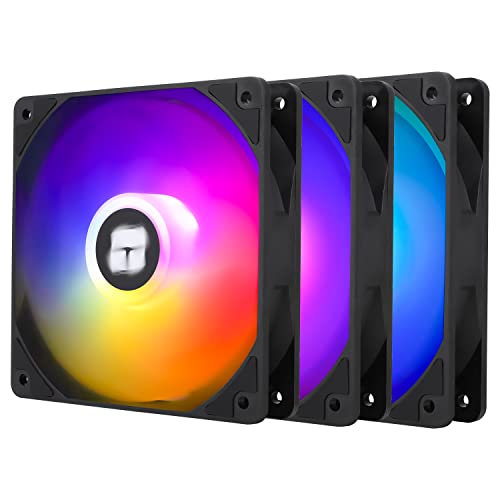
Thermalright does it again, this time bringing high-value ARGB lighting to the multi-pack market. The TL-C12C-S X3 offers three 25mm fans with soft, diffused lighting effects at a price point that challenges the notion that RGB has to be expensive. The fans perform identically to their non-RGB siblings, featuring the S-FDB bearing for quiet operation and reliable airflow.
This pack is perfect for builders who want to add colorful accents to their case without dedicating a large portion of their budget to fans. The ARGB connectors can be daisy-chained, and the fans perform solidly for case airflow. For the cost of a single premium fan from other brands, you get a complete set of three that both cool effectively and look great.
It represents arguably the best dollar-for-dollar value in the RGB fan segment, allowing you to allocate funds to more critical performance components like the CPU or GPU while still achieving a polished, lit build.
Why it’s great
- Incredible value: a full set of three ARGB fans for a very accessible price.
- Good cooling performance backed by the quiet S-FDB bearing.
- Bright, customizable lighting with daisy-chain support.
Good to know
- At higher RPMs, some units may produce a mild motor hum or bearing noise.
- Build materials are good but understandably not “premium” at this price.
- Standard 25mm thickness, not for slim applications.
9. Thermalright TL-C12C X3

If you need to populate a case with multiple fans and have zero interest in lighting, the Thermalright TL-C12C X3 pack is the ultimate efficiency play. You get three reliable, quiet PWM fans with S-FDB bearings for a remarkably low cost per fan. They include basic daisy-chain cables for power, making multi-fan installation straightforward.
These fans are about pure function: moving air quietly and reliably. They are a favorite among budget-conscious builders and system integrators who prioritize performance and value over aesthetics. The black, non-descript design blends into any build, and their acoustic performance is consistently praised as being excellent for the price.
For filling out intake and exhaust positions in a mid-tower or simply wanting a set of dependable spare fans, this pack is almost impossible to beat. It frees up your budget for more impactful component upgrades.
Why it’s great
- Unbeatable cost-per-fan value for quality PWM fans.
- Quiet operation thanks to the S-FDB bearing system.
- Includes cables for easy daisy-chaining of power.
Good to
10. Thermalright C12015W-S ARGB

For builders who want to add a splash of color to their small-form-factor project without sacrificing precious clearance, the Thermalright C12015W-S offers a compelling solution. It packs addressable RGB lighting into a genuine 15mm slim frame, making it one of the few fans that can provide both style and space-saving function. The lighting is diffused through the blades for a softer effect and can be synchronized with your motherboard’s ARGB header.
Performance-wise, it shares the same core architecture as other Thermalright slim fans, including a 1500 RPM max speed and vibration-damping pads. It provides adequate airflow for case ventilation or as an intake, though its static pressure is moderate. The white frame (also available in black) can help reflect light and match specific build themes.
If your ITX or HTPC build has a window and you want to incorporate RGB lighting, but a standard 25mm RGB fan won’t fit, this is one of your most viable and value-oriented options. It lets you participate in the RGB trend without compromising on the slim form factor that made your build possible.
Why it’s great
- Brings ARGB lighting to the 15mm slim fan category at a great value.
- White and black color options to match different aesthetics.
- Includes vibration pads and uses a 4-pin PWM connector for control.
Good to know
- Cooling performance is adequate but not class-leading.
- Requires separate management of both PWM and ARGB cables.
- A few user reports note potential variability in long-term reliability.
11. ARCTIC P12 PWM PST

While not a slim fan, the standard 25mm ARCTIC P12 PWM PST deserves an honorary mention for its legendary status in the value cooling segment. It consistently appears on “best fan” lists because it delivers near-premium performance—excellent static pressure, good airflow, and quiet operation—for an entry-level price. Its PST daisy-chaining feature is a bonus that adds tremendous practical value.
This is the fan to get if you have standard 25mm of clearance and want the best possible performance without spending a lot. It’s a fantastic choice for case airflow, CPU cooler upgrades, or even radiator use. The six-year warranty is a testament to ARCTIC’s confidence in its build quality and motor longevity.
If your build doesn’t have the strict clearance requirements that force you into the slim fan category, choosing the P12 PWM PST is one of the smartest, most cost-effective cooling decisions you can make. It frees up budget for other components while ensuring reliable and quiet cooling.
Why it’s great
- Unbeatable price-to-performance ratio for a standard 120mm fan.
- Pressure-optimized design works well on heatsinks and as a case fan.
- Includes PST daisy-chaining and comes with a six-year warranty.
Good to know
- Standard 25mm thickness, so not for slim applications.
- Some users note a very mild motor hum at specific RPM ranges.
- The all-black, non-RGB design is purely functional.
Understanding the Specs
CFM (Cubic Feet per Minute)
This measures the volume of air a fan can move in one minute. A higher CFM generally means more airflow, which is great for unobstructed case ventilation. However, in restricted spaces (like behind a dust filter or against a radiator), a fan’s static pressure is more important.
Static Pressure (mm H₂O)
This measures a fan’s ability to push air against resistance. Think of it as the fan’s “strength.” A higher static pressure rating (measured in millimeters of water, mmH₂O) is critical for effectively moving air through dense heatsinks, radiators, or tight case meshes. For slim fans used in cramped ITX cases, prioritizing static pressure often yields better real-world cooling.
Noise Level (dBA)
Decibels (dBA) measure sound pressure. A lower number is quieter. However, this rating is usually taken at a set distance and specific RPM. The type of noise (a smooth whoosh vs. a grating whine or motor hum) matters just as much as the volume. Fans with better bearings and blade designs produce less annoying noise.
Bearing Type
The bearing is the core mechanism that allows the fan to spin. Sleeve Bearings are basic and inexpensive but can be noisier and have a shorter lifespan. Rifle Bearings are an improved sleeve design with better longevity. Fluid Dynamic Bearings (FDB) and SSO Bearings are top-tier, using a fluid cushion for near-silent operation and very long life, often exceeding 150,000 hours.
FAQ
Can I use a slim fan on a CPU cooler or radiator?
Are slim fans louder than regular fans?
Do I need PWM control for a slim fan?
How many slim fans do I need for a small ITX case?
Final Thoughts: The Verdict
For most people tackling a space-constrained build, the best 120mm slim fan winner is the Silverstone Air Slimmer 120 because it refuses to compromise, delivering standard-fan performance in a slim 15mm frame. If you want the absolute quietest operation and premium reliability, grab the Noctua NF-A12x15 PWM. And for the best balance of performance, noise, and value in a slim package, nothing beats the Thermalright TL-C12015.

Mo Maruf
I created WellFizz to bridge the gap between vague wellness advice and actionable solutions. My mission is simple: to decode the research and give you practical tools you can actually use.
Beyond the data, I am a passionate traveler. I believe that stepping away from the screen to explore new environments is essential for mental clarity and physical vitality.