Our readers keep the lights on and my smoothie glass nicely filled. As an Amazon Associate, I earn from qualifying purchases.
Building a reliable PC doesn’t require a massive budget, but it does demand smart part selection to avoid performance pitfalls and premature failures.
I’m Mohammad Maruf — the founder and writer behind WellFizz. My process involves deep market research, analyzing thousands of specifications, and sifting through user data to identify which components truly deliver on their promises.
This guide cuts through the noise to show you where to allocate your funds for maximum impact, ensuring every dollar contributes to a stable, cool-running system. My research pinpoints the best budget pc parts that balance cost, cooling performance, and long-term reliability.
How To Choose The Best Budget Pc Parts
Selecting components for a budget build is a balancing act between performance, noise, and aesthetics. The goal is to avoid bottlenecks in cooling or compatibility that can shorten the life of your core hardware.
Prioritize Cooling Performance
Effective airflow is non-negotiable. Look for fans with higher Cubic Feet per Minute (CFM) ratings and respectable static pressure if they’ll be pushing air through heatsinks or radiators. PWM (Pulse Width Modulation) control is a key feature, allowing the fan speed to adjust automatically based on temperature, which keeps noise down during idle periods.
Understand Case Fundamentals
A case with a mesh front panel and multiple pre-installed fans offers tremendous value, as it provides immediate cooling and saves you from buying fans separately. Check clearances for your CPU cooler height and GPU length to ensure everything fits comfortably.
Balance Aesthetics and Function
Addressable RGB (ARGB) lighting can add personality without a significant premium, but ensure the fans or cases support your motherboard’s lighting ecosystem for seamless control. Remember that solid build quality and easy cable management often matter more than flashy looks for long-term satisfaction.
Quick Comparison
On smaller screens, swipe sideways to see the full table.
| Model | Type | Best For | Key Feature | Amazon |
|---|---|---|---|---|
| Cooler Master Hyper 212 Black | CPU Cooler | Mid-range CPU cooling | 4 copper heat pipes, 2500 RPM fan | Amazon |
| MUSETEX NN8 Case | PC Case | Maximum airflow & RGB | 6 pre-installed PWM ARGB fans | Amazon |
| Zalman i3 NEO Case | PC Case | Easy-access builds | Hinged tempered glass side panel | Amazon |
| Thermalright TL-C12C X3 | Case Fan | Quiet, high-airflow setups | S-FDB bearing, 66.17 CFM | Amazon |
| AsiaHorse AMICI-5GT Fans | Case Fan | RGB enthusiasts | Infinity mirror, HDB bearing | Amazon |
| GAMDIAS AURA GC1 ELITE | PC Case | Budget case with fans | 4 built-in ARGB fans, mesh front | Amazon |
| MUSETEX Y6 Case | PC Case | Showcase builds | 270° tempered glass, Type-C port | Amazon |
| Zalman S2 TG Case | PC Case | Airflow-focused builds | Full mesh front, 3 pre-installed fans | Amazon |
| Vetroo SA-140 Fan | Case Fan | 140mm ARGB intake | Motherboard sync, 69.29 CFM | Amazon |
| Thermalright TL-S12R Fan | Case Fan | Reverse airflow intake | Counter-rotating blades, ARGB halo | Amazon |
| GAMDIAS AURA GC1 ELITE WH | PC Case | White aesthetic builds | White variant with 4 ARGB fans | Amazon |
In‑Depth Reviews
1. Cooler Master Hyper 212 Black
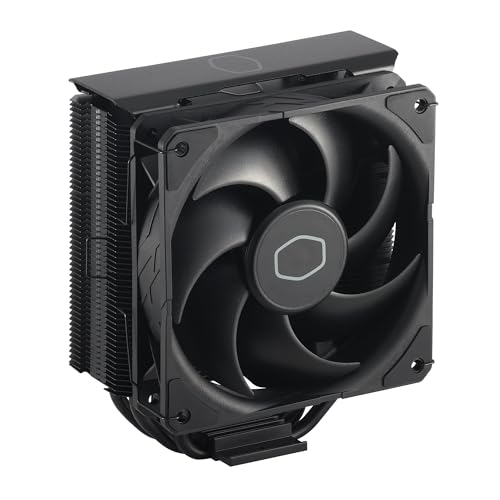
The Cooler Master Hyper 212 Black remains a benchmark in the mid-range air cooling category, offering proven performance for processors like AMD Ryzen 7 and Intel Core i7. Its four direct-contact copper heat pipes and dense aluminum fin stack efficiently pull heat away from the CPU. The included SickleFlow 120 PWM fan adjusts from 690 to 2500 RPM, providing a balance of cooling power and acoustics that easily outpaces stock coolers.
Installation has been streamlined with updated brackets for modern sockets like AM5 and LGA 1700, though you may need to remove the motherboard for access in some cases. The all-black aesthetic with a brushed aluminum top plate gives it a premium, understated look that fits most builds. Users consistently report temperature drops of 15-20°C compared to bundled coolers, with noise levels staying remarkably low during everyday tasks.
Reviewers highlight its role in solving stability issues on high-power chips, noting that it often allows systems to boot and run where stock cooling failed. The included thermal paste is adequate, but enthusiasts may prefer to use a higher-performance compound. While not designed for extreme overclocking, it delivers exceptional value for cooling mainstream CPUs quietly and reliably, making it a cornerstone of budget-conscious builds.
Why it’s great
- Substantial cooling upgrade over stock solutions
- Quiet PWM fan with wide speed range
- Clean, universal black design
- Excellent compatibility with current platforms
Good to know
- Installation can be tricky in tight cases
- Taller profile may not fit all compact cases
- Single fan configuration; a second fan can be added for extra performance
2. MUSETEX NN8 Case

The MUSETEX NN8 delivers an almost unbeatable package for builders who want maximum cooling and lighting straight out of the box. It comes with six 120mm PWM ARGB fans pre-installed—three intake at the front, two intake on the side, and one exhaust at the rear—creating immediate positive pressure and excellent airflow. The polygonal mesh front panel ensures these fans can breathe easily, while the side-opening tempered glass door offers unique, tool-free access to your components.
Each fan is addressable, offering 16.8 million colors that can be synced with major motherboard RGB ecosystems, and the PWM functionality allows for automatic speed control based on system temperatures. The case supports ATX, Micro-ATX, and Mini-ITX motherboards, with ample room for graphics cards up to 320mm and CPU coolers up to 160mm. Builders appreciate the thoughtful cable routing channels and numerous tie-down points, which make managing the wires from six fans surprisingly manageable.
Customer feedback raves about the value proposition, with many noting that buying six quality ARGB fans alone would cost more than this entire case. The airflow keeps components cool even under gaming loads, and the lighting effects are vibrant and customizable. Some note that the side-mounted fans can make cable routing to the motherboard slightly tighter, but the overall build experience and thermal performance are consistently praised.
Why it’s great
- Unmatched value with six pre-installed PWM ARGB fans
- Excellent airflow from mesh front and side intakes
- Convenient side-swing glass door for easy access
- Solid cable management space and options
Good to know
- Side fan cables need careful routing
- GPU length clearance may be tight with front radiator
- Dust filtration is basic on the mesh panels
3. Zalman i3 NEO ATX Mid Tower Case

The Zalman i3 NEO stands out with its innovative hinged tempered glass side panel, which swings open like a door for effortless access to your PC’s interior for cleaning, upgrades, or simply showing off your build. It comes with four fixed-color rainbow LED fans pre-installed (three intake at the front, one exhaust at the rear), providing solid baseline cooling and a splash of color. The full tempered glass front panel adds to the showcase aesthetic, though the side vents ensure adequate air intake.
Inside, the layout is spacious, supporting ATX motherboards and radiators up to 360mm in the front. The top includes a magnetic dust filter and a useful I/O panel with USB 3.0 ports. Builders note that the rear fan requires a separate motherboard header or a splitter, as it’s not daisy-chained with the front fans. The static RGB lighting on the fans provides a constant rainbow cycle, which is vibrant but not customizable without replacing the fans—a common step for enthusiasts seeking ARGB control.
Reviews consistently praise the convenience of the swing-open door, calling it a game-changer for maintenance. The case feels sturdy for its class, with metal feet featuring rubberized cushions to dampen vibrations. Some users report that the front glass panel can slightly restrict airflow compared to full mesh, but the pre-installed fans maintain safe temperatures for mid-range components. It’s a fantastic option for those who prioritize easy access and a clean, illuminated look.
Why it’s great
- Hinged glass side panel is incredibly convenient
- Good out-of-the-box cooling with four fans
- Spacious interior with strong radiator support
- Attractive white finish and clean design
Good to know
- Pre-installed fans have non-adjustable static RGB
- Front glass panel may slightly limit airflow versus mesh
- Rear fan needs separate power connection
4. Thermalright TL-C12C X3 CPU Fan

Thermalright’s TL-C12C X3 three-pack represents one of the best values in silent, high-airflow case fans. These 120mm fans use a quality S-FDB (Self-Fluid Dynamic Bearing) that minimizes noise and extends lifespan, rated for smooth operation at up to 1550 RPM. With an airflow of 66.17 CFM and a noise level of just 25.6 dBA, they move a significant amount of air while staying whisper-quiet, rivaling more expensive brands.
The all-black, non-RGB design is purpose-built for performance, featuring four silicone corner pads that dampen vibrations against the case. Each fan has a 4-pin PWM connector, allowing for automatic speed control via your motherboard, and they can be daisy-chained together to simplify cable management. Users frequently deploy these as intake or exhaust fans in their cases, or even as replacements for CPU cooler fans, noting immediate improvements in thermals and noise over stock options.
Customer reviews highlight the exceptional build quality and near-silent operation, even under load. Many builders transitioning from budget Arctic or stock fans are impressed by the reduction in hum and motor noise. The included screws and daisy-chain cables add to the out-of-box convenience. While a rare unit might exhibit slight coil whine depending on the motherboard’s PWM control, the overwhelming consensus is that these fans offer premium performance at an entry-level cost.
Why it’s great
- Extremely quiet operation with high airflow
- Premium S-FDB bearing for longevity
- Daisy-chain capability for clean wiring
- Excellent value in a three-pack
Good to know
- No RGB lighting for those seeking aesthetics
- Some motherboards may cause slight PWM whine
- Packaging is minimal but functional
5.AsiaHorse AMICI-5GT RGB PC Fans

The AsiaHorse AMICI-5GT fans are designed for builders who want high-visibility RGB aesthetics without completely sacrificing performance. The standout feature is the infinity mirror effect at the hub, illuminated by 24 individually addressable LEDs that offer 16.8 million colors. They’re compatible with major motherboard sync software, allowing for seamless integration into your lighting scheme. Underneath the glamour, they utilize an HDB (Hydraulic Dynamic Bearing) for smoother, quieter operation and a claimed 50,000-hour lifespan.
Performance-wise, these 120mm fans move a respectable 61.5 CFM of air with 2.0mmH2O of static pressure, making them suitable for both case airflow and pushing air through heatsinks. The nine-blade design and included rubber pads help keep noise down to a maximum of 30 dBA. Each fan comes with independent 5V 3-pin ARGB and 4-pin PWM connectors that can be daisy-chained (recommended up to three fans in series), though this does create more cable management work compared to modular systems.
Users are consistently impressed with the visual impact, noting the infinity mirrors look more premium than the price suggests. The fans are bright, colorful, and relatively quiet at lower speeds. Some reviews mention that the included cables can lead to a cluttered look in the back of the case, and a small minority report LED issues over time. For those prioritizing striking RGB over absolute top-tier airflow, these fans deliver impressive style and solid mid-range cooling.
Why it’s great
- Stunning infinity mirror RGB aesthetics
- Good airflow and pressure for an RGB fan
- Quiet HDB bearing with long lifespan rating
- Easy daisy-chaining for power and RGB
Good to know
- Cable management can be challenging with multiple fans
- RGB connectors are proprietary 6-pin, requiring the included hub
- Some users report LED longevity concerns
6. GAMDIAS AURA GC1 ELITE ARGB Case

The GAMDIAS AURA GC1 ELITE offers a compelling entry point for first-time builders, bundling four 120mm ARGB fans and a mesh front panel into a single affordable package. The mesh front ensures those intake fans can pull in ample cool air, addressing one of the most common thermal bottlenecks in budget cases. The included fans are connected to a built-in controller with a case-mounted button for cycling lighting modes, or they can be plugged into a motherboard ARGB header for software control.
Build quality exceeds expectations for the category, with a tempered glass side panel, a PSU shroud for cleaner visuals, and magnetic dust filters on the top. It supports standard ATX motherboards and offers reasonable clearances for components (up to 340mm GPUs and 160mm CPU coolers). Users report that the assembly process is straightforward, with decent room for cable routing behind the motherboard tray, though the metal panels can feel somewhat thin.
Feedback emphasizes the outstanding value of getting four functional ARGB fans with a decent case. Thermals are good for mid-range builds, keeping components well within safe limits during gaming. The fans are fixed-speed (non-PWM) but move enough air quietly for most users. Some note the need to double-check that all front fans are set to intake, as one may be installed as exhaust by default. For a cost-effective foundation that looks good and cools effectively, it’s a top contender.
Why it’s great
- Exceptional value with four included ARGB fans
- Effective mesh front panel for airflow
- Easy-to-use RGB button controller
- Good build quality for the price point
Good to know
- Included fans are not PWM speed controllable
- Check front fan orientation during installation
- Cable management space in the back is adequate but not generous
7. GAMDIAS AURA GC1 ELITE WH Case

This is the white variant of the GAMDIAS AURA GC1 ELITE, offering the same core value proposition—four pre-installed ARGB fans and a mesh front panel—wrapped in a clean, white aesthetic. The white finish on the steel chassis and the contrasting black mesh create a modern look that’s popular for themed builds. All the functional features are identical to the black model: the mesh front panel, tempered glass side panel, built-in RGB controller, and support for ATX motherboards and large components.
The primary reason to choose this version is for visual cohesion in a white or light-colored setup. The ARGB lighting from the fans pops beautifully against the white interior. Builders appreciate that they don’t need to pay a significant premium for the white color option, making it an accessible choice for aesthetic-focused budgets. As with the black model, the installation process is user-friendly, and the case provides a solid thermal foundation right out of the box.
Reviews from users of the white model echo the sentiments of the black version: outstanding value, good airflow, and surprisingly decent construction. Some note that the white paint can be slightly thin in spots, but it’s generally consistent. The included fans provide sufficient cooling for mainstream gaming PCs. If you’re building a white-themed PC and want to minimize additional fan purchases, this case delivers a complete, visually matching solution at a very competitive point.
Why it’s great
- All the value of the GC1 ELITE in a popular white color
- Pre-installed fans eliminate extra cost and color-matching hassle
- Effective cooling design with mesh front
- Cohesive aesthetic for white build themes
Good to know
- Same limitations as black model (non-PWM fans)
- White paint may be prone to minor scratches during assembly
- Accessory screws are standard black
8. MUSETEX Y6 ATX PC Case

The MUSETEX Y6 focuses on creating a dramatic visual presentation with its 270-degree dual tempered glass panels, offering a wider view of your components than traditional single-panel cases. It comes with three 120mm fans pre-installed and includes a modern front I/O panel with a USB 3.2 Type-C port, a welcome feature often missing in budget cases. The internal layout is a dual-chamber design, separating the PSU and drives from the main compartment for a cleaner look and potentially better thermal management.
Build space is generous, supporting GPUs up to 400mm and CPU coolers up to 176mm, with room for a 360mm radiator at the top. The panels use a tool-less, snap-on design for easy removal. Users praise the ample cable management room behind the motherboard tray and the inclusion of magnetic dust filters on the top and bottom. The pre-installed fans provide adequate baseline airflow, and the case’s open design allows for easy expansion with more fans or liquid cooling.
Customer feedback highlights the premium feel and stunning visuals of the extensive glass. The Type-C port is a frequently mentioned plus. Some builders encountered minor issues with standoff alignment or the lack of rubber grommets at cable passthroughs, but most found the build process straightforward and the final result impressive. For those wanting a case that makes their components the star of the show, the Y6 delivers a high-end look without a premium price.
Why it’s great
- Stunning 270-degree tempered glass showcase
- Includes a modern front-panel USB Type-C port
- Spacious interior with excellent component clearances
- Dual-chamber design for cleaner builds
Good to know
- Glass panels require careful handling
- Cable passthroughs lack rubber grommets
- Some users report minor fitment issues with standoffs
9. Zalman S2 TG ATX Mid-Tower Case

The Zalman S2 TG is a no-nonsense, airflow-focused case built around a full-perforated mesh front panel. This design prioritizes unobstructed air intake, making it an excellent choice for cooling performance on a budget. It comes with three fans pre-installed (two 120mm intakes in the front, one 120mm exhaust in the rear) and includes magnetic dust filters on the top and bottom for easy maintenance. The side panel is tempered glass, providing a clear view of your build.
Inside, it supports ATX, Micro-ATX, and Mini-ITX motherboards with a straightforward layout. The build quality is solid for its class, with rolled edges to prevent cuts. Users note that cable management space behind the motherboard tray is somewhat limited, requiring careful planning to get the side panel back on. The included front fans use older Molex connectors (not PWM), meaning they run at a fixed speed, but they are quiet and move ample air thanks to the open mesh.
Reviews commend the S2 TG for its excellent thermal performance, often keeping systems several degrees cooler than comparable cases with solid or restricted fronts. The value of getting three fans and a mesh design is highly appreciated. Some mention the blue power LED is very bright, and the hard drive cage is riveted in place, limiting flexibility. If your top priority is cool-running components and you prefer function over flashy RGB, this case is a reliable and efficient choice.
Why it’s great
- Superior airflow from full mesh front panel
- Includes three functional fans for immediate cooling
- Magnetic dust filters are convenient
- Simple, effective design focused on performance
Good to know
- Front fans are fixed-speed (Molex)
- Cable management space in the back is tight
- Non-removable hard drive cage
10. Vetroo SA-140 ARGB PWM Fan
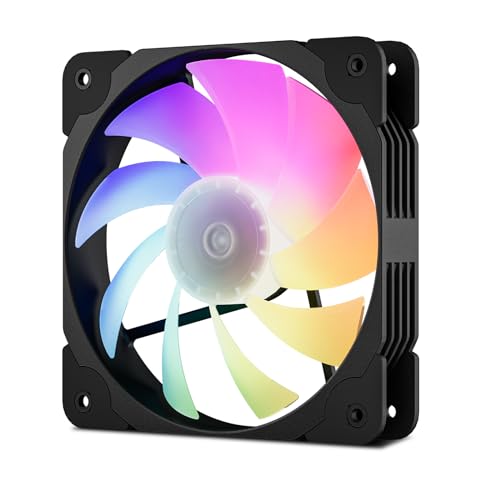
The Vetroo SA-140 fills a specific niche: a budget-friendly 140mm fan that combines PWM speed control and addressable RGB lighting. The larger 140mm size allows it to move more air (69.29 CFM) at lower RPMs (1200 max) compared to 120mm fans, which can translate to quieter operation for similar cooling performance. Its nine white blades against a black frame create a classic contrast, and the ARGB lighting ring syncs with major motherboard software via a standard 5V 3-pin header.
This fan uses a hydraulic bearing and includes rubber pads to minimize vibration noise. The PWM control allows your motherboard to automatically adjust its speed from a near-silent idle to a higher-flow state under load. Users frequently deploy these as front intake fans in cases that support 140mm mounts, noting a significant improvement in airflow and a pleasant, customizable lighting effect. The build quality feels sturdy, and the cables are a good length for routing.
Customer reviews highlight the fan’s quiet operation and vibrant, smooth RGB effects. Many are impressed that Vetroo packs both PWM and ARGB into such a competitively priced 140mm fan. Some note that the included instructions for daisy-chaining or using the optional hub could be clearer, but the standard connectors make setup intuitive for most. For builders seeking larger, quieter fans with modern lighting control, the SA-140 is an outstanding value.
Why it’s great
- 140mm size offers great airflow-to-noise ratio
- Combines both PWM control and addressable RGB
- Clean black-and-white aesthetic
- Easy motherboard synchronization
Good to know
- Instructions for accessories could be more detailed
- Maximum speed (1200 RPM) is lower than some 120mm fans
- Requires a case with 140mm mounting points
11. Thermalright TL-S12R Reverse Blade Fan
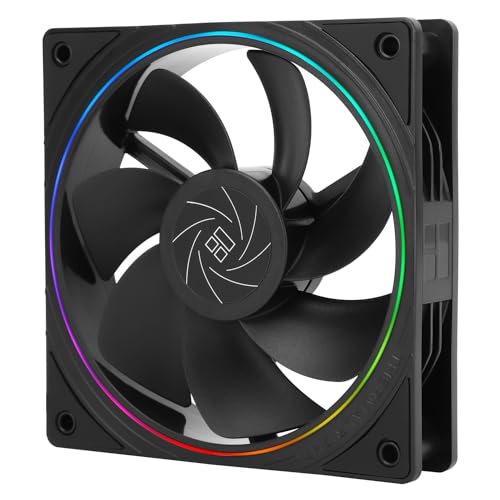
The Thermalright TL-S12R solves a specific problem in PC building: creating clean-looking front intakes. Most fans are designed to exhaust air from the “pretty” side (the one with the support spokes). The TL-S12R’s blades rotate counter-clockwise, making the structured, aesthetic side the intake side. This allows you to mount it as a front intake with the nice ARGB halo ring facing into the case, perfect for showcasing through tempered glass.
Beyond its unique orientation, it’s a competent 120mm PWM fan with an ARGB halo light, moving 47.6 CFM at up to 1500 RPM. It includes silicone feet for vibration dampening and uses a standard 4-pin PWM and 5V 3-pin ARGB connector for easy integration. Builders use these primarily as front or bottom intake fans to maintain a consistent visual theme where all visible fan faces look uniform. The lighting is subtle yet effective, illuminating just the slim ring around the fan.
User feedback is overwhelmingly positive, with many calling these “essential” for clean aesthetic builds. They perform reliably, are quiet, and the reverse blade design works exactly as advertised. Thermalright’s reputation for quality at this price point is reinforced here. The only minor note is that the wiring for the ARGB and PWM connectors is separate, so managing multiple fans requires a bit more planning. For anyone frustrated with seeing the “ugly” back of standard intake fans, this is the perfect, cost-effective solution.
Why it’s great
- Unique reverse blade design for aesthetic intake mounting
- Subtle and stylish ARGB halo lighting
- PWM control for automatic speed adjustment
- Excellent build quality and value from a trusted brand
Good to know
- Specific use-case (ideal for visible intake fans)
- Separate cables for power and RGB need management
- Airflow is good but not class-leading
Understanding the Specs
CFM (Cubic Feet per Minute)
This measures the volume of air a fan can move in one minute. Higher CFM generally means better cooling potential for case airflow. For example, a fan with 66 CFM will move more air than one with 47 CFM, but also consider noise and static pressure.
PWM (Pulse Width Modulation)
A 4-pin fan connector that allows the motherboard to dynamically control fan speed based on temperature. This is a key feature for balancing cooling performance with noise, as fans can spin slower when the system is idle.
Static Pressure (mmH2O)
This measures a fan’s ability to push air through resistance, like a heatsink fin stack or radiator. Fans with higher static pressure (e.g., 2.0mmH2O) are better suited for CPU coolers and AIO radiators than for unimpeded case airflow.
ARGB (Addressable RGB)
5V 3-pin connectors allow individual LEDs on a fan or strip to be controlled independently, creating complex, moving color effects. This differs from standard RGB (12V 4-pin), which can only display one color at a time across all LEDs.
FAQ
Are pre-installed case fans usually good enough?
What is more important, CFM or static pressure?
Do I need an RGB controller for addressable fans?
Is a cheap CPU cooler better than the stock one?
Final Thoughts: The Verdict
For most people, the best budget pc parts winner is the Cooler Master Hyper 212 Black because it delivers a massive cooling upgrade over stock solutions at a mid-range price, ensuring your CPU runs cool and quiet. If you want maximum airflow and RGB straight out of the box, grab the MUSETEX NN8 Case. And for building a quiet, high-performance system on a tight budget, nothing beats the value of the Thermalright TL-C12C X3 fan pack.

Mo Maruf
I created WellFizz to bridge the gap between vague wellness advice and actionable solutions. My mission is simple: to decode the research and give you practical tools you can actually use.
Beyond the data, I am a passionate traveler. I believe that stepping away from the screen to explore new environments is essential for mental clarity and physical vitality.