Our readers keep the lights on and my smoothie glass nicely filled. As an Amazon Associate, I earn from qualifying purchases.
Choosing the right 1080P video card is less about raw power and more about finding the perfect balance for your specific PC, games, and workflow. The wrong choice can leave you with choppy gameplay, wasted money, or a card that doesn’t fit in your case.
I’m Mohammad Maruf — the founder and writer behind WellFizz. My approach focuses on deep market research and analyzing product specifications and performance data to cut through the hype and identify the hardware that truly delivers on its promises for everyday users.
This guide sorts through the noise, comparing everything from ultra-efficient office cards to performance legends, to help you make a confident upgrade that lasts. The goal is to identify the perfect best 1080p video card that matches your system’s capabilities and your personal demands without overspending.
How To Choose The Best 1080P Video Card
The term “1080P card” covers a massive range, from basic display output to high-refresh-rate gaming. Your decision hinges on three non-negotiable factors: what you need it for, what your computer can physically and electrically handle, and the level of future-proofing you want.
Define Your Primary Use Case
Are you adding monitors to an office PC, playing the latest games, or breathing life into an older system? For general computing and video streaming, a modest, low-power card is sufficient. For modern gaming at 60+ frames per second, you’ll need a dedicated gaming GPU with ample VRAM (6GB or more is the current sweet spot). For content creation, look for cards that support the latest APIs like DirectX 12 and Vulkan for better software acceleration.
Check Your Power and Physical Limits
Two of the most common upgrade mistakes are buying a card that needs more power than your supply can deliver, or one that’s too large for your case. Check your power supply’s wattage and available PCIe power connectors (6-pin or 8-pin). For small form factor (SFF) cases, you must look for “low profile” or “ITX” cards, and verify the exact length in millimeters against your case’s clearance.
Balance New Features with Proven Value
Newer cards, like those from NVIDIA’s RTX 30/40 series, offer features like DLSS (AI-powered upscaling) and better power efficiency. However, previous-generation cards or renewed models like the GTX 1080 Ti often deliver exceptional raw performance for 1080P at a compelling point. Consider driver support; very old cards may not work with the latest operating systems like Windows 11.
Quick Comparison
On smaller screens, swipe sideways to see the full table.
| Model | Type | Best For | Key Feature | Amazon |
|---|---|---|---|---|
| MOUGOL RX 580 | AMD Gaming | Balanced 1080P gaming | 8GB GDDR5, dual fan | Amazon |
| ZOTAC GTX 1660 Super | NVIDIA Gaming | Efficient 1080P performance | 6GB GDDR6, super compact | Amazon |
| ASUS RTX 3050 6GB | Modern Gaming | Modern features & efficiency | DLSS support, PCIe 4.0 | Amazon |
| XFX RX 580 GTS | AMD Gaming | High-refresh 1080P | Robust cooling, 8GB VRAM | Amazon |
| GIGABYTE GTX 1080 Ti | Enthusiast | Max 1080P/1440P performance | 11GB VRAM, triple fan | Amazon |
| ASUS GTX 1080 Ti Turbo | Renewed Power | High FPS gaming | Blower-style cooler, 11GB | Amazon |
| MSI GTX 1080 Gaming | Premium Build | Quiet, cool operation | Twin Frozr VI cooling | Amazon |
| NVIDIA GTX 1080 FE | Renewed | Strong 1080P/1440P | Founders Edition, 8GB GDDR5X | Amazon |
| maxsun GT 1030 | Budget ITX | Office/media PC upgrade | Low profile, no extra power | Amazon |
| MSI GTX 1050 Ti | Entry Gaming | Light gaming, no PSU cables | 4GB VRAM, PCIe slot powered | Amazon |
| SAPLOS Radeon HD 6570 | Ultra-Budget | Adding HDMI to an old PC | Dual HDMI, low power | Amazon |
In‑Depth Reviews
1. MOUGOL AMD Radeon RX 580
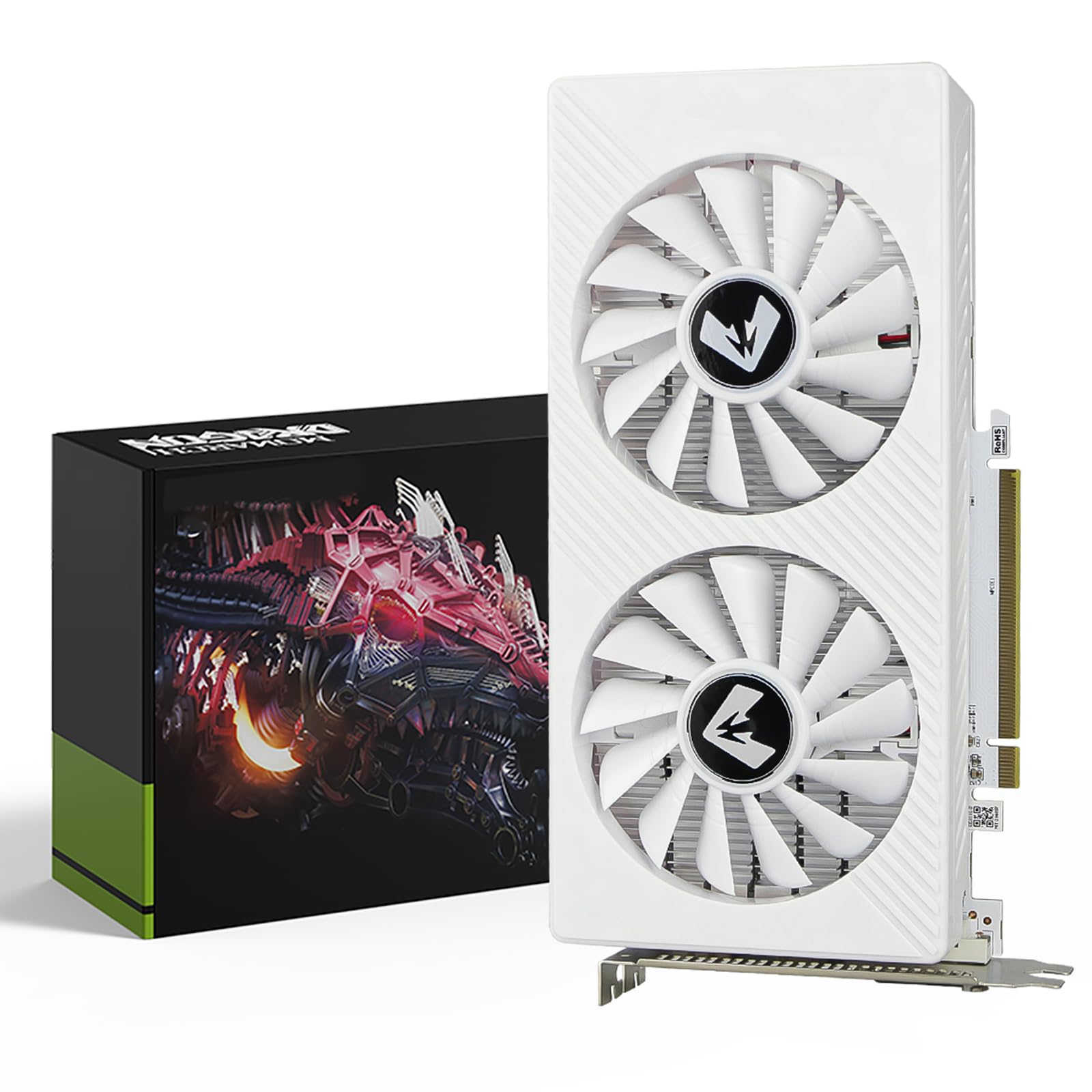
The MOUGOL RX 580 stands out as the quintessential 1080P gaming card because it delivers a nearly perfect balance of performance, VRAM, and value. With 8GB of GDDR5 memory on a 256-bit bus, it handles modern games’ high-resolution textures without bottlenecking, a common issue with 4GB cards. The 2048 stream processors and dual-fan cooling system provide stable frame rates in popular titles, making it a reliable drop-in upgrade for most mid-tower gaming rigs.
Beyond gaming, this card supports triple-monitor setups via its versatile HDMI, DisplayPort, and DVI outputs, catering to both productivity and immersive gaming. It’s fully compatible with modern software suites, offering hardware acceleration for video editing and 3D rendering. The inclusion of a backplate adds structural rigidity, a nice touch at this tier.
While it requires a single 8-pin power connector, its power draw is reasonable for the performance offered. It represents the sweet spot where you get tangible, high-settings 1080P gaming capability without stepping into the premium tier, making it the most sensible first choice for most builders.
Why it’s great
- 8GB of VRAM is ideal for modern 1080P gaming without stuttering.
- Excellent price-to-performance ratio for a new card.
- Robust cooling with dual fans maintains stable temperatures.
- Triple display support enhances productivity.
Good to know
- Requires a 6-pin or 8-pin PCIe power connector from your PSU.
- It’s a larger, dual-slot card, so check your case clearance.
- Based on older GCN architecture, so it lacks newer features like ray tracing.
2. ZOTAC Gaming GeForce GTX 1660 Super

The ZOTAC GTX 1660 Super is the efficiency expert of the 1080P world. Built on NVIDIA’s Turing architecture (sans ray tracing cores), it pairs 6GB of speedy GDDR6 memory with a boost clock up to 1785 MHz. This combination delivers remarkably smooth 1080P gaming, often surpassing the RX 580 in titles that favor NVIDIA optimization, all while running cooler and drawing less power.
Its super compact 6.83-inch design is a standout feature, allowing it to fit in 99% of systems, including many small form factor cases that would reject larger cards. The dual-fan cooler is effective and relatively quiet, and the card requires only a single 8-pin power connector. For users upgrading a pre-built PC with limited space, this card is a godsend.
It also supports modern display standards with three DisplayPort 1.4 and one HDMI 2.0b output, making it ready for high-refresh-rate monitors. If your priority is a cool, quiet, and space-efficient card that delivers maxed-out 1080P performance without any fuss, the GTX 1660 Super is a professional-grade choice.
Why it’s great
- Excellent performance per watt, running cool and quiet.
- Tiny footprint fits virtually any case with a PCIe slot.
- GDDR6 memory offers a bandwidth advantage over GDDR5.
- Great driver support and compatibility.
Good to know
- Only 6GB of VRAM, which is still ample for 1080P but less future-proof than 8GB.
- Lacks dedicated ray tracing hardware of RTX cards.
- The small heatsink can mean higher fan speeds under sustained load.
3. ASUS Dual NVIDIA GeForce RTX 3050 6GB

The ASUS Dual RTX 3050 6GB is your gateway to modern GPU features in a 1080P package. It’s built on NVIDIA’s efficient Ampere architecture, which means support for DLSS (AI-powered frame boosting) and dedicated hardware for ray tracing. While its 6GB frame buffer is geared towards 1080P, the technological leap from older cards is significant for supported games and applications.
This particular model uses a clever 2-slot design with Axial-tech fans that increase downward air pressure, making it an excellent choice for cases with restricted airflow. It’s also notably power-efficient, drawing all its needed power from the PCIe slot in many configurations, which simplifies upgrades for systems with basic power supplies.
For someone building a new, balanced system or upgrading an office PC to handle light gaming and creative tasks, the RTX 3050 offers a path to current-generation technology. It ensures compatibility with the latest games and software features that older architectures simply cannot support.
Why it’s great
- Access to DLSS and ray tracing for future-proofing.
- Very power-efficient, often not requiring extra PSU cables.
- 2-slot design with excellent cooling for its size.
- Full support for PCIe 4.0 on compatible motherboards.
Good to know
- 6GB VRAM is its main limitation for texture-heavy games.
- Raw rasterization performance is similar to older, more affordable cards.
- DLSS is only beneficial in games that specifically support it.
4. XFX Radeon RX 580 GTS XXX Edition

The XFX RX 580 GTS is the performance-oriented sibling in the RX 580 family. It comes factory overclocked to 1386 MHz and features XFX’s Double Dissipation cooling technology, which typically translates to better thermal performance and lower noise levels under load compared to reference designs. This makes it a fantastic choice for gamers targeting high refresh rate 1080P monitors.
A key feature is the dual BIOS switch, allowing you to toggle between a quiet mode and a performance mode. This offers flexibility to prioritize acoustics or maximum clock speeds depending on your task. The card is built with quality components and feels substantial, signaling a product designed for longevity.
Like the MOUGOL model, it boasts 8GB of VRAM and supports triple-monitor outputs. For the enthusiast who wants a little extra performance headroom and the security of a dual BIOS from a reputable brand like XFX, this card represents tremendous value and reliability.
Why it’s great
- Factory overclock delivers out-of-the-box performance gains.
- Dual BIOS provides a safety net and customization.
- Superior cooling solution from a well-known AMD partner.
- VR Ready certification for entry-level virtual reality.
Good to know
- It’s a long card (over 10.6 inches), so case compatibility is crucial.
- Requires a robust 500W power supply recommendation.
- Can run warm if case airflow is poor, necessitating a custom fan curve.
5. GIGABYTE GTX 1080 Ti Gaming OC

The GIGABYTE GTX 1080 Ti is a legend repackaged with modern cooling. With 11GB of high-speed GDDR5X memory, this card wasn’t just a 1080P champion in its day; it’s a competent 1440P card even now. For users who want to absolutely max out every 1080P game at ultra settings with high frame rates or dabble in 1440P gaming, this card remains a powerhouse.
This model features a massive triple-fan Windforce cooler and a metal backplate, ensuring the card runs cool, quiet, and with minimal sag. The RGB Fusion lighting adds aesthetic customization. Its overclocking headroom is significant thanks to an 8+2 power phase design, allowing enthusiasts to push performance even further.
While it lacks the ray tracing and DLSS cores of newer RTX cards, its raw rendering muscle for traditional gaming is immense. If you find one in good condition, it delivers near top-tier performance that crushes 1080P and handles 1440P with ease, all wrapped in a premium, stylish cooler.
Why it’s great
- Monstrous 11GB VRAM buffer eliminates memory constraints at 1080P/1440P.
- Exceptional cooling with a triple-fan setup and rigid backplate.
- Substantial overclocking potential for performance seekers.
- Aesthetic RGB lighting adds to the build theme.
Good to know
- Very high power consumption, requiring a strong 600W+ PSU.
- Large, triple-slot design demands a spacious case.
- Lacks modern features like DLSS and hardware-based ray tracing.
6. ASUS GeForce GTX 1080 Ti Turbo

The ASUS GTX 1080 Ti Turbo offers the same legendary 11GB GPU performance in a renewed package with a blower-style cooler. This design exhausts hot air directly out the back of your case, which is ideal for small form factor builds or systems with limited internal airflow where open-air coolers would cause heat buildup.
As a renewed product, it represents a chance to acquire flagship-level performance from a previous generation. It’s fully capable of 4K gaming at lower settings and absolutely dominates 1080P and 1440P. The 1582 MHz boost clock in OC mode ensures high frame rates, and the 3584 CUDA cores provide immense parallel processing power for gaming and creative tasks.
Purchasing renewed comes with a shorter warranty, but for builders who understand the value and are comfortable with the format, this card unlocks performance that rivals current mid-range offerings at a compelling point, especially when new old stock is available.
Why it’s great
- Blower cooler is perfect for multi-GPU setups or compact cases.
- Unmatched 1080P performance and strong 1440P capability.
- Access to high-end specs at a renewed product point.
- Turbo boost clocks provide excellent out-of-box speed.
Good to know
- Blower coolers are typically louder under load than open-air designs.
- Renewed products carry a inherent risk, though Amazon’s policy offers protection.
- High power draw and requires significant PSU capacity.
7. MSI Gaming GeForce GTX 1080

The MSI GTX 1080 Gaming X is the premium, quiet iteration of the GTX 1080. It’s renowned for MSI’s Twin Frozr VI thermal design, which uses TORX 2.0 fans that generate tremendous airflow with minimal noise. This card is for the user who wants powerful 1080P/1440P performance without the fan noise often associated with high-end graphics cards.
Beyond acoustics, it features a solid metal backplate, customizable RGB lighting controlled via a mobile app, and high-quality components for stable overclocking. The 8GB of GDDR5X memory provides ample bandwidth, making it excellent for high-refresh-rate 1080P gaming or smooth 1440P gameplay.
It represents the height of the GTX 10-series consumer experience. If you value a silent or near
experience and can find one in good condition, this card delivers a refined and powerful gaming experience that remains relevant.
Why it’s great
- Exceptional cooling solution that operates very quietly under load.
- Premium build quality with a metal backplate and RGB lighting.
- Strong 1080P/1440P performance with 8GB of fast GDDR5X memory.
- Good overclocking headroom thanks to robust power delivery.
Good to know
- A high-end card from a past generation, so it lacks modern RTX features.
- Requires two 8-pin power connectors, demanding a capable PSU.
- Large size may not fit in all cases.
8. NVIDIA GeForce GTX 1080 Founders Edition (Renewed)
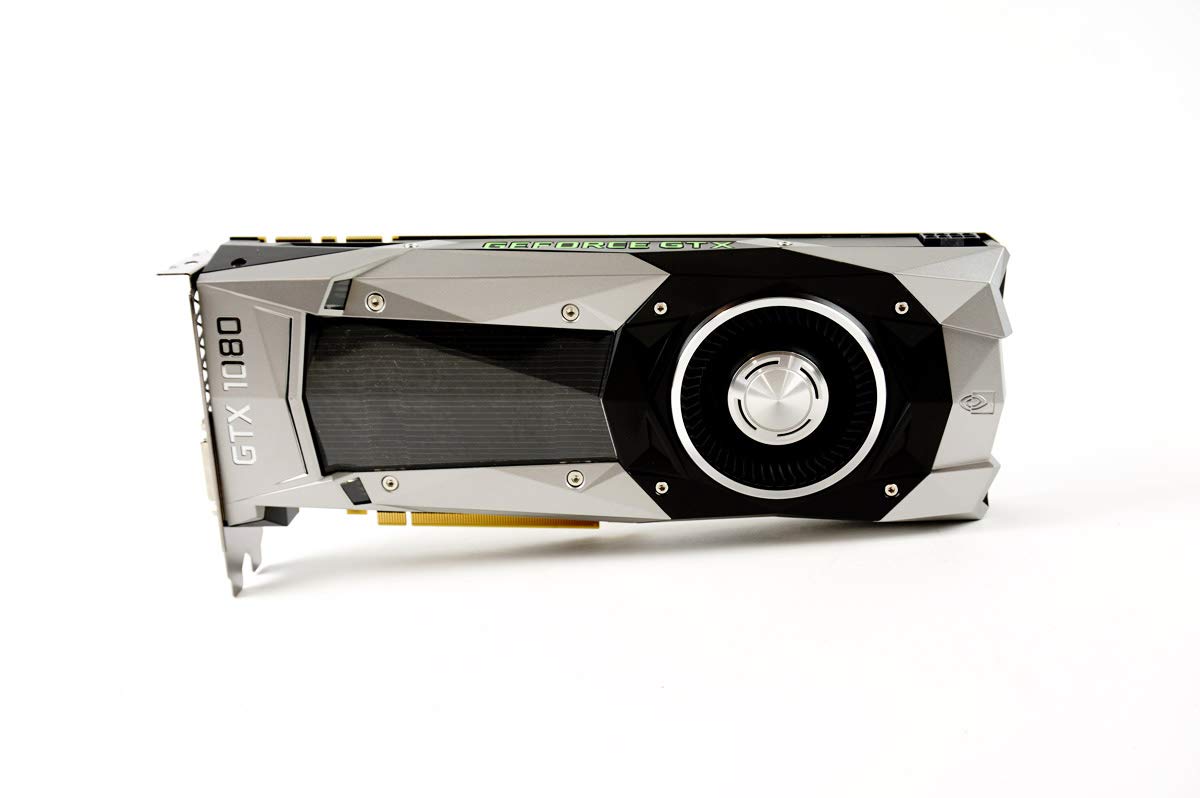
This renewed NVIDIA Founders Edition GTX 1080 offers a direct path to high-performance 1080P and 1440P gaming with the distinctive, efficient blower-style cooler that defined the series. The 8GB of GDDR5X memory provides a significant performance uplift over standard GDDR5, making it a strong contender for fast-paced gaming and content creation.
As a renewed product, it has been inspected and tested to work like new, offering a more accessible entry point to this performance tier. The blower design, while sometimes louder, is excellent for cases with limited airflow as it exhausts heat directly outside, keeping other components like your CPU cooler.
For users who appreciate the iconic design and want reliable performance without the frills of third-party coolers, this card is a solid bet. It’s a straightforward, powerful GPU that handles modern titles with ease, provided you’re comfortable with the renewed category and its associated warranty.
Why it’s great
- Classic Founders Edition design with an efficient blower cooler.
- GDDR5X memory offers high bandwidth for smooth performance.
- Strong 1080P/1440P performance at a renewed product point.
- Compact footprint compared to many third-party cards.
Good to know
- Renewed products have a shorter warranty than new items.
- Blower cooler can become noticeably loud under heavy load.
- Requires a 6-pin and an 8-pin power connector.
9. maxsun NVIDIA GeForce GT 1030

The maxsun GT 1030 is the definitive upgrade card for office PCs and home theater systems. Its primary strength is its minimalism: it requires no external power connector, drawing all its needed electricity from the PCIe slot, and it’s available in a low-profile form factor that fits even the slimmest small form factor cases.
Powered by NVIDIA’s Pascal architecture, it’s significantly faster than integrated graphics and older entry-level cards. The 2GB of GDDR5 memory (a crucial spec over the slower GDDR4 version) ensures smooth 4K video playback and provides just enough muscle for very light gaming or older titles. It’s the perfect solution for adding a modern HDMI or DVI output to an older business desktop to drive a new monitor.
This card isn’t for gaming, but for transcoding video, extending desktop real estate, and providing a crisp, lag-free experience for everyday tasks. It’s the most sensible, low-impact upgrade you can make to an aging system.
Why it’s great
- Ultra-low power draw, no extra PSU cables required.
- Low-profile design fits virtually any desktop case.
- GDDR5 version offers much better performance than GDDR4.
- Perfect for 4K video streaming and adding monitor ports.
Good to know
- Only 2GB of VRAM, not suitable for modern gaming.
- Performance is strictly for basic tasks and media.
- Ensure the listing includes the low-profile bracket, as some users report missing parts.
10. MSI GeForce GTX 1050 Ti 4GT OC

The MSI GTX 1050 Ti is the king of the “no-hassle” upgrade. Like the GT 1030, it draws all its power from the PCIe slot, but it packs a much more significant punch with 4GB of GDDR5 memory and 768 CUDA cores. This makes it a legitimate entry-level gaming card capable of playing many modern titles at 1080P with low to medium settings.
It’s the ideal solution for upgrading a pre-built desktop with a weak power supply (often 300W-400W) that lacks PCIe power cables. You get a substantial gaming performance boost without needing to replace any other components. The compact, single-fan design ensures compatibility with most cases, and MSI’s build quality is reliable.
For students, families, or anyone with a locked-down system, this card offers a gateway into PC gaming. It’s the maximum performance you can typically get without touching your power supply, making it a uniquely valuable product in the lineup.
Why it’s great
- Runs entirely off the PCIe slot, perfect for low-wattage PSUs.
- 4GB of VRAM allows for light modern gaming and multitasking.
- Compact and easy to install in almost any system.
- A proven, reliable model from a major brand.
Good to know
- Performance is limited by its 75W power ceiling.
- Not suitable for high-settings 1080P gaming in demanding titles.
- Older architecture, so it lacks newer encoding and features.
11. SAPLOS Radeon HD 6570

The SAPLOS HD 6570 exists for one specific, important purpose: to add modern display outputs to very old computers. If you have a vintage office PC with only VGA and need to connect it to an HDMI-only monitor or TV, this card solves that problem. Its 60W power draw is so low it doesn’t require any extra power connectors, and its low-profile design fits small cases.
It features dual HDMI outputs, which is unusual for a card at this tier, allowing for a simple dual-monitor office setup. The 1GB of GDDR3 memory is sufficient for desktop composition and video playback at 1080P. It’s a tool for functionality, not performance.
Crucially, this card has significant limitations. Driver support ended years ago, so it’s not compatible with Windows 11 and may have issues with the latest versions of Windows 10. It’s strictly for basic display output on legacy systems, and understanding that scope is key to being satisfied with the purchase.
Why it’s great
- Extremely low cost for adding HDMI ports to an old PC.
- Dual HDMI outputs are a rare and useful feature.
- No external power required, plug-and-play simplicity.
- Low profile, fits small form factor cases.
Good to know
- No driver support for Windows 11 and limited support for Win 10.
- 1GB of slow GDDR3 memory is not for any kind of gaming.
- Based on very old architecture (DirectX 11 only).
Understanding the Specs
VRAM (Video RAM)
This is the graphics card’s dedicated memory, used to store textures, frames, and other data. For 1080P gaming, 4GB is the absolute minimum, 6GB is comfortable, and 8GB is ideal for future-proofing and high-resolution textures. For office use, 1-2GB is sufficient for driving displays.
Power Connectors & TDP
Thermal Design Power (TDP) indicates heat output and approximate power draw. A card’s required connectors (6-pin, 8-pin, or none) tell you if your power supply can handle it. Cards without extra connectors (like the GT 1030 or 1050 Ti) are perfect for low-wattage pre-built systems.
Form Factor
This includes the card’s length, width (number of slots), and height. “Low profile” or “ITX” cards are short and often use a half-height bracket for small cases. Always measure the available space in your case, especially length, before buying.
Display Outputs
Modern cards typically have DisplayPort and HDMI. DisplayPort is preferred for high-refresh-rate monitors. The number of outputs determines how many monitors you can connect directly. Older cards may have DVI or VGA, useful for legacy monitors.
FAQ
Is 8GB of VRAM overkill for 1080P gaming?
Can I put a powerful card in my old office computer?
What does “renewed” or “refurbished” mean for a graphics card?
Do I need to upgrade my power supply for a new video card?
Final Thoughts: The Verdict
For most people, the best 1080p video card winner is the MOUGOL RX 580 because it delivers the perfect balance of 8GB VRAM, strong gaming performance, and value. If you want modern features and efficiency, grab the ASUS RTX 3050 6GB. And for maximum raw performance on a budget, nothing beats the renewed ASUS GTX 1080 Ti.

Mo Maruf
I created WellFizz to bridge the gap between vague wellness advice and actionable solutions. My mission is simple: to decode the research and give you practical tools you can actually use.
Beyond the data, I am a passionate traveler. I believe that stepping away from the screen to explore new environments is essential for mental clarity and physical vitality.