Our readers keep the lights on and my smoothie glass nicely filled. As an Amazon Associate, I earn from qualifying purchases.
Upgrading to a 10-gigabit network is the single most impactful way to eliminate frustrating bottlenecks between your workstation and your NAS or server. It transforms workflows for video editors, developers, and data hoarders, turning file transfers from a coffee break into a blink. But not every 10Gb network card is built the same, and choosing the wrong one can lead to compatibility nightmares and wasted performance.
I’m Mohammad Maruf — the founder and writer behind WellFizz. For over a decade, I’ve specialized in parsing the technical specifications and long-term reliability data behind hardware upgrades, separating marketing hype from genuine engineering.
This guide cuts through the noise by analyzing controller chips, driver ecosystems, and thermal design, so you can invest in a card that delivers rock-solid speed for years. Choosing the right best 10gb network card comes down to understanding your specific setup and future needs.
How To Choose The Best 10Gb Network Card
Selecting a 10Gb card is more than just chasing the biggest number. It’s about matching the card’s physical and technical attributes to your computer, your network, and your use case. Getting this match wrong can leave you with a card that doesn’t fit, overheats, or simply won’t work with your operating system.
RJ45 (Base-T) vs. SFP+ Ports
This is your first and most crucial decision. An RJ45 port lets you use standard Ethernet cables (Cat6a or better for 10Gb over distance), which is incredibly convenient for most home and office setups. An SFP+ port requires a separate transceiver module or Direct Attach Copper (DAC) cable, offering more flexibility for fiber optic connections and often lower latency and power consumption, but adds complexity and cost.
The Controller Chipset Matters
The brain of the card determines everything from driver availability to multi-gig support. Intel’s X540/X550 (for RJ45) and X520/82599 (for SFP+) are enterprise-proven, with excellent, mature drivers across Windows, Linux, and VMware, but they lack native 2.5G/5G support. Marvell’s AQC113 is a newer, popular choice for RJ45 cards that natively supports all multi-gig speeds (10/5/2.5/1 Gbps) and often uses more efficient PCIe x1 or x4 lanes.
PCIe Slot Compatibility and Lane Count
A card needs enough PCIe lanes to handle 10 gigabits of data. Older Intel-based cards often require a full x8 slot, which can be a problem on crowded motherboards. Modern Marvell-based cards can achieve 10Gb on a PCIe 3.0 x1 or x4 slot, offering far more installation flexibility. Always check your motherboard manual to see which slots are available and if they share bandwidth with other components like M.2 drives.
Heat Dissipation and Form Factor
10Gb network controllers generate significant heat. A card with a robust, finned heatsink is essential for sustained performance. Passive cooling is common, but ensuring good case airflow over the card is critical. Also, verify the card includes a low-profile bracket if you’re installing it in a small form factor (SFF) or home server chassis.
Quick Comparison
On smaller screens, swipe sideways to see the full table.
| Model | Type | Best For | Key Feature | Amazon |
|---|---|---|---|---|
| 10Gtek Dual RJ45 (X540) | RJ45 | Servers & NAS | Intel X540, Dual Ports | Amazon |
| TRENDnet TEG-10GECTX | RJ45 | Reliable Multi-Gig | Full 10/5/2.5/1G Support | Amazon |
| TP-Link TX401 | RJ45 | Gamers & Enthusiasts | Includes CAT6A Cable, QoS | Amazon |
| ASUS XG-C100C | RJ45 | Windows Gaming Rigs | Built-in QoS, Brand Support | Amazon |
| SABRENT NT-10PE | RJ45 | Modern PCIe x4 Systems | Aluminum Heatsink, Multi-Gig | Amazon |
| YuanLey AQC113 | RJ45 | Flexible PCIe x1 Slots | Marvell AQC113, PCIe x1 | Amazon |
| NICGIGA AQC113 (2025) | RJ45 | Compact, Modern Builds | Latest Marvell Chip, Low-Profile | Amazon |
| VIMIN Dual SFP+ (X520) | SFP+ | High-Efficiency Servers | Intel 82599, Dual SFP+ | Amazon |
| 10Gtek Single SFP+ (X520) | SFP+ | SFP+ Switch Users | Intel 82599EN, Single Port | Amazon |
| VIMIN Dual RJ45 (X540) | RJ45 | Budget Dual-Port Needs | Intel X540-T2 Controller | Amazon |
| NICGIGA Dual RJ45 (X540) | RJ45 | Entry-Level 10Gb | Dual 10G RJ45 Ports | Amazon |
In‑Depth Reviews
1. 10Gtek 10Gb Dual RJ45 Port Network Card (Intel X540)

For those seeking proven, server-grade stability without a premium outlay, this 10Gtek card built around the original Intel X540 controller is a standout. It delivers exactly what power users need: two 10Gb RJ45 ports capable of handling heavy, sustained data flows between workstations, NAS devices, and servers. The use of the Intel chipset means broad driver compatibility with Windows Server editions, Linux, and VMware, providing a reliable foundation for critical tasks.
Installation is straightforward with included standard and low-profile brackets, but be prepared for a minor driver hunt. Windows, especially Windows 11, may not have the drivers pre-loaded, requiring a manual download from Intel’s website—a common step for many Intel-based NICs. Once configured, users report achieving full 10-gigabit speeds with excellent stability, making it ideal for home labs and content creation workflows where consistent throughput is key.
The card’s design focuses on function over flash, with a substantial heatsink to manage thermals. While it runs reliably in well-ventilated cases, some users in tight spaces have added supplemental cooling. It’s important to note this chipset is a pure 10Gb/1Gb device; it does not support intermediate 2.5Gb or 5Gb speeds, which is fine for dedicated high-speed networks but something to consider if your switch uses multi-gig standards.
Why it’s great
- Enterprise-proven Intel X540 controller ensures broad OS support and stability.
- Dual RJ45 ports offer flexibility for link aggregation or connecting two networks.
- Exceptional value for a feature set typically found in more expensive cards.
- Includes both full-height and low-profile brackets for versatile installation.
Good to know
- Does not support 2.5Gb or 5Gb multi-gig speeds, only 10Gb/1Gb/100Mb.
- Drivers are not always auto-installed by Windows; manual download may be needed.
- Can run warm under sustained load, benefiting from good case airflow.
2. TRENDnet 10G PCIe Network Adapter (TEG-10GECTX)

TRENDnet delivers a polished, reliable single-port RJ45 solution that perfectly bridges the gap between modern multi-gig networks and traditional 10Gb infrastructure. Its key advantage is full, auto-negotiating support for every speed tier: 10Gbps, 5Gbps, 2.5Gbps, 1Gbps, and 100Mbps. This makes it incredibly future-proof and versatile, allowing you to connect to the latest 2.5G/5G switches today and upgrade to full 10Gb later without changing hardware.
Built with a compact, efficient heatsink and a PCIe 3.0 x4 interface, this card fits easily into most systems without blocking adjacent slots. Users highlight its plug-and-play nature in Windows, though downloading the latest Marvell AQtion drivers from TRENDnet’s site is recommended for optimal stability and feature access. The card is also NDAA/TAA compliant, reflecting its build quality and suitability for professional environments where reliability is non-negotiable.
Feedback consistently praises its stability under load and cool operation. It’s an excellent choice for users who want a straightforward, no-surprises upgrade from a trusted networking brand, complete with a 3-year warranty and standard/low-profile brackets. It handles everything from high-speed internet connections to local file transfers with consistent performance.
Why it’s great
- True multi-gig support (10/5/2.5/1Gb) offers maximum compatibility with current and future gear.
- Compact design with effective cooling fits easily into crowded cases.
- Backed by a strong 3-year warranty and professional technical support.
- Plug-and-play in Windows with stable, regularly updated drivers available.
Good to know
- Uses a Marvell/Aquantia chipset; some Linux distros may need a recent kernel for best support.
- A single-port design, so it’s not suitable for link aggregation or dual-network setups.
3. TP-Link 10GB PCIe Network Card (TX401)

TP-Link’s TX401 is a thoughtfully packaged mid-range option that’s particularly appealing to PC gamers and enthusiasts. Beyond the card itself, it includes a quality 1.5-meter CAT6A cable, ensuring you have a certified link capable of 10Gb speeds right out of the box—a small but significant touch that eliminates guesswork. The card features a red-accented heatsink and TP-Link’s branded Quality of Service (QoS) software, which can prioritize gaming traffic for a potentially smoother online experience.
Performance-wise, it utilizes a Marvell AQtion controller that supports the full spectrum of multi-gig speeds. Many users report seamless plug-and-play operation in Windows 10/11, though a subset have encountered stability issues that were resolved by installing the latest beta or official drivers directly from TP-Link’s website, a recommended step for any new installation. When functioning correctly, it delivers excellent throughput for both high-speed internet and local network transfers.
The inclusion of both full-height and low-profile brackets adds to its versatility. It’s a strong candidate for someone building a new high-performance PC who wants a reliable, brand-name 10Gb upgrade with gaming-centric features and the convenience of an included high-speed cable.
Why it’s great
- Excellent bundle includes a certified CAT6A cable, providing everything you need to start.
- Gamer-friendly features like QoS software and a sleek aesthetic.
- Full multi-gig backward compatibility (10/5/2.5/1Gb).
- Strong brand support with a 2-year warranty and accessible drivers.
Good to know
- Some users report initial instability that requires manual driver updates to fix.
- The Marvell chipset driver experience can be less uniform than Intel’s across different OSes.
4. ASUS XG-C100C 10G Network Adapter
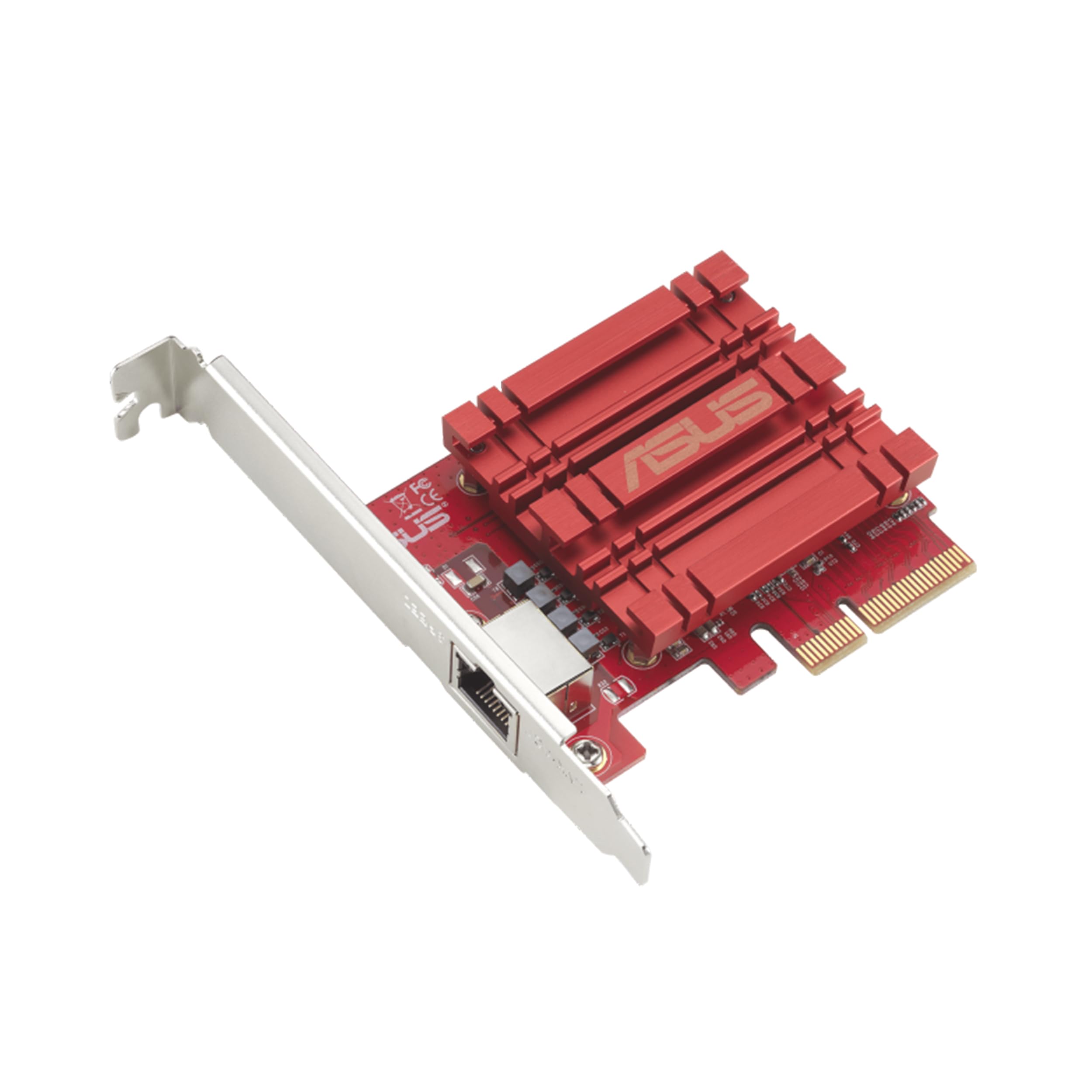
The ASUS XG-C100C brings the brand’s gaming aesthetic and software integration to the 10Gb networking space. It features a distinctive red and grey heatsink shroud that will appeal to users building a coordinated, high-end PC. More than just looks, it incorporates ASUS’s GameFirst QoS utility, which provides granular control over application bandwidth prioritization, a boon for gamers streaming or households with heavy concurrent network use.
Technically, it’s based on an Aquantia (now Marvell) controller, offering full multi-gig support. Installation in Windows is generally smooth, with ASUS providing its own driver package. Users praise its performance in Windows environments, where it can fully saturate high-speed internet connections and deliver fast local transfers. The build quality feels premium, and it’s TAA compliant, indicating a focus on durable components.
It’s worth noting that, like several Aquantia-based cards, it lacks Wake-on-LAN support—a consideration for remote management. Some users have also reported rare boot-time conflicts or driver issues, though these seem less common with modern Windows versions. This card is ideal for the ASUS loyalist or any PC builder who values brand synergy, gaming-focused software, and a polished visual design.
Why it’s great
- Premium build with a gaming aesthetic that matches high-end ASUS components.
- Useful GameFirst QoS software for network traffic prioritization.
- Strong performance and reliability in Windows-based systems.
- TAA compliance suggests good component sourcing and durability.
Good to know
- Does not support Wake-on-LAN (WOL) functionality.
- Occasional reports of boot conflicts or driver peculiarities on some systems.
- Primarily optimized for Windows; Linux support may require more configuration.
5. SABRENT 10 Gigabit Ethernet PCIe Adapter (NT-10PE)
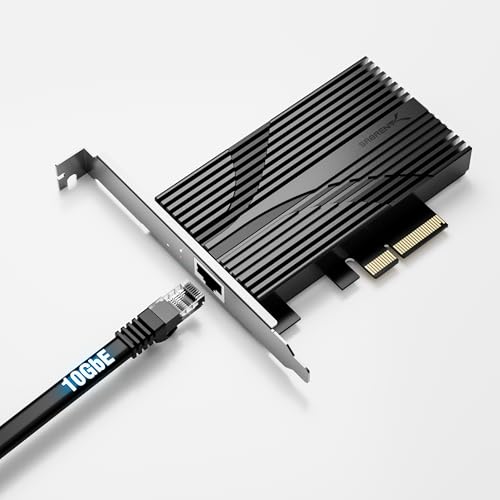
Sabrent enters the 10Gb arena with a well-built adapter focused on efficient, modern design. The card is built around the capable Marvell AQC113 chipset and features a substantial, finned aluminum heatsink that provides excellent passive cooling. Its use of a PCIe 3.0 x4 interface ensures ample bandwidth while maintaining compatibility with a wide range of slot sizes (x4, x8, x16).
This card shines in Windows environments, where it can deliver full multi-gig speeds after some driver tuning. Enthusiasts note that to achieve optimal, symmetrical performance, diving into the advanced driver settings in Windows Device Manager is beneficial—disabling features like Energy Efficient Ethernet and Interrupt Moderation can reduce latency and improve stability. For users comfortable with a bit of configuration, the payoff is excellent performance.
Linux users should be aware that support for the AQC113 requires a relatively recent kernel version. Those on older or Long-Term Support (LTS) distributions may need to manually update kernel modules to get the card working properly. It’s a powerful, compact option for tech-savvy users who appreciate Sabrent’s build quality and are willing to fine-tune their setup.
Why it’s great
- High-quality aluminum heatsink ensures cool and stable operation.
- Modern PCIe 3.0 x4 design offers good performance with slot flexibility.
- Full multi-gig support (10/5/2.5/1Gb) via the Marvell AQC113 chip.
- Compact form factor with a clean, professional look.
Good to know
- May require manual driver tweaks in Windows for best stability and speed.
- Linux support is excellent but dependent on a newer kernel (4.11+ recommended).
- As a newer product from Sabrent in this category, long-term track record is still being established.
6. YuanLey 10G Base-T Ethernet Card (Marvell AQC113)
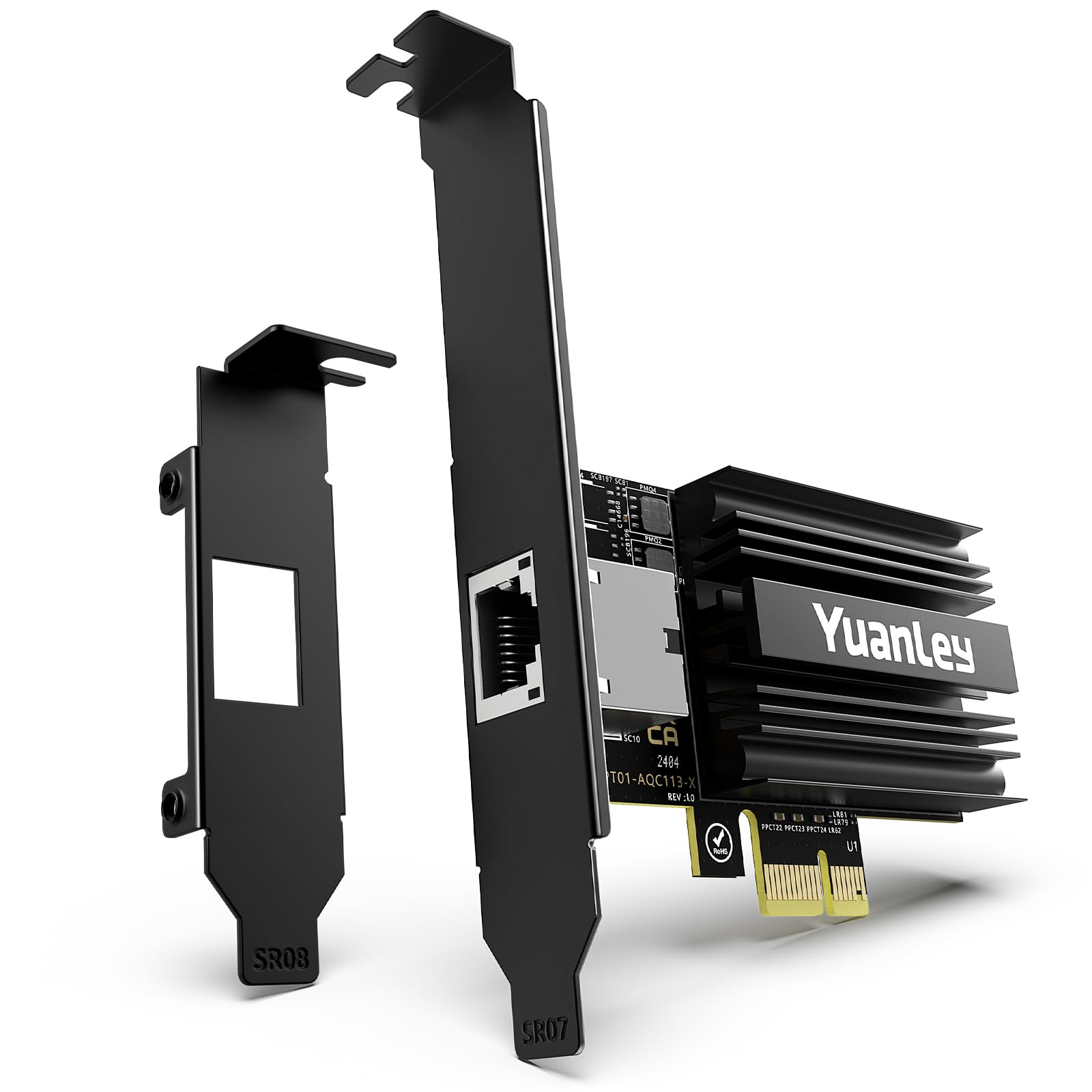
The YuanLey card solves a specific but common problem: achieving 10Gb speeds when you only have a tiny PCIe x1 slot available. Leveraging the efficiency of the Marvell AQC113 controller and the high bandwidth of PCIe 4.0, this card can deliver full 10Gb performance from a x1 connection—a feat that was impossible with older chipset designs. This makes it perfect for compact ITX motherboards or systems where all the x4/x8/x16 slots are occupied by GPUs or other expansion cards.
Users report impressive plug-and-play compatibility, with Windows 11 and many Linux distributions recognizing it immediately. It includes both full-height and low-profile brackets, further enhancing its versatility for small form factor builds. Performance is as advertised, capable of saturating a 10Gb link for file transfers and high-speed internet access, provided your PCIe slot is Gen 3 or Gen 4.
It’s a testament to modern chipset efficiency. Before purchasing, double-check that your available PCIe x1 slot is at least version 3.0, as the bandwidth of a PCIe 2.0 x1 slot would be a bottleneck. For anyone with limited expansion room but a need for speed, this card is a clever and effective solution.
Why it’s great
- Unlocks 10Gb networking from a single PCIe x1 slot, a unique space-saving advantage.
- Excellent plug-and-play experience on modern Windows and Linux systems.
- Full multi-gig support (10/5/2.5/1Gb) in a very compact package.
- Includes both standard and low-profile brackets for maximum compatibility.
Good to know
- Requires a PCIe 3.0 or 4.0 x1 slot for full 10Gb bandwidth; older PCIe 2.0 will limit speed.
- The small form factor means a smaller heatsink; ensure adequate case airflow.
7. NICGIGA 10G Base-T PCI-e4.0 X1 Network Card (2025)
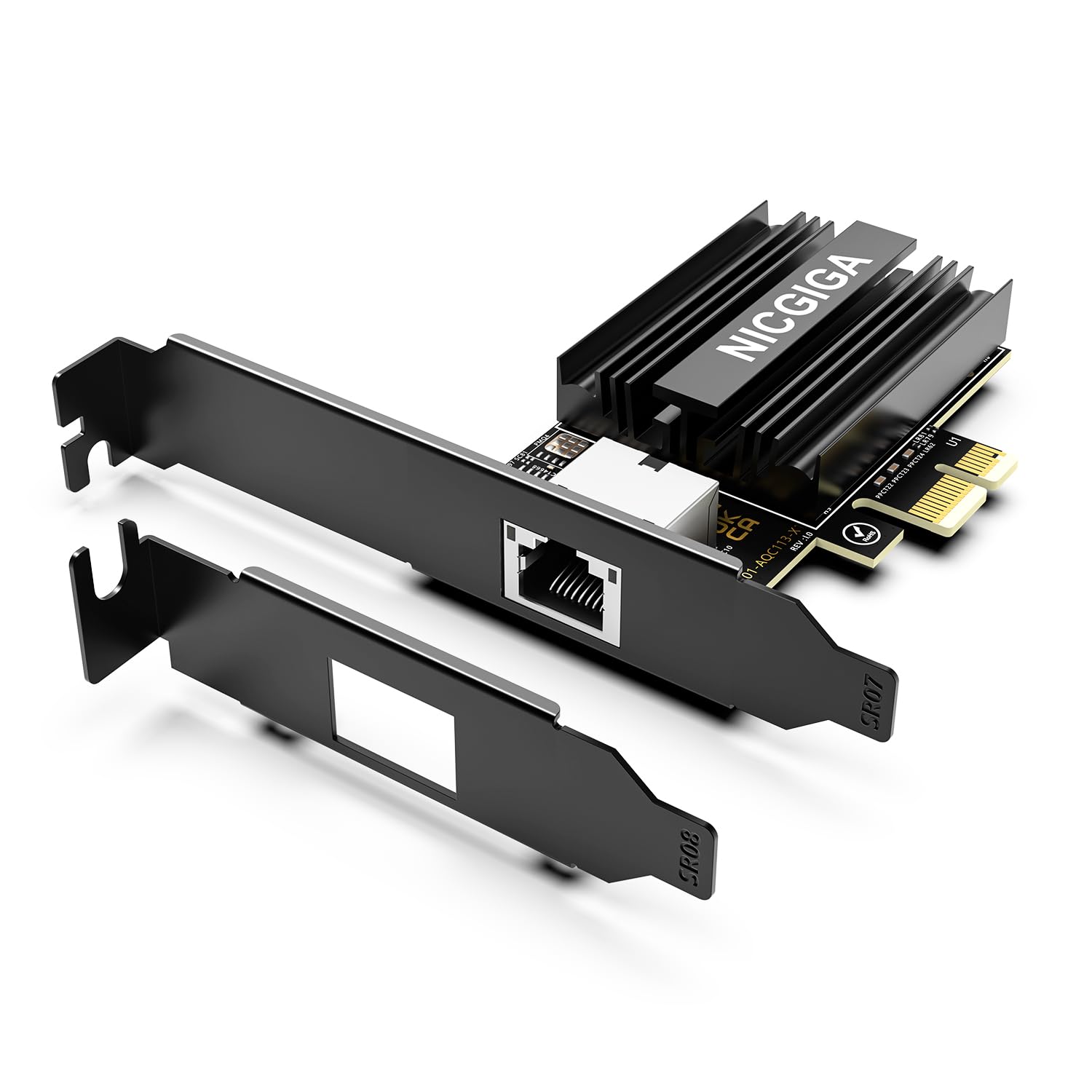
Marketed as a 2025 model, this NICGIGA card represents the current generation of efficient 10Gb adapters. It uses the same potent Marvell AQC113 controller as other leaders in this space but differentiates itself with a blacked-out PCB and an explicit mention of Wake-on-LAN (WOL) support—a feature sometimes missing on Aquantia/Marvell-based cards. This makes it a consideration for users who need remote management capabilities.
Like its counterparts, it achieves 10Gb over a PCIe x1 (Gen4) interface, offering tremendous installation flexibility. Early adopters note a smooth installation process on Windows 11, with drivers often installing automatically. The card maintains the now-standard inclusion of dual brackets, making it suitable for both standard and SFF builds. Its modern design is aimed at users who want the latest hardware iteration with a clean, aesthetic-friendly appearance.
As a newer product, its long-term reliability is still being proven in the field. However, the underlying AQC113 chipset has a solid reputation. This card is a strong option for builders putting together a new, sleek system who value features like WOL and prefer a more contemporary product listing.
Why it’s great
- Modern design based on the proven and efficient Marvell AQC113 chip.
- Explicit Wake-on-LAN support is a plus for remote access scenarios.
- Black PCB and clean look appeal to builders focused on aesthetics.
- PCIe x1 design maximizes compatibility with crowded motherboards.
Good to know
- Being a newer model, the long-term durability track record is less established.
- Performance and driver experience are very similar to other AQC113-based cards.
8. VIMIN 10Gb PCIe Network Card, Dual SFP+ (Intel 82599)

For environments where efficiency, low latency, or fiber optic connections are priorities, this VIMIN dual SFP+ card is a compelling choice. It’s built around the Intel 82599ES controller (the chip behind the Intel X520-DA2), an enterprise workhorse known for exceptional driver support and stability in server operating systems like Linux, VMware, and Windows Server. The dual SFP+ ports allow for direct device connections, link aggregation, or connection to an SFP+ switch.
SFP+ technology typically runs cooler and uses less power than 10GBASE-T (RJ45) ports, making it ideal for dense server deployments. It’s important to remember that this card requires separate SFP+ transceivers or DAC cables; it cannot accept a standard RJ45 Ethernet cable directly. This setup is common in data centers and advanced home labs, offering great flexibility in cable type (fiber or copper DAC) and distance.
Users report excellent compatibility with TrueNAS, Proxmox, and ESXi. As with many Intel-based server cards, driver management is straightforward due to the chip’s widespread adoption. This card is for the user who is building a professional-style lab, has an SFP+ switch, or wants the thermal and latency benefits of SFP+ connectivity.
Why it’s great
- Enterprise-grade Intel 82599 chipset ensures maximum compatibility and stability in server environments.
- Dual SFP+ ports offer high flexibility for direct connections or switch uplinks.
- Typically runs cooler and with lower latency than equivalent RJ45-based cards.
- Ideal for use with fiber optics for long-distance runs or DACs for short, efficient links.
Good to know
- Requires separate SFP+ transceivers or DAC cables, adding to the total cost.
- Does not support multi-gig speeds (2.5G/5G); only 10Gb and 1Gb via SFP+ modules.
- Primarily designed for server OSes; driver setup in standard Windows may require manual steps.
9. 10Gtek 10Gb PCI-E NIC, Single SFP+ Port (Intel 82599EN)

This single-port SFP+ card from 10Gtek is the more compact sibling to the dual-port model, perfect for workstations or servers where only one high-speed connection is needed. It utilizes the same reliable Intel 82599EN controller, guaranteeing that deep driver support and stability across operating systems. Its smaller footprint can be an advantage in tightly packed systems.
Users report seamless integration with Synology and QNAP NAS devices, as well as with hypervisors like VMware ESXi. As with all SFP+ cards, you’ll need to pair it with an appropriate transceiver or DAC cable. Performance is consistently at full 10Gb line rate, with low CPU overhead thanks to the Intel controller’s offload capabilities. It’s a straightforward, no-frills path to 10Gb networking for those committed to the SFP+ ecosystem.
Note that this card, following the Intel 82599 specification, does not support 2.5G or 5G speeds—it’s strictly 10Gb or 1Gb (if using a 1Gb SFP module). For users with a 10Gb SFP+ switch or a direct connection between two devices, this card offers proven reliability and performance at an entry-level point.
Why it’s great
- Single-port design is cost-effective and ideal for standard workstation or server connections.
- Intel 82599EN controller provides excellent driver support and low CPU utilization.
- Proven compatibility with major NAS brands and virtualization platforms.
- Compact form factor with included low-profile bracket.
Good to know
- Only one port, so no option for link aggregation or failover on the card itself.
- Lacks multi-gig support (2.5G/5G).
- Like all SFP+ cards, requires separate modules or DAC cables.
10. VIMIN 10G PCI-E Network Card, Dual RJ45 (Intel X540-T2)

VIMIN’s offering is another strong contender in the budget dual-port RJ45 category, mirroring the core specifications of the top-pick 10Gtek card with the Intel X540-T2 controller. It provides the same fundamental benefits: two 10Gb ports, wide OS compatibility, and the stability of the Intel chipset. This makes it a viable alternative, often found at a very competitive point.
Installation and performance notes are nearly identical to its counterpart. It includes both brackets and requires attention to driver installation on modern Windows systems. Users have successfully deployed it in Windows 11, TrueNAS, and Linux systems. Some feedback suggests paying close attention to the “Speed & Duplex” settings in Windows, manually setting it to 10 Gbps Full Duplex if auto-negotiation issues arise—a common tweak for many 10Gb cards.
As with all X540-based cards, remember it does not support 2.5G or 5G speeds. It’s a pure 10Gb/1Gb card. For the price, it delivers exceptional port density and reliable performance, making it a great choice for a file server or a workstation that needs to connect to multiple high-speed networks simultaneously.
Why it’s great
- Dual 10Gb RJ45 ports provide excellent connectivity options at a budget-friendly price.
- Intel X540-T2 controller ensures proven stability and driver availability.
- Includes both standard and low-profile brackets for flexible installation.
- Strong performance for file transfers and server applications.
Good to know
- No support for 2.5G or 5G multi-gig speeds.
- May require manual driver installation and configuration in Windows.
- Performance and reliability are very similar to other X540-T2 clones; brand choice may come down to minor price or warranty differences.
11. NICGIGA 10Gb Dual LAN Base-T PCI-e Network Card (Intel X540)

Completing the list is NICGIGA’s take on the dual-port Intel X540 design. This card serves as a basic, entry-level conduit to 10Gb networking, offering the same core technology as the others in this category. It’s a straightforward card focused on delivering two 10Gb RJ45 ports for users who need the connectivity but are working within a strict budget.
Feedback indicates it works as expected for many users, with plug-and-play operation in some Windows and Linux environments. However, some critical reviews point out potential reliability issues under sustained heavy load or over longer periods, which may be a consideration for 24/7 server use. As with any budget component, there can be variability in long-term durability.
It includes the necessary brackets and is backed by a one-year warranty. This card is best suited for non-critical applications, testing environments, or situations where upfront cost is the primary deciding factor and the absolute highest tier of reliability is less of a concern.
Why it’s great
- Most affordable entry point to dual-port 10Gb RJ45 connectivity.
- Uses the familiar and compatible Intel X540 controller.
- Includes both standard and low-profile brackets.
- Suitable for light to moderate duty cycles and testing setups.
Good to know
- Some user reports indicate potential long-term reliability concerns under heavy server loads.
- Lacks the extended warranty or brand reputation of more established options.
- Same 10Gb/1Gb-only limitation as other X540 cards.
Understanding the Specs
Controller Chipset
This is the card’s brain. Intel’s X540/X550 (RJ45) and X520/82599 (SFP+) are the gold standard for stability and driver support but lack native 2.5G/5G. Marvell’s AQC113 is the modern king of multi-gig RJ45, supporting all speeds (10/5/2.5/1Gb) and often using more efficient PCIe lanes. The chipset dictates your driver experience and long-term reliability.
PCIe Interface & Lanes
This determines which slot you can use and if you’ll have enough bandwidth. A PCIe 3.0 x1 slot provides ~8 Gbps of bandwidth, enough for a Marvell AQC113 card to run near 10Gb. Older Intel cards often require an x8 slot, which provides more bandwidth but limits placement. Always check your motherboard’s manual to see which slots are available and if they share bandwidth with M.2 drives.
FAQ
Do I need special cables for a 10Gb network card?
Why does my 10Gb card only connect at 1Gb speed?
Can I use a 10Gb network card for gaming?
What is the difference between SFP+ and RJ45 ports?
Final Thoughts: The Verdict
For most people, the best 10gb network card winner is the 10Gtek Dual RJ45 (X540) because it delivers proven server-grade stability, dual-port flexibility, and wide compatibility at a mid-range point. If you want full multi-gig support and effortless compatibility with modern 2.5G/5G switches, grab the TRENDnet TEG-10GECTX. And for maximizing a tiny PCIe x1 slot in a compact build, nothing beats the YuanLey AQC113 for its clever engineering and plug-and-play ease.

Mo Maruf
I created WellFizz to bridge the gap between vague wellness advice and actionable solutions. My mission is simple: to decode the research and give you practical tools you can actually use.
Beyond the data, I am a passionate traveler. I believe that stepping away from the screen to explore new environments is essential for mental clarity and physical vitality.