Our readers keep the lights on and my smoothie glass nicely filled. As an Amazon Associate, I earn from qualifying purchases.
Specs are compiled from manufacturer listings and verified buyer reviews and can change over time — please confirm the key details on the product page before buying.
If your wrists ache by lunchtime or your fingers tingle after a long shift, the shape of your keyboard and mouse is almost certainly the culprit. A flat keyboard forces your forearms to twist inward, while a flat mouse keeps your hand rotated at an unnatural angle. The right ergonomic setup repositions your hands into a neutral, relaxed posture — the picks below deliver that.
I’m Mohammad Maruf — the founder and writer behind WellFizz. This guide is built by comparing the manufacturers’ published specifications and the patterns across verified customer reviews, so you get each pick’s real strengths and trade-offs instead of marketing spin.
We’ve matched the best ergonomic keyboard and mouse sets to the people who actually need them, from split-key designs to vertical mice.
Our Picks at a Glance

How To Choose The Best Ergonomic Keyboard And Mouse
An ergonomic set is only worth it if it actually corrects your posture. The most important thing is that your hands, wrists, and forearms stay in a straight, natural line while you work — a wave-shaped keyframe or a split design both encourage this by keeping your hands from twisting inward.
The Keyboard Shape Matters Most
A flat, rectangular keyboard forces your forearms to angle inward toward your body. Ergonomic designs curve the keys in a wave or split them into two zones, so your hands rest at a more natural shoulder-width position. Look for a cushioned, soft palm rest at the base — it supports your palms and keeps your wrists from bending back against the desk edge.
Don’t Forget the Mouse
Your mouse is half the equation. A vertical mouse tilts your hand up to a handshake-like position, taking the pressure off your wrist and forearm. If the keyboard is sculpted but you still use a flat mouse, you’ll only fix half the problem. A comfortable mouse with a thumb rest and adjustable DPI settings makes a visible difference over a full day of clicking.
Quick Comparison
| Model | Best For | Connectivity | Keyboard Design | Battery | Amazon |
|---|---|---|---|---|---|
| Logitech Wave Keys & Lift★ Best Overall | The premium all-rounder with brand trust | Bluetooth + Logi Bolt USB | Wave keys, compact | 2x AAA + 1x AA | Amazon |
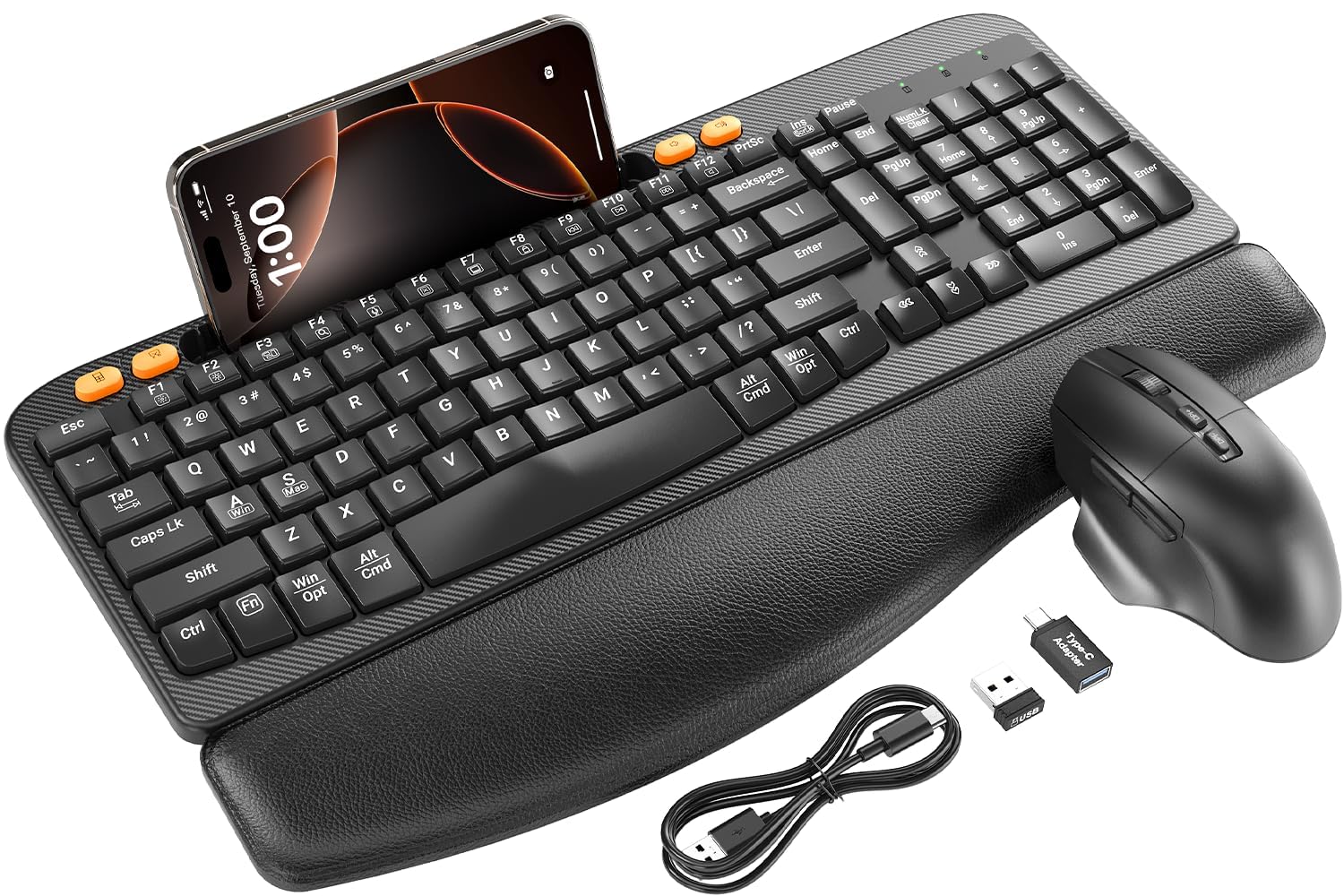
| SABLUTE MA22 PlusBest Value | Budget-friendly comfort with a phone holder | 2.4G USB Wireless | Wave keys, full-size | Type-C Rechargeable | Amazon |
| SABLUTE MA31 Purple | Leather palm rest and adjustable stands | 2.4G USB Wireless | Wave keys, full-size, 104 keys | 2 AA batteries | Amazon |
| SABLUTE MA31 Pro | Backlit keys with huge battery life | 2.4G USB Wireless | Wave keys, full-size | 4000mAh rechargeable | Amazon |
| X9 Performance Ergo | Split 2-zone design, connects 3 devices | Bluetooth + 2.4G | Split design, 100 keys | USB-C Rechargeable | Amazon |
| ProtoArc EKM01 Plus | Full-size split keyframe for writers | Bluetooth + 2.4G USB | Split full-size, 117 keys | 500mAh rechargeable | Amazon |
| Perixx PERIBOARD-612 | Mac & Windows dual-key flexibility | Bluetooth + 2.4G | Split-key, 104 keys | AA batteries | Amazon |
In-Depth Reviews
1. Logitech Wave Keys Keyboard & Lift Mouse Ergonomic Combo – Graphite
Our pick — over 4★ from 300+ verified ratings; the strongest balance of quality and price.
The crowd-pleasing pair that turns a cramped desk into a genuinely comfortable workspace.
The star here is the Lift vertical mouse, which tilts your hand to a 57° angle — that specific tilt takes the pressure off your wrist and promotes a more natural forearm posture. The Wave Keys keyboard pairs with it using the same wavy design that supports natural hand, wrist, and forearm alignment. A cushioned memory foam palm rest sits at the base, giving you all-day comfort and enhanced wrist support while you type.
You can switch between your PC and Mac without touching a cable: this combo pairs via Bluetooth Low Energy (a low-power wireless standard) or a Logi Bolt USB receiver (a small plug-in dongle), and one receiver handles both the keyboard and mouse. Buyers report it’s “so easy to switch devices” between setups. The plunger key switches (the mechanism under each key) deliver a tactile, discreet feel that owners describe as quiet but satisfyingly clicky — one wrote: “Expensive, but worth it!”
The honest trade-off is the compact size. At 1.7 pounds, it’s lighter than many full-size rivals, and that compact footprint delights some owners while leaving those with large hands feeling cramped. Reviews consistently call this the quality pick, and the ergonomic relief is well documented — several owners note the mouse helps with hand fatigue and that the curved keyboard keeps hands stationary during long work-from-home days. It meets ergonomic criteria set by leading ergonomists, a certification most rivals lack.
Why it wins
- 57° vertical mouse angle eases wrist strain
- Memory foam palm rest for all-day typing comfort
- One receiver connects both devices to PC and Mac
The fit check
- Compact size feels small for large hands
- Vertical mouse takes a few days to get used to
Reach for it if: you want a polished, er go-certified set with brand reliability and easy multi-device switching.
Look elsewhere if: you have large hands and prefer a full-width keyframe with a number pad’s generous footprint.
2. SABLUTE MA22 Plus Ergonomic Wireless Keyboard and Mouse Combo
A whisper-quiet, budget-friendly duo that slips into any home office while staying affordable.
Your wrists get a break here: the integrated sponge-filled leather wrist rest (a padded bar under the keys) is what owners mention noticeably reduces wrist strain — one owner called it “soft leather palm rest reduces wrist strain” in a rare review that nails the core benefit. The wave-arc keyframe (a curved, wavy key layout) fits the curve of your palm naturally, helping you maintain a neutral posture and reducing the risk of repetitive strain injury during long typing sessions.
Both the keyboard and mouse charge via Type-C in 2-3 hours, so you can ditch AA batteries entirely. A built-in 7.28-inch phone holder along the top lets you multitask while you type without looking away from your screen. The mouse uses Silent Switch technology with a rubber scroll wheel, cutting click noise by 90% for a quieter workday. — the quiet operation and soft keys are the most-repeated praise across owner reviews.
Connectivity is dead simple: one 2.4G USB receiver handles both devices, and it works with Windows and Mac laptops and PCs. Buyers describe it as plug-and-play with no drivers needed, and it replaced an older Logitech setup in more than one home office. The trade-off is that it’s a membrane keyboard, not a mechanical one, so the feel is soft and cushioned rather than crisp and clicky. For comfort and price together, though, the value is tough to match.
What owners love
- Leather wrist rest relieves strain during long shifts
- 90% quieter clicks for a focused workspace
- Type-C charging means no battery swaps
Keep in mind
- Membrane keys feel soft, not mechanical
- Requires Windows 11 minimum for full compatibility
Perfect for: home-office workers on a budget who want quiet keys, a cushioned rest, and a handy phone dock.
Not for: typists who crave a loud, tactile mechanical click with every keystroke.
3. SABLUTE MA31 Ergonomic Wireless Keyboard and Mouse Combo (Purple)
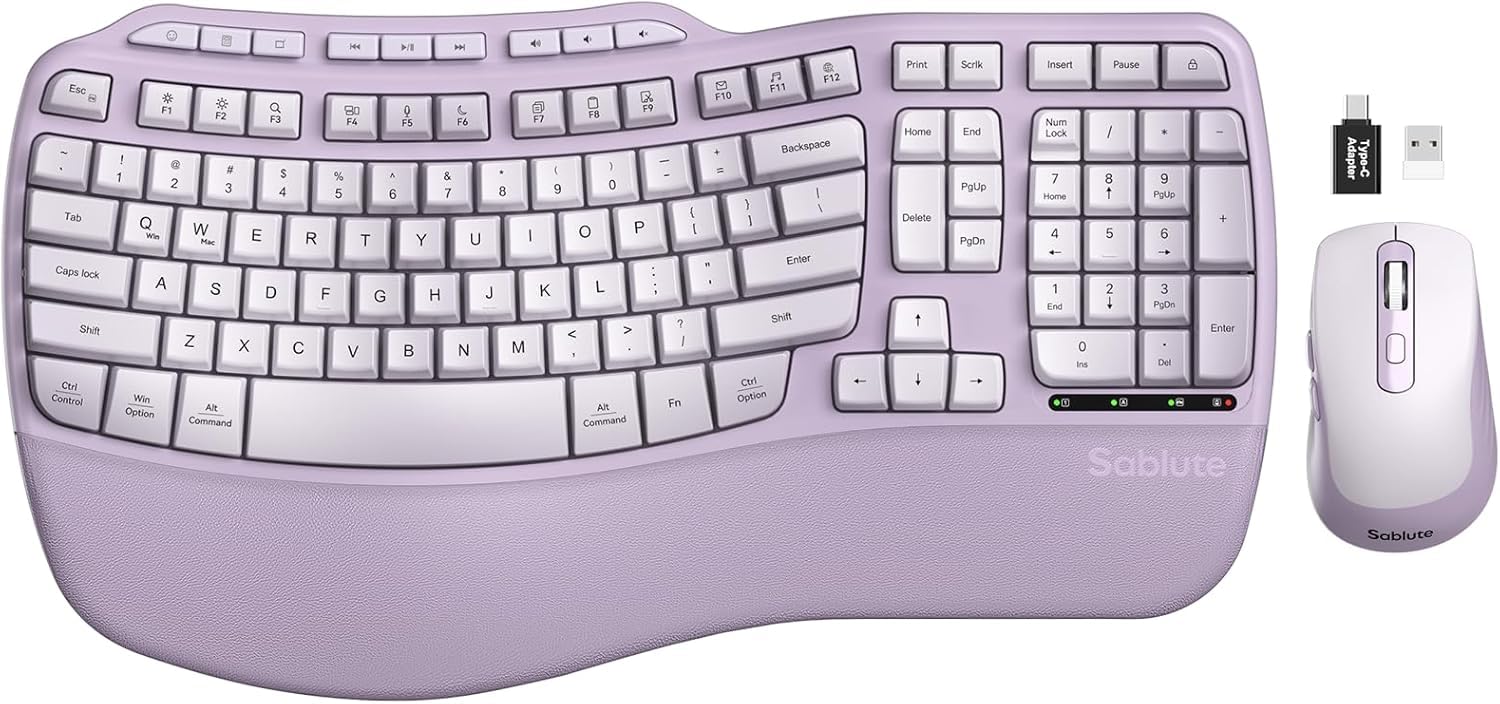
The sporty-looking set that cradles your fingertips and adds a pop of color to the desk.
The headline feature is the memory foam leather palm rest, which owners describe with words like “luxurious” and “silkier than other cushion wrist rests” — it’s sweat-proof and easy to clean, unlike fabric alternatives. The wave-shaped keys cradle your fingertips for soft, responsive typing, and the marketing claims 15% fewer errors, which tracks with the overall feel of precision you get from the key layout.
What sets this one apart is the dual adjustable stands: you can use the front or back stand to find the ideal wrist angle whether you’re seated at a desk or standing at a workstation. Both stand positions are engineered to reduce wrist strain during a full workday. The included SilenceTouch mouse adds 6 buttons with 3 adjustable DPI levels (800/1200/1600) and 9 shortcut keys, so you can speed up apps, volume, and browsing without lifting your fingers.
At 2.7 pounds, it’s noticeably heavier than the Logitech’s 1.7 pounds — that weight (59% more) gives it a solid, stable presence on the desk but makes it less portable. Owners consistently compliment the padded wrist rest and easy setup, noting it’s compact enough for a home office and smooth for productivity. The recurring caveat is Mac compatibility: the orange copy/cut/paste keys don’t function on macOS and the Command/Option keys are reversed, so Windows users will get the most out of this one.
The highlights
- Memory foam leather rest is sweat-proof and plush
- Front and back stands for seated or standing desks
- 9 shortcut keys boost workflow speed
Watch out
- Mac shortcut keys don’t work as labeled
- Heavier than compact rivals at 2.7 pounds
Grab this if: you’re on Windows, want a plush leather rest, and like the idea of adjustable typing stands.
Think twice if: you’re a MacBook user — the copy/paste keys and Command layout are reversed.
4. SABLUTE MA31 Pro Rechargeable Backlit Ergonomic Keyboard and Mouse Combo

The backlit workhorse that keeps typing for weeks and lights up your whole desk.
The 4000mAh battery is the standout spec here — roughly double the capacity of standard backlit keyboards, and with intelligent auto-sleep it lasts weeks on a single charge. Customers note the rechargeable setup is a huge quality-of-life upgrade over swapping batteries, and the keyboard takes about 5 hours to charge while the mouse needs around 3. The battery life is consistently praised, with reviews noting it simply keeps going between charges.
The backlighting is the second-biggest crowd-pleaser: choose soft tones like blue, cyan, and white for calm productivity, or bold colors like red, green, purple, and yellow to match your mood — a different color for every day of the week. The mouse adds its own RGB (red-green-blue, customizable color lighting) flair with 6 fixed colors or 5 cycle modes, plus 3 DPI levels (800/1200/1600) for precision control — so you can slow the cursor for fine edits or speed it up for big screens. The faux lambskin leather palm rest feels silky and premium against the wrist, and the matte finish resists fingerprints.
Connectivity is universal: one 2.4GHz USB receiver reaches 33 feet and pairs both devices, with USB-A and USB-C options that work with 99% of devices including PCs, laptops, tablets, and Macs. Reviews highlight the quiet, tactile feedback — one owner typed at 55WPM comfortably — and note it’s a worthy replacement for an aging Logitech K350. The ergonomics get mixed feedback from some owners who find the wave shape takes adjustment, but the build quality and smooth operation win over the vast majority.
The bright spots
- 4000mAh battery lasts weeks per charge
- Choose from 7 backlight colors and RGB mouse modes
- Faux lambskin rest feels soft and premium
The trade-offs
- Wave keyframe takes time to adapt to
- Mouse can feel slippery in the hand for some
Best suited for: night owls and low-light workers who want glowing keys and hate hunting for batteries.
skip it if: you prefer a plain, unlit keyboard and don’t need the extra charge capacity.
5. X9 Performance Ergo Split Keyboard and Mouse Wireless Combo

A true split-key design that lets each hand sit at its own natural angle.
The split “2-zone” design is the real differentiator here — the keys are divided into two sections so your hands can rest at a shoulder-width, neutral position instead of being forced inward. Four kickstands let you adjust the typing angle to suit your posture, whether you’re at a desk or on the couch. Owners with arthritis report the natural hand position relieves joint pain, and the integrated wrist cushion earns consistent praise for making long typing sessions more comfortable.
You can jump from your laptop to your phone to your tablet with one button press: this setup connects to 2 Bluetooth channels plus 1 for 2.4GHz radio (a wireless band for peripherals), letting you pair and switch between 3 devices. Both the keyboard and mouse charge via USB-C (the modern oval charging port), and the battery genuinely lasts a month or two between charges based on owner reports. The scissor-switch keys (a low-profile mechanism) deliver short, responsive presses with zero missed characters, and the mouse adds 6 buttons with 4 DPI modes for adjustable speed.
The learning curve is real — a split layout takes a few days to feel natural, and some owners note the keys are slightly loud compared to quieter membrane boards. But the consensus is strong: the ergonomic relief is worth the adjustment, with multiple owners calling it a fantastic alternative to far pricier options. It comes backed by up to 2 years of warranty and accessible customer support. The one persistent complaint involves connection drops for a minority of users, so if you switch between computers constantly, test it early.
Standout strengths
- Split 2-zone keyframe keeps hands at natural width
- Switch between 3 devices via Bluetooth and 2.4G
- USB-C rechargeable battery lasts 1-2 months
Fair warnings
- Split layout takes days to learn
- Occasional Bluetooth connection drops reported
Choose this for: multi-device households and anyone with arthritis who needs true hand separation while typing.
Consider alternatives if: you want a drop-in keyboard with zero adjustment period.
6. ProtoArc EKM01 Plus Wireless Ergonomic Keyboard Mouse Combo – Blue
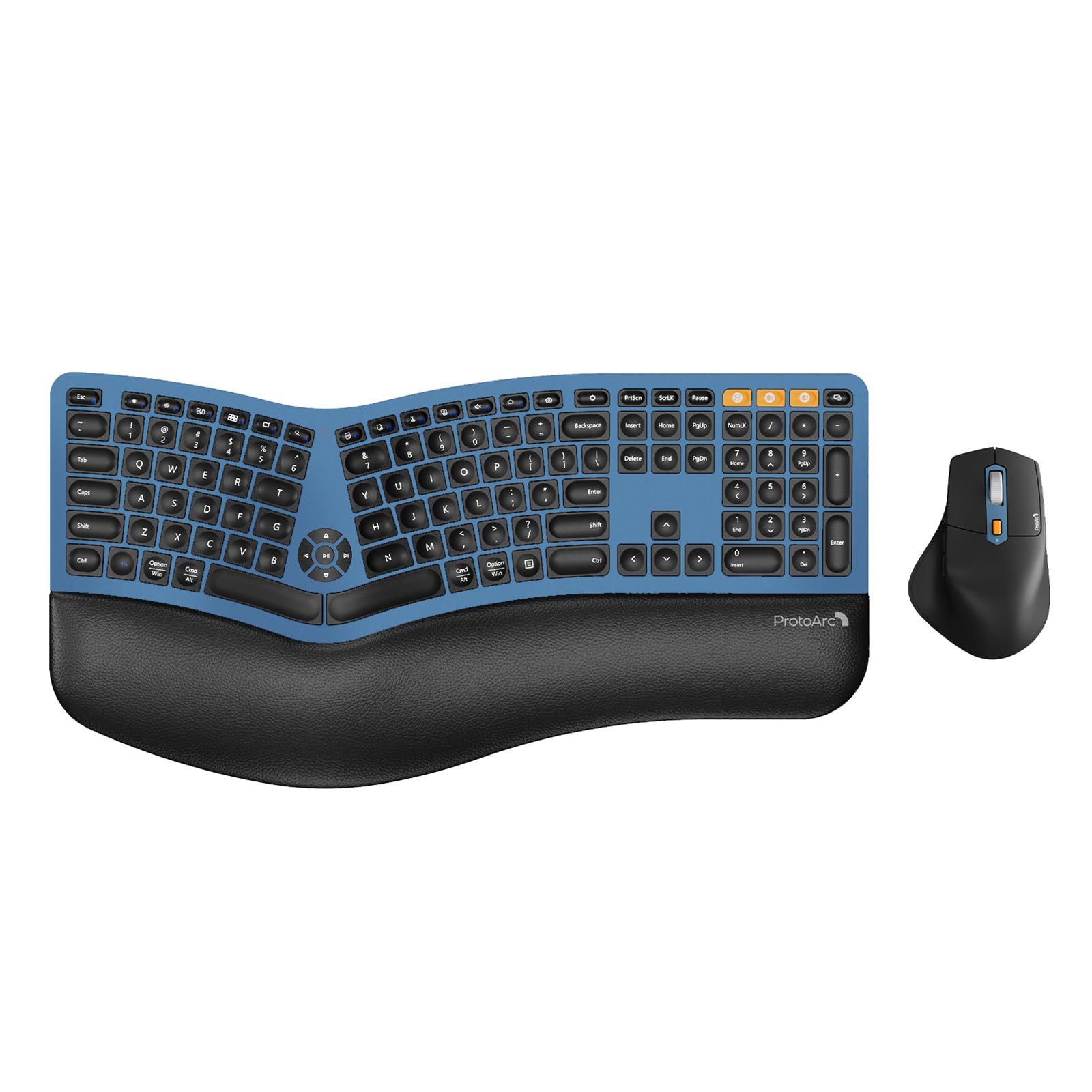
A full-size sculpted deck built for writers and coders who live at the keyboard.
If you crunch numbers all day, this is the one to get: with 117 keys including a full number pad, it’s the most complete keyframe in the lineup — the curved, split design positions your wrist and forearm in a more natural, relaxed posture, while the scooped keys match the shape of your fingertips for quick response on every keystroke. The cushioned memory foam wrist rest curves to support your palms and reduces wrist bending compared to standard flat keyboards. It’s the pick for anyone who needs the number pad and refuses to give up full-size layout.
The sculpted mouse earns its own praise: it has a palm and thumb rest that keeps your hand in a natural position, cutting down on wrist strain, with 2000 DPI (dots per inch, a sensitivity measure) for precise control and forward/backward buttons for easier web browsing. Both devices pack a 500mAh lithium battery (a rechargeable cell), rechargeable via the included Type-C cable, with auto-sleep after 30 minutes of no operation to save power. Switching is smooth — connect via USB receiver or Bluetooth and flip between up to 3 devices with a single button press.
Owners consistently call it comfortable, quiet, and easy to set up with a Mac — the thin keyboard, quiet scissor keys, and solid battery life come up again and again in reviews. One described it as “split, sculpted, and surprisingly satisfying” and noted it instantly reduced wrist strain during work-from-home days. The honest caveat is the footprint: at 20.75 inches long and 11 inches wide, it demands real desk space, so measure before you buy. A few owners note the battery drains in about 3 days with heavy backlight use, though others report much longer life.
Why it stands out
- Full 117-key layout with number pad for data entry
- 2000 DPI mouse with palm and thumb rest
- Switch between 3 devices in half a second
Before you buy
- 20.75-inch width needs a large desk
- Battery life varies, some report 3 days per charge
Ideal for: programmers, writers, and number-crunchers who need the full keyframe and switch between multiple computers.
pass on it if: your desk is cramped — this one needs room to stretch.
7. Perixx Ergonomic Bundle PERIBOARD-612 Keyboard with PERIMICE-713 Vertical Mouse

The budget bundle that covers Mac and Windows with a swap of four keys.
The headline feature here is true dual-OS flexibility: the keyboard ships with 4 extra switchable keys for Mac or Windows layouts plus a key puller, so you can remap the bottom row to match whichever machine you’re on. The split-key design includes an integrated palm rest that supports wrists and reduces forearm tension during long typing sessions.
The PERIMICE-713 vertical mouse takes the handshake-position approach, offering a wireless 2.4GHz connection with up to 10 meters of operation range. A nano USB receiver tucks into a compartment at the bottom of the mouse so it’s never lost. The keyboard itself connects via Bluetooth or a 2.4GHz radio, with the nano receiver stored safely in a compartment under the keys. Owners describe it as a set that “connects with no issues to both Mac and Windows computers and easy to switch between modes.”
The trade-offs are honest ones: Bluetooth pairing takes a moment when waking the devices, which some owners find “a little annoying at times,” and the vertical mouse feels less sensitive than pricier alternatives. The key layout also differs subtly from conventional keyboards, so there’s a short adaptation curve. That said, the consensus is overwhelmingly positive — multiple owners call it the best ergonomic set they’ve owned and note their wrists feel much better after switching, with some keeping a set at home and another at work. It comes with a 12-month limited warranty.
What works
- 4 extra Mac keys with puller for true dual-OS use
- Vertical mouse relieves wrist pressure
- Nano receivers store inside devices, no lost dongles
What to expect
- Bluetooth takes a moment to reconnect on wake
- Key layout differs slightly from standard boards
Reach for this if: you split your week between a Mac at work and a Windows PC at home and want one set for both.
Look elsewhere if: instant Bluetooth wake-up and hair-trigger mouse sensitivity are must-haves.
Understanding the Specs
Keyboard Shape: Wave vs. Split
A wave-key keyboard curves the keys in a gentle arc so your hands follow a natural inward angle without twisting your forearms. A split-key design divides the board into two sections, letting each hand rest at shoulder-width. Both reduce strain; the split is more aggressive and takes longer to learn, while the wave is easier to adapt to quickly.
The Vertical Mouse Angle
A vertical mouse tilts your hand up into a handshake position, typically around 57°, which takes the pressure off the underside of your wrist and promotes a more natural forearm posture. It feels strange for the first few days, but owners consistently report less fatigue after a full shift. If your keyboard is ergonomic but your mouse is flat, you’re only fixing half the problem.
FAQ
Will an ergonomic keyboard and mouse fit my laptop or desktop?
How long does the battery last on a typical wireless set?
What is the difference between a wave keyboard and a split keyboard?
How long does it take to get used to an ergonomic keyboard?
Are ergonomic keyboards and mice good for carpal tunnel syndrome?
Can I switch between my work laptop and personal PC with one set?
Is a vertical mouse better than a regular mouse?
Do ergonomic keyboards work with Mac computers?
How many keys do I need on an ergonomic keyboard?
Final Thoughts: The Verdict
For most buyers, the ergonomic keyboard and mouse winner is the Logitech Wave Keys & Lift because it combines er go-certified design, the 57° vertical mouse, and easy multi-device switching in one polished package. If you want backlit keys and weeks of battery life, grab the SABLUTE MA31 Pro. And for a full-size split keyframe with a number pad, the ProtoArc EKM01 Plus is the one to reach for.
How We Picked
We do not accept paid placement. Every pick is matched to a real buyer and a real use-case; we do not hands-on test units.
Sources & Methodology
Specifications: manufacturer listings and product documentation. Review insights: verified customer reviews, as of August 2026. Pricing: not shown on this page (it changes often); check the current price via the retailer link.
As an Amazon Associate, WellFizz earns from qualifying purchases. This does not affect which products we feature.
Related Guides

Mo Maruf
I created WellFizz to bridge the gap between vague wellness advice and actionable solutions. My mission is simple: to decode the research and give you practical tools you can actually use.
Beyond the data, I am a passionate traveler. I believe that stepping away from the screen to explore new environments is essential for mental clarity and physical vitality.