Our readers keep the lights on and my smoothie glass nicely filled. As an Amazon Associate, I earn from qualifying purchases.
Specs are compiled from manufacturer listings and verified buyer reviews and can change over time — please confirm the key details on the product page before buying.
Choosing PC fans is really two decisions in one: how much air you need to move and how much noise you can tolerate. The fans on this list range from 40 cfm (cubic feet per minute — the standard measure of airflow) for entry-level builds to 72.2 cfm for high-pressure radiator setups. This guide breaks down what those numbers mean in real gaming and workstation scenarios, so you can pick the right airflow for your case without overpaying in cash or decibels.
I’m Mohammad Maruf — the founder and writer behind WellFizz. This guide is built by comparing the manufacturers’ published specifications and the patterns across verified customer reviews, so you get each pick’s real strengths and trade-offs instead of marketing spin.
Whether you are chasing silence, RGB lighting, or raw radiator performance, the best fans for pc balance airflow, noise, and bearing quality to match your exact case layout and cooling needs.
Our Picks at a Glance


How To Choose The Best Fans For PC
Before you buy a handful of fans, you need to understand the two main jobs they do inside your case. Intake fans pull cool air in from the front or bottom, while exhaust fans push hot air out the back or top. Your fan choice depends on which job each one will perform.
Airflow vs. Static Pressure
Think of airflow (measured in cfm) as how much air a fan can move in open space. Think of static pressure as how well a fan can push air through resistance, like a radiator or a dense heatsink. Radiators need fans with higher static pressure; case intakes and exhausts can get away with pure airflow fans.
PWM Control and Noise
A 4-pin PWM connector lets your motherboard automatically adjust fan speed based on temperature. This means the fan spins slowly when your PC is idle and speeds up during gaming. Look for a wide RPM range (revolutions per minute) so you have fine control over the balance between cooling and noise.
Bearing Type and Lifespan
The bearing is the part that lets the fan spin, and it determines both noise and longevity. Rifle bearings and fluid dynamic bearings are known for longer life (an 80,000-hour rated lifespan is excellent), while cheaper sleeve bearings tend to wear out faster. Hydraulic bearings are a solid mid-ground for budget builds.
Quick Comparison
| Model | Best For | Airflow (CFM) | Max Speed (RPM) | Noise (dB) | Amazon |
|---|---|---|---|---|---|
| be quiet! Pure Wings 3 140mm★ Best Overall | Quiet high-pressure radiators | 72.2 cfm | 1800 rpm | 30.5 db | Amazon |
| NZXT F120 RGB CorePremium Pick | NZXT CAM ecosystem builds | — | — | 33.88 db | Amazon |
| Prism6 MAX 120mm ARGBStyle Pick | Bright RGB with reverse airflow | 58.35 cfm | 1850 rpm | 29 db | Amazon |
| ARCTIC P14 Slim PWM PST | Tight SFF cases & push/pull | 52 cfm | 1800 rpm | 0.3 sones | Amazon |
| be quiet! Pure Wings 3 120mm | Silent 120mm builds | 59.6 cfm | 2100 rpm | 30.9 db | Amazon |
| DARKROCK Black F120 3in1 | Budget RGB aesthetics | 46.7 cfm | 1600 rpm | 27.7 db | Amazon |
| DS RGB Fans 6-Pack | Budget full-case fill | 40 cfm | 1200 rpm | 23 db | Amazon |
| Thermalright TL-C12CW-S 5-Pack | Best-value white ARGB setups | 66.17 cfm | 1550 rpm | 25.6 db | Amazon |
In‑Depth Reviews
1. be quiet! Pure Wings 3 140mm Quiet PWM High-Speed Case Fan
Our pick — over 4.5★ from 400+ verified ratings; the strongest balance of quality and price.
The 140mm heavyweight that shoves 72.2 cfm through a radiator while whispering at 30.5 db.
That extra throughput matters most on radiators, where the frame is specifically designed to boost pressure against the fins. At just 220 g it is roughly twice the weight of the ARCTIC P14 Slim at 109 g, giving it a denser, more solid feel during installation.
Sound is the other headline feature. The 30.5 db rating keeps it quiet enough for a bedroom rig, per owner reports. The 1800 rpm maximum speed sounds low against the 120mm version’s 2100 rpm, but the larger 140mm blades move more air per revolution, which is why it can stay slower and quieter while pushing that massive 72.2 cfm. Its rifle bearing is rated for 80,000 hours, so it can run non-stop for about nine years.
Installation is genuinely plug-and-play, as buyers put it: “It’s a fan. It works. It is quiet-ish for a 140mm fan.” The bright white frame and plain blades mean no RGB fuss, just clean airflow. The recurring praise centers on the noise level, with dozens of owners singleing out how silent it runs at low RPM — one even noted it spins at 1500rpm without any tweaking needed.
Where It Shines
- Highest airflow on this list at 72.2 cfm for radiator-heavy setups.
- 80,000-hour rifle bearing lifespan for long-term reliability.
- 140mm size delivers quiet air at lower speeds.
Keep In Mind
- No RGB lighting on the frame or blades.
- Heavier 220 g build might be overkill for simple case intakes.
Reach for it: anyone running a radiator or a demanding case that needs max airflow with minimal whine.
Look elsewhere: if you want lighting effects — this is pure function, no flash.
2. NZXT F120 RGB Core 120mm
The ecosystem entry point that ties your whole build together through NZXT CAM software.
You get a smooth, even glow from the 8 individually-addressable RGB LEDs (each light can be set to its own color) mounted on the hub and diffused through semi-translucent blades, avoiding the spotted look of blade-edge LEDs. The fluid dynamic bearing is rated for 60,000 hours, outlasting a typical GPU generation. At 174 g with a sturdy metal frame, it feels premium in hand compared to cheaper plastic fans.
This is the fan to buy if you are already inside the NZXT ecosystem. The CAM software lets you control fan curves and sync lighting with other NZXT products, and buyers report it pairs perfectly with the NZXT controller. The 33.88 db noise level is a touch higher than the quieter picks on this list, but the anti-vibration rubber corners keep that hum from transmitting into your case panels. One trade-off to note: the near-identical 120mm DARKROCK and be quiet! options cost less, but they cannot match the software integration if you are building a full NZXT rig.
Owners running an NZXT Flow 7 case with a 4080 Super praise how cool it keeps high-end hardware while staying “extremely quiet”. The RGB is bright enough to light a room, and the fan draws little power. The honest caveat is the proprietary RGB plug — you will want an NZXT hub before adding more than one of these.
The Pull
- Hub-mounted 8-LED RGB gives clean, even lighting.
- 60,000-hour fluid dynamic bearing for long life.
- Full CAM software sync for NZXT builds.
The Catch
- Proprietary RGB plug requires an NZXT hub for expansion.
- Higher 33.88 db rating than several cheaper fans here.
Best for: builders committed to the NZXT ecosystem who want unified RGB control.
Think twice if: you are mixing brands — the proprietary connector will frustrate you.
3. Prism6 MAX 120mm ARGB 3-Pack
A reverse-airflow RGB triple-pack that pushes 58.35 cfm with light so bright it looks premium.
The headline here is the 3-sided infinite mirror design with 28+8 LED beads, creating continuous lighting that owners call “super bright” and “beautiful”. The 9-blade design pushes 58.35 cfm with 2.07mmH2O static pressure, which makes it genuinely capable on radiators, not just a pretty face. What makes this pack special is the reverse airflow variant — the blades are tune to act as exhaust while still showing the pretty side toward the glass panel, a trick most budget fans cannot pull off.
The 55 cm of cable on the be quiet!’s 120mm cousin is a different story; here the Prism6’s daisy-chain clips keep the build clean without a separate hub. Variable speed spans 800-1850 rpm with PWM, so you can drop it to near-silent at idle and ramp up under load. The hydraulic bearing keeps noise to ≤29 dBA, though budget buyers should know these bearings are more sensitive to dust buildup over time — owners suggest checking them during cleaning.
At 140 g per fan and 4.72-inch frame, these are standard 120mm dimensions that fit most cases. Owners mention the RGB integrates with any motherboard sync software, and some note the colors are slightly less accurate than Lian Li’s pricier options but easily tuned. The noise level sits at a comfortable 29 db, which is quieter than both be quiet! picks on this list while moving a respectable amount of air.
Why Buy It
- Reverse airflow keeps the pretty side visible on exhaust mounts.
- High 58.35 cfm with 2.07mmH2O pressure for radiators.
- Infinite mirror RGB with bright 28+8 LED beads.
Consider This
- LED #1 lights 3 seeds in parallel, limiting per-LED control.
- Hydraulic bearings can fail early if the build gets dusty.
Choose it: if you want the glass-side look of reverse airflow without paying Lian Li prices.
Pass it up: if you need granular per-LED RGB effects — the wiring caps that.
4. Thermalright TL-C12CW-S 5-Pack White ARGB

The value king: five white ARGB fans with 66.17 cfm airflow for less than a single premium fan.
This 5-pack is the math problem that wins most budget builds. You get five 120mm fans rated at 66.17 cfm each — higher airflow than the DARKROCK’s 46.7 cfm — plus white S-FDB (fluid dynamic) bearings for quiet, stable rotation. The 1550 rpm cap is lower than the be quiet! 120mm’s 2100 rpm, but the higher cfm per revolution means the Thermalright moves comparable air with less noise, rated at just 25.6 db.
The S-FDB bearing is the quiet star here, solving the common blade-shake problem in lifting mode and extending lifespan. One owner keeps a 7800x3d below 75°C under load with a 120mm radiator setup. The ARGB lighting uses high-brightness atomizing blades that soften the LED glow for a more diffused look, supporting up to 17 light modes synced through your motherboard’s 5V 3-pin header.
Even the cables are generous — up to 55 cm lets you daisy-chain PWM and ARGB across all five fans without a separate hub, working with SignalRGB and most sync software. The 100 g weight per fan makes them featherlight during install. Buyers consistently call this the best value ARGB fan on the market, noting the occasional dead-on-arrival unit but praising overall reliability better than pricier brands.
The Win
- Five fans for one premium price point equals unbeatable value.
- 66.17 cfm airflow exceeds most single-fan rivals.
- Quiet 25.6 db with quality S-FDB bearings.
The Trade-off
- 1550 rpm cap is lower than high-speed 120mm rivals.
- Rare dead-on-arrival units reported in the batch.
Why it wins: the price-to-performance ratio simply cannot be beaten for a full white ARGB case.
Skip if: you need maximum 2000+ rpm speeds for dense radiators.
5. ARCTIC P14 Slim PWM PST 140mm
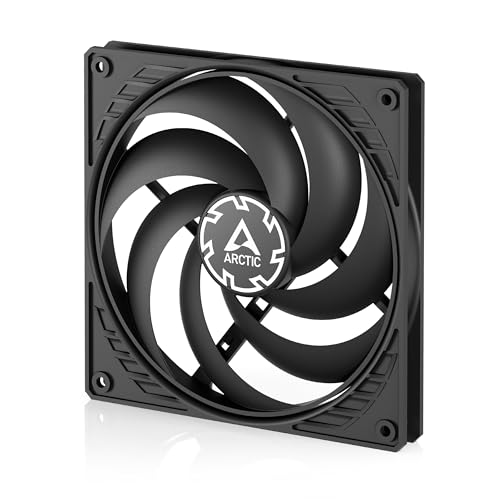
The 16mm-thin 140mm that squeezes into small form factor cases where 25mm fans will not fit.
This is the specialist for SFF (small form factor) builds. At just 16 mm of installation height — versus the standard 25 mm thickness — it slides into tight spaces and push/pull radiator configs where a regular fan physically will not mount.
The pressure-tune design (1.31 mmH₂O static pressure) makes it a solid choice on heatsinks and radiators despite the modest airflow number. PWM PST (a daisy-chaining feature) lets you run the 120-1800 rpm range off a single motherboard header, and the noise level of just 0.3 sones is inaudible in most rooms. Owners running push/pull radiator configs say the slim profile added exactly what they needed without the bulk.
The recurring praise centers on how quiet it runs even under load, with strong airflow out of such a thin frame. The durable polycarbonate build has generally held up — customers note “they didn’t break like others have reported,” even when handled roughly. The honest downside is that some owners had to add rubber washers to stop blade wobble at low speeds when mounted blade-side to the case.
Who It Serves
- 16mm height fits SFF cases and tight push/pull stacks.
- Featherlight 109 g for easy mounting.
- Pressure-tune 1.31 mmH₂O for heatsinks.
Who It Does Not
- 52 cfm is the lowest airflow among 140mm picks here.
- Occasional blade wobble needs rubber washer fixes.
For: SFF builders and push/pull radiator modders who need thin, quiet fans.
Not for: max airflow on a standard case mount — grab the be quiet! 140mm instead.
6. DARKROCK Black F120 3in1 ARGB

A 3-pack with infinite mirror looks and 46.7 cfm flow that makes budget builds feel flagship.
DARKROCK built this 3-pack around the infinite mirror design — a visual trick with layered reflections that makes the center and sides look endlessly deep. The 24 LED lights on the blades and frame put on a show for a fraction of what similar aesthetics cost from bigger brands. At 46.7 cfm per fan, it is not the airflow king here — the Prism6’s 58.35 cfm beats it — but it does push enough air for most mid-tower builds while staying whisper-quiet at 27.7 db.
The 800-1600 rpm PWM range (±10%) gives you solid control, and the hydraulic bearing plus eight pre-installed rubber pads keeps vibration and noise down. Owners have installed six of these in a single case in about four hours, praising excellent airflow and clean cable management through daisy-chaining. Each fan measures a standard 120mm frame, so it slots into most chassis, AIOs, and CPU coolers without adapters.
Where this pack truly wins is value — three fans with this lighting quality for the price of one premium RGB fan. The design matches well with CPU coolers and RAM kits that use mirror aesthetics. One honest note from owners: the RGB colors can be slightly inaccurate, with red rendering as pink through some motherboard software like Corsair iCUE, so it is not the pick for color-perfect builds.
What Impresses
- Infinite mirror design looks far more expensive than it is.
- Pre-installed rubber pads kill vibration noise.
- Daisy-chainable 3-pack simplifies installation.
The Shortfall
- 46.7 cfm is lower than several 120mm rivals here.
- RGB color accuracy varies across sync software.
Buy it: for a budget build where aesthetics matter more than raw airflow.
Skip it: if you need exact color matching — the reds can drift pink.
7. DS RGB Fans 120mm 6-Pack

Six fans for the price of one premium unit, delivering 40 cfm each with old-school static RGB glow.
If you just need to fill every mount in a full-tower case without emptying your wallet, this 6-pack does the job. Each 120mm fan pushes 40 cfm — modest by modern standards, but perfectly adequate for a mid-range or budget rig. At 23 db, the noise level is actually the lowest on this entire list, making it a strong pick for silent builds on a tight budget.
The trade-off for that low price is the lighting. These are static RGB fans — the rainbow is fixed and cannot be changed, dimmed, or turned off. Owners describe the glow as “old school LED,” with a soft light from the hub and transparent edges. The 1200 rpm maximum speed is also the lowest on this list, so these are not the choice for overclocking towers or dense radiators, but they move plenty of air for everyday gaming.
The build quality is the honest weak point. While the 4-pin Molex connector works with most power supplies and the rubber grommets dampen vibration well, a handful of reviewers point out units that developed noise or stopped spinning after a couple of months. The 6-pack value equation still works for most buyers, but reliability is the roulette wheel you are spinning at this price.
What You Get
- Six fans for a fraction of single-fan premium costs.
- Lowest noise here at 23 db for quiet operation.
- Rubber grommets reduce case vibration.
What You Risk
- Static RGB is fixed — no color change or off switch.
- Occasional units fail or get noisy within a few months.
Best for: budget builds needing maximum fan coverage per dollar.
Heads up: skip these if you need controllable RGB or plan to run them 24/7 on hot hardware.
8. be quiet! Pure Wings 3 120mm PWM High-Speed

The 120mm speed demon that hits 2100 rpm yet stays quiet enough to forget it is spinning.
Here is the high-speed sibling in the Pure Wings family, and it trades the 140mm’s sheer volume for raw RPM. The 2100 rpm top speed is 17% higher than the 140mm version’s 1800 rpm, which pushes 59.6 cfm through the same rifle-bearing design. At 30.9 db, it is just 1% louder than the 140mm version, so extra speed costs little in sound.
Owners call it “near-silent even under load,” and one builder saw a 10°C temperature drop after swapping it in. The 7 airflow-tune blades and the closed-loop motor design let it run at very low minimum RPM for whisper-quiet idle, then ramp up only when your components demand it. As a heatsink replacement for a Hyper212X or as a case exhaust, it performs admirably, and shoppers say reliability stretching back years with the rifle bearing.
The 180 g weight and 4.72-inch frame are standard for a 120mm, and the 4-pin PWM cable suits most routing. Buyers report they “work great” even after four-plus years of use. The one thing you miss is lighting — this is a pure function fan, so skip it if your build needs RGB flair.
Why It Earns Its Spot
- 2100 rpm high-speed with a near-silent 30.9 db rating.
- 59.6 cfm airflow with 7 tune blades.
- 80,000-hour rifle bearing for long-term builds.
Fair Warning
- Loudest noise rating on this list at full 2100 rpm.
- No RGB or lighting options available.
Pick it: for heatsinks and exhaust positions where high RPM matters more than silence.
Pass on it: if you want RGB effects or the larger 140mm airflow volume above.
Understanding the Specs
Airflow (CFM)
CFM stands for cubic feet per minute, and it measures how much air a fan moves at maximum speed. Higher numbers mean more cooling potential, but the number only tells part of the story. A fan with 60 cfm on a radiator may underperform a 45 cfm fan because static pressure matters when pushing through dense fins. Match the fan’s strength to where you plan to mount it.
Static Pressure
Static pressure, measured in mmH₂O, tells you how well a fan pushes air against resistance. Radiators and thick heatsinks create resistance, so they need fans with higher static pressure to force air through the fins. Case intakes with open mesh do not need as much pressure — pure airflow fans work better there. The ARCTIC P14 Slim’s 1.31 mmH₂O is a good example of a pressure-focused design.
PWM Control
PWM stands for pulse-width modulation, a 4-pin connection method that lets your motherboard adjust fan speed continuously based on temperature sensors. This is the smart way to run fans: slow and silent at idle, fast when the CPU or GPU heats up under load. Look for a wide RPM range, like 120-1800 rpm, for the best control. Fans without PWM typically run at fixed speeds, which means constant noise.
Noise Level (dBA & Sones)
Noise is measured in two common units: dBA (decibels A-weighted) and sones. Both scale with perceived loudness — lower numbers are quieter. A fan rated at 23 db is barely audible in a quiet room, while 33 db is noticeable but not distracting. Remember that noise ratings are measured at specific speeds, so a high-RPM fan can be quiet at 800 rpm and noisy at 2100 rpm. The real test is how the fan sounds at your typical operating speed.
Bearing Types
The bearing determines how smoothly and quietly the fan spins, and how long it lasts. Rifle bearings (80,000 hours rated) and fluid dynamic bearings (60,000 hours) are the premium options, offering low noise and long life. Hydraulic bearings are a solid budget middle-ground, while cheaper sleeve bearings tend to degrade faster and grow noisy. The bearing is the single biggest factor in long-term fan reliability.
Fan Size and RPM
Bigger fans move more air at lower speeds, which is why 140mm fans like the be quiet! Pure Wings 3 can push 72.2 cfm at just 1800 rpm while staying quiet. Smaller 120mm fans need higher RPM to match that airflow, which usually means more noise. Check your case’s mount points before buying — a 140mm fan will not fit in a 120mm slot. RPM is only useful as a comparison within the same size class.
FAQ
How many case fans do I actually need?
What is the difference between airflow fans and static pressure fans?
Will a 140mm fan fit in a 120mm mount?
What does PWM actually do for my fans?
How long should a PC fan last?
Can I mix different fan brands and sizes in one case?
Do more fans always mean better cooling?
Can I use an RGB fan without a motherboard ARGB header?
Final Thoughts: The Verdict
Across the board, the best fans for pc overall is the be quiet! Pure Wings 3 140mm because its 72.2 cfm airflow (cubic feet per minute, or how much air it moves) with 30.5 db noise (decibels, or how loud it is) is the strongest balance of power and silence on this list, backed by an 80,000-hour bearing. If you want the best-value full-case coverage, grab the Thermalright 5-Pack for five quiet fans with high airflow. And if you are building inside the NZXT ecosystem, the NZXT F120 RGB Core is the one to reach for its smooth CAM software integration (NZXT’s control app for tuning fan speeds and lighting).
How We Picked
We do not accept paid placement. Every pick is matched to a real buyer and a real use-case; we do not hands-on test units.
Sources & Methodology
Specifications: manufacturer listings and product documentation. Review insights: verified customer reviews, as of August 2026. Pricing: not shown on this page (it changes often); check the current price via the retailer link.
As an Amazon Associate, WellFizz earns from qualifying purchases. This does not affect which products we feature.
Related Guides

Mo Maruf
I created WellFizz to bridge the gap between vague wellness advice and actionable solutions. My mission is simple: to decode the research and give you practical tools you can actually use.
Beyond the data, I am a passionate traveler. I believe that stepping away from the screen to explore new environments is essential for mental clarity and physical vitality.