Our readers keep the lights on and my smoothie glass nicely filled. As an Amazon Associate, I earn from qualifying purchases.
Specs are compiled from manufacturer listings and verified buyer reviews and can change over time — please confirm the key details on the product page before buying.
Putting together a streaming setup means juggling microphones, cameras, lights, and capture gear — and it is easy to spend money on the wrong piece. The best gear works together as one simple system, not a pile of random boxes. This guide sorts through the gear that matters for a clean, professional stream, starting with the mic owners swear by.
I’m Mohammad Maruf — the founder and writer behind WellFizz. This guide is built by comparing the manufacturers’ published specifications and the patterns across verified customer reviews, so you get each pick’s real strengths and trade-offs instead of marketing spin.
Whether you are a total beginner or a seasoned broadcaster, finding the right equipment for streaming means matching each tool to your room, your computer, and your goals — and we break down exactly what fits where.
Our Picks at a Glance


How To Choose The Best Equipment For Streaming
Streaming gear falls into a few clear jobs: capturing your voice, capturing your face or screen, lighting the shot, and controlling the whole show. Most beginners start with a USB microphone and a webcam, then add a light and a control deck as the setup grows. Buy tools that will still fit your workflow a year from now.
Start With Sound, Not Video
Viewers forgive average video, but they click away from bad audio in seconds. A USB condenser microphone like the HyperX QuadCast gives you crisp, clear voice reproduction the moment you plug it in — no mixer or interface required. If you want the broadcast-style look and are comfortable with a steeper learning curve, an XLR dynamic mic through a mixer gives you more control over every level.
Match the Mic to Your Room
A condenser mic is sensitive — it will catch your keyboard clicks and your neighbor’s lawnmower if you are not careful. That is where polar patterns come in. Cardioid mode picks up sound mostly from the front, so it ignores your desk and your room. If you regularly host a co-host or a guest on camera, omnidirectional mode captures sound from every direction, making it the better fit for multi-person streams.
Think About the Whole Chain
Your microphone is only one link. A dedicated webcam with a real sensor beats a laptop’s built-in camera for sharpness, and a key light with a high CRI rating keeps your skin tones looking natural. If you use a DSLR or mirrorless camera, a capture card like the Elgato Cam Link 4K carries the video signal into your computer. And a Stream Deck puts scene switching, mute toggles, and lighting control at your fingertips.
Quick Comparison
| Model | Best For | Type | Key Spec | Connectivity | Amazon |
|---|---|---|---|---|---|
| HyperX QuadCast★ Best Overall | Plug-and-play broadcast voice | USB Condenser Mic | Four polar patterns | USB | Amazon |
| FIFINE KS5 BundleBest Value | Beginner XLR/USB hybrid setups | Mic + Audio Mixer | XLR + USB dynamic mic | XLR / USB | Amazon |
| Elgato Cam Link 4KTop Performer | Turning a DSLR into a webcam | Capture Card | 1080p60 or 4K60 | HDMI to USB 3.0 | Amazon |
| Logitech Blue Yeti | Versatile studio-quality recording | USB Condenser Mic | Three-capsule array | USB | Amazon |
| HyperX QuadCast 2 Frost | Clean looks with onboard controls | USB Condenser Mic | 24-bit/96kHz audio | USB Type-A | Amazon |
| NEEWER GL1 Pro | Soft, flattering key lighting | LED Streaming Light | 4300 lux at 0.5m | 2.4G / WiFi / Bluetooth | Amazon |
| Elgato Stream Deck MK.2 | One-touch scene and app control | Macro Key Controller | 15 customizable LCD keys | USB-C | Amazon |
| Insta360 Link 2C | Smart AI-tracking webcam video | 4K Webcam + Tripod | 1/2″ sensor, HDR | USB-C | Amazon |
| Osee GoStream Deck | Multi-camera pro production | Video Mixer / Switcher | 4 HDMI inputs, 2 outputs | HDMI / USB-C / Ethernet | Amazon |
In-Depth Reviews
1. HyperX QuadCast USB Condenser Gaming Microphone
Our pick — over 4.5★ from 35,500+ verified ratings; the strongest balance of quality and price.
A plug-and-play USB mic that delivers broadcast-quality voice, trusted by over 35,000 owners.
If you want one microphone that goes from box to stream in under a minute, this is the one. The QuadCast is a USB condenser mic, meaning it carries its own analog-to-digital conversion and connects straight to your PC, PS5, PS4, or Mac with a single cable — no audio interface or mixer needed. The moment you plug it in, you get crisp, clear voice reproduction that owners describe as a big upgrade from any headset mic.
The defining feature here is the four selectable polar patterns — stereo, omnidirectional, cardioid, and bidirectional — which let you change how the mic hears the room. Switch to cardioid for solo streaming to block out your keyboard, or use omnidirectional when a guest joins. The built-in anti-vibration shock mount uses elastic rope suspension to isolate the mic from desk bumps, and the tap-to-mute sensor lights an LED so you always know if you are live. A gain control dial at the base sets your sensitivity, and the internal pop filter blocks harsh plosive sounds.
You get the usual trade-offs of a premium USB mic: it costs more than a basic model, and the red LED lighting — which many owners love for the eye-catching look — is a single color you cannot change. The metal build survives daily use, with owners reporting it still works after being thrown. It is certified for Discord and TeamSpeak, and works natively with Streamlabs OBS, OBS Studio, and XSplit.
What wins people over
- Plug-and-play setup with zero performance issues reported
- Four polar patterns adapt to solo, duo, or full-room capture
- Anti-vibration shock mount kills desk rumble before it hits the stream
What to know first
- Red LED is fixed — you cannot adjust or turn it off
- Premium price; XLR setups can cost less if you already own a mixer
Grab it for: a reliable, great-sounding USB mic that works on any device with zero learning curve.
Think twice if: you need RGB lighting to match a colorful setup, or you want XLR-level control.
2. FIFINE Gaming Equipment Bundle KS5
A complete XLR microphone and mixer kit that hands beginners a studio-style setup without the studio price.
This is the rare bundle that gives you a dynamic XLR microphone and a dedicated streaming audio mixer in one box — everything a growing gamer needs to upgrade from a headset. The dynamic mic is the same type used in radio broadcasting, so it naturally rejects background noise and keeps your voice upfront and clear. Owners call the sound quality excellent and a massive step up for a first dedicated setup.
The mixer is where this kit shines. You get individual mute control per channel, headphone monitoring to hear yourself in real time, and a volume fader for each input and output. It runs on 4 channels, giving you room to add a second mic or a music source later. Five kinds of RGB lighting effects on the mixer and the mic let you match your desktop theme, and the whole thing works as a portable studio when paired with a laptop.
There is one honest catch: the mixer has a known quirk where it can randomly shut off or reboot, causing a brief loss of sound. It does not affect every unit, but it is worth knowing before you buy. Also note the included function keys for RGB, mute, and monitoring only work over the USB connection, not the XLR path. Overall, the build is plastic at this price point, yet owners repeatedly call it great value for the money and, as one put it, “the perfect” first setup for a beginner.
Why it’s a steal
- Complete kit: dynamic mic, mixer, stands, and all cables included
- Dynamic XLR mic rejects background noise better than a condenser
- 4-channel mixer with faders, mute, and headphone monitoring
The honest limits
- Occasional reports of the mixer rebooting mid-stream
- RGB and mute controls only function over USB, not XLR
Perfect for: a first-time streamer or podcaster who wants a real XLR workflow on a budget.
skip it if: you need rock-solid reliability for daily professional broadcasts.
3. Elgato Cam Link 4K Capture Card
The tiny stick that turns your DSLR or camcorder into a razor-sharp streaming webcam.
If you already own a nice camera, this capture card is the cheapest way to make it your streaming camera. The Cam Link 4K takes an HDMI video signal from a DSLR, mirrorless camera, camcorder, or action cam and feeds it into your computer over USB 3.0. Stream and record in 1080p60 or even 4K60, giving you far better image quality than any built-in webcam can produce. Functionality is what owners praise most, with the device working reliably across Canon, Sony, Nikon, and Fuji cameras.
Setup is genuinely plug-and-play — no software required to get a picture. Buyers report smooth connections with cameras like the Sony ZV-E10, and solid, consistent image quality for both streaming and work-from-home calls. You can even use your iPad as a pro field monitor over USB-C to preview your shot in real time. At just 20.14 grams, it slips into a pocket and adds almost nothing to your bag.
The honest trade-off is that the “ultra-low latency” claim has limits — a few owners notice slight delay, and some sources can stutter until you tweak settings in the Elgato Capture utility. It also runs warm if left idle, so unplug it when you are done. You will need a separate HDMI cable, and for cameras with a USB-C output, the card can feel redundant. But for a real camera workflow, the image quality beats cheaper capture cards by a clear margin.
What it delivers
- Real 4K capture with sharp, clean output that beats budget cards
- Ultra-low latency keeps video and audio in sync for live streams
- Works with DSLR, mirrorless, camcorder, action cam, or iPhone
What to expect
- Noticeable latency for fast-paced gaming — it’s built for cameras
- Runs warm when idle; needs a separate HDMI cable
Choose this if: you own a DSLR or mirrorless camera and want it to be your streaming camera today.
Look elsewhere if: you only need low-latency console gameplay capture.
4. Logitech Creators Blue Yeti USB Microphone

The legendary three-capsule USB mic that has powered podcasts, streams, and studios for years.
The Blue Yeti is a household name in streaming for one reason: it delivers studio-quality sound over a single USB cable, with none of the complexity of XLR gear. At its heart is a custom three-capsule array that produces clear, powerful, broadcast-quality voice for YouTube videos, Twitch streams, podcasting, Zoom meetings, and music recording. A solid metal enclosure gives it a heavy-duty, professional feel that anchors your desk.
You get four pickup patterns — cardioid, omni, bidirectional, and stereo — that let one mic do the work of several. Cardioid is the go-to for solo streaming, while bidirectional captures two people face-to-face and stereo suits instruments. The Blue VO!CE software adds broadcast-style effects, advanced modulation, and HD audio samples to keep your audience entertained. Onboard controls put headphone volume, pattern selection, instant mute, and mic gain right at your fingertips, and the no-latency monitoring lets you hear yourself with zero delay.
Owners consistently describe it as crisp and easy to set up, with one noting it “works beautifully” for conference calls. The catch is that this is a sensitive condenser mic — it picks up room noise and plosives, so a pop filter and a quiet room are worth adding. It is not portable, and a separate review notes it is not studio-grade for professional music work, but for voice it holds its own. With over 56,000 ratings, it is the most battle-tested mic here.
Its strengths
- Three-capsule array delivers rich, broadcast-quality voice
- Four pickup patterns replace multiple dedicated mics
- Built-in headphone jack with no-latency live monitoring
Its limits
- Sensitive to room noise — a pop filter is strongly recommended
- Not portable; best left on a desk or boom arm
Best for: podcasters and streamers who want proven, studio-quality voice with flexible pickup patterns.
Not for: untreated noisy rooms where a dynamic mic would be easier to manage.
5. HyperX QuadCast 2 Frost

The second-gen HyperX that adds onboard controls and a pearly white Frost finish to a proven formula.
HyperX took everything people loved about the original QuadCast and added real onboard controls. The QuadCast 2 Frost delivers clear 24-bit/96kHz audio through its USB Type-A connection, and the frosted pearly-white finish gives it a clean, upscale look that stands apart from the black-and-red standard. Owners describe the setup as the easiest ever — plug in one cord and you have professional sound straight from the start.
What sets this apart from the original is the control layout. You get an onboard knob for gain adjustment, tap-to-mute with a clear LED status indicator so you always know your live state, and controls for your polar patterns right on the body. The removable shock mount reduces accidental bumps and rumbles from reaching the mic, and the aluminum enclosure gives it a sturdy “tank” build that handles daily use. It mounts cleanly to a boom arm if you want it off your desk.
The main difference from the pricier QuadCast 2 S is the lighting: this Frost model has a fixed white light that you can adjust for pulse and dimming, but you cannot change its color. It is USB-only, so there is no XLR option for future expansion. Owners call the microphone quality the standout feature, and note it is “overkill” for Discord but perfect for streaming and podcasting. At 335 grams, it is light enough to feel at home on a compact desk setup.
What stands out
- Onboard gain knob, tap-to-mute, and polar pattern controls
- Removable shock mount and sturdy aluminum build
- Fixed white frost lighting with adjustable pulse and dimming
Trade-offs
- Frost white light cannot change color like RGB models
- USB-only connection — no XLR path for future gear
Reach for this if: you want a clean, modern-looking mic with easy onboard controls and no software fuss.
Look past it if: you need RGB color matching or plan to move to an XLR interface later.
6. NEEWER 15.5″ LED Streaming Key Light GL1 Pro
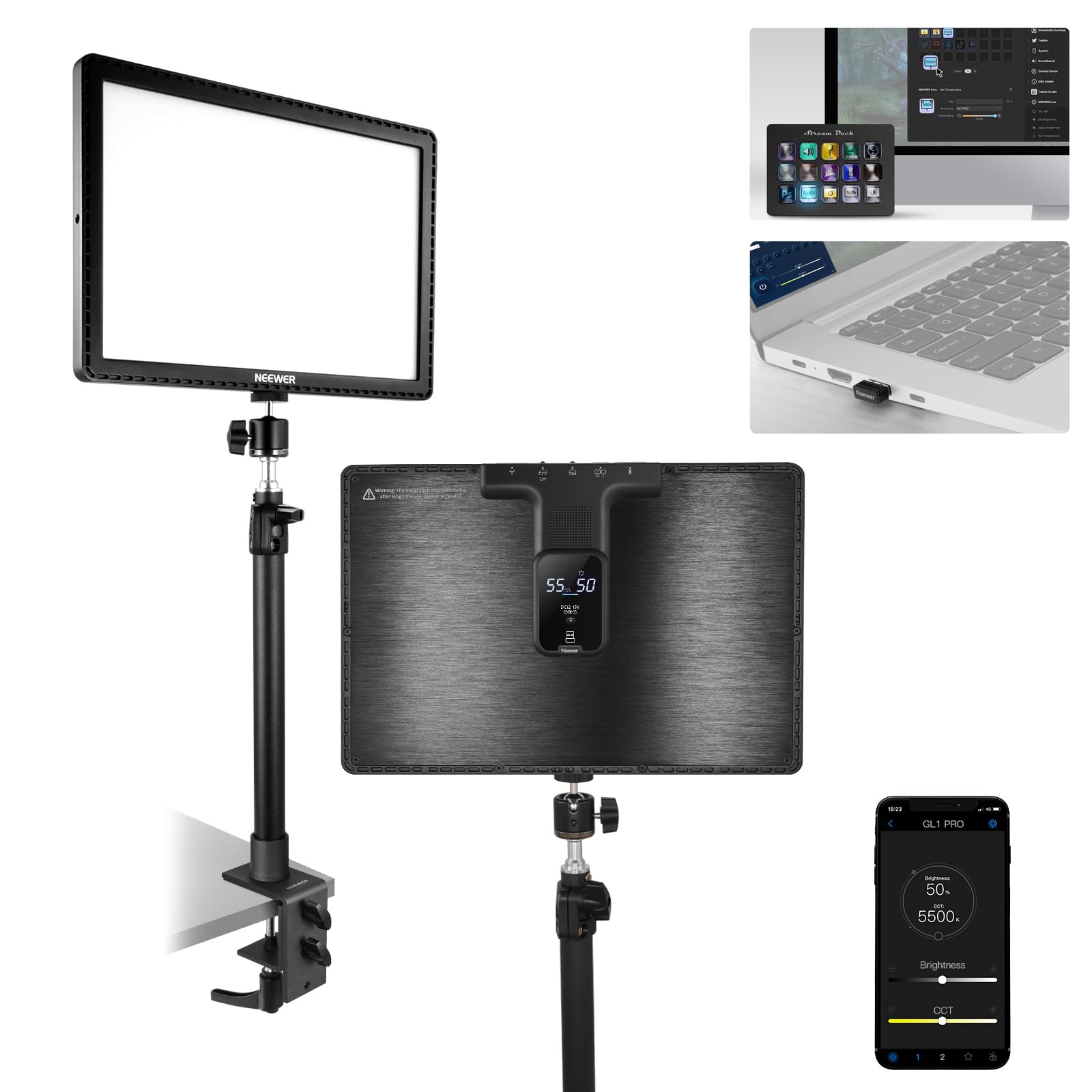
The bright, soft-edged panel that makes your face camera-ready without turning your room into a sauna.
Great lighting makes an average webcam look professional, and this NEEWER panel does it beautifully. The GL1 Pro uses edge-lit technology that turns a point light source into soft, diffused light, which owners say smooths skin tones and flatters the face. Brightness is the thing everyone raves about — it pushes up to 4300 lux at 0.5m, which is genuinely a lot of light for a desktop panel, and the color temperature adjusts from a warm 2900K to a cool daylight 7000K so you can match your room’s vibe.
Color accuracy is where this light earns its premium label. With a color rendering index of CRI97+ and TLCI98+, it reproduces colors faithfully, so your skin and your green screen both look true-to-life. The silent fanless design means it does not add a hum to your recordings — the aluminum casing handles heat dissipation on its own. The desktop clamp fits desks from 0.4″ to 3″ thick and adjusts in height from 13.8″ to 23.6″, so it works as a key light or an overhead fill.
Control comes three ways: a 2.4G USB transmitter for your PC or Mac, WiFi connection, or Bluetooth through the NEEWER app. It is even compatible with the Elgato Stream Deck, letting you adjust brightness and color temperature without breaking your stream flow. Owners note the desktop app can be finicky on some Windows systems, but the phone app works perfectly for on/off and settings. The metal build feels premium, though the panel runs a bit smaller than the 15.5″ name suggests to some eyes.
Why it flatters
- 4300 lux of brightness with soft, shadow-free diffusion
- CRI97+ and TLCI98+ color accuracy for true-to-life tones
- Silent fanless design that never interferes with recording
Small gripes
- Desktop app has glitches on some Windows 10 machines
- Some owners feel the panel runs small versus the listed name
Grab it for: flattering, color-accurate key light that works with your Stream Deck or phone.
Expect less if: you need a large softbox-style panel or rely only on the desktop Windows app.
7. Elgato Stream Deck MK.2 Studio Controller

Fifteen tiny LCD screens that put every scene switch, mute toggle, and light control one tap away.
If you have ever fumbled for a hotkey mid-stream, this is the cure. The Stream Deck MK.2 gives you 15 customizable LCD keys that trigger actions in OBS, Twitch, YouTube, Discord, Spotify, and hundreds of other apps. Each key shows its own icon with visual feedback, so you instantly know your command executed. Owners describe it as the desk accessory they cannot stream without, with one calling it “one of those things you don’t realize you need until you have it.”
Setup is genuinely simple: plug in the USB-C cable, download the software, and start dragging actions onto keys. The keys support submenus, so a single button can open a folder of nine more actions. Beyond streaming, it streamlines film editing, music production, and photography workflows with hotkey actions. The gummy, responsive keys are quiet and satisfying to press, and the adjustable brightness and customizable screensaver let you match your setup’s vibe.
What owners praise most is the build quality and sheer customizability — the plugin marketplace connects it to the Elgato 4KCU, Philips Hue lights, and countless other tools. The main limitation is that there is no dedicated quick-mute button from the start, so it may not fully replace a standalone mute device. It is a plastic enclosure, but it feels solid and premium in daily use. At 15 keys and 3″ tall, it fits cleanly beside a keyboard without eating desk space.
What it masters
- 15 customizable LCD keys with instant visual feedback
- Hundreds of plugins for streaming, lighting, and productivity apps
- Submenu support turns one key into many actions
Small caveats
- No dedicated quick-mute function from the start
- Plastic build, though it feels premium in hand
Pick this up if: you want every streaming action — scenes, mutes, lights, sounds — under your thumb.
Hold off if: you only stream occasionally and are comfortable with hotkeys.
8. Insta360 Link 2C 4K Webcam Tripod Bundle

A 4K webcam with a real sensor and AI tracking that follows you around the room, tripod included.
If you want webcam video that looks like it came from a real camera, this is the smartest pick. The Insta360 Link 2C packs a 1/2″ sensor — far larger than the tiny sensors in typical webcams — to deliver true-to-life 4K visuals with HDR and strong low-light performance. A maximum aperture of f/1.8 lets in plenty of light, and the Phase Detection Auto Focus (PDAF) locks onto your face quickly so you stay sharp even when you lean in to read something.
The intelligence here is the real selling point. Auto Framing automatically zooms and adjusts to keep you in the center of the frame, whether you are alone or presenting to a group. Gesture control lets you start tracking, zoom, or activate Whiteboard Mode with a simple hand signal, and you can control the webcam remotely from your smartphone. The AI noise-canceling microphone filters out background chatter so your voice stays clear even in a busy room, and the natural bokeh effect gives you that DSLR-style blurred background straight from the software.
The bundle includes a mini 2-in-1 tripod, magnetic mount, and recognition markers, so it works right from the start with Zoom, Teams, Twitch, and more. Owners mention the video looks great when it works, but the included tripod only raises the camera 7.5 inches — not quite tall enough to clear a laptop screen, so some owners stack it on books. A few also note the software’s virtual camera can disconnect and reload. For a streamer who moves around, the auto-framing makes this a standout.
Its smart tricks
- Auto Framing keeps you perfectly centered, solo or in a group
- 1/2″ sensor with HDR and f/1.8 low-light performance
- Gesture and smartphone control for zoom and tracking
Watch for
- Tripod only reaches 7.5 inches — may need a book stack
- Occasional software disconnects in the virtual camera
Choose it if: you move around while you stream and want a camera that follows you.
Pass it by if: you want a fixed, no-software webcam experience.
9. Osee GoStream Deck HDMI Pro Video Mixer

A broadcast-grade video switcher that packs four camera inputs and three-stream output into a desktop box.
When you outgrow single-camera streaming, this is the tool that takes you to broadcast level. The Osee GoStream Deck gives you 4 HDMI inputs and 2 HDMI outputs, letting you connect four different cameras or media sources and preview them on two displays. It streams to three platforms simultaneously — YouTube, Facebook, Zoom, or any RTMP server — straight through its Ethernet port, or you can route the USB output through OBS or vMix. Owners call it a genuine rival to the ATEM Mini Pro at a friendlier price.
The hard control panel is built for real production. You get PVW/PGM buses for previewing before you go live, a T-Bar for smooth manual transitions, and Macros for one-touch multi-step operations. The built-in menu system means you can run an entire live production without a PC — ideal for church broadcasts, conferences, weddings, and podcasts. On top of that, it records your program output to an SD card or USB SSD while playing back MP4 files for intros and breaks.
Professional features run deep: MultiSource with dual video windows, graphics overlay, a downstream keyer for logos and lower-thirds, and an upstream keyer that supports green screen, chroma key, and picture-in-picture effects. Owners call it a “great replacement for an ATEM,” noting its superior USB output for Zoom. The honest downsides are that it runs hot and has a plastic build, and the on-screen menu can feel laggy. It also lacks 4K video scaling. For multi-camera streams, the functionality and value are hard to match.
What it powers
- 4 HDMI inputs and 2 outputs for multi-camera production
- Streams to 3 platforms at once with built-in recording
- Green screen, PIP, and graphics overlay built in
What to manage
- Runs very hot during long sessions
- No 4K video scaling, and the menu can lag
Built for: multi-camera streamers, churches, and event producers who need broadcast control without a PC.
Not for: single-camera beginners who are better served by software alone.
Understanding the Specs
Polar Patterns
A polar pattern describes which directions a microphone hears sound from. Cardioid picks up mostly from the front, which blocks your keyboard and room noise — the default for solo streaming. Omnidirectional captures sound from every direction, which works when a guest sits beside you. Bidirectional records two sides, and stereo captures a wide soundstage. Your room and your co-host situation should decide which pattern you need, and many mics let you switch on the fly.
CRI and Color Rendering
CRI (Color Rendering Index) measures how accurately a light reproduces colors compared to natural sunlight, on a scale up to 100. A light with CRI97+ makes your skin tones look natural and your green screen key cleanly. The related TLCI98+ rating does the same job specifically for video cameras and broadcasting. Low-CRI lights can make you look washed out and flat on camera, so this is one spec worth checking before you buy a stream light.
FAQ
What is the difference between a USB and an XLR microphone for streaming?
Do I need a capture card if I already have a good webcam?
How many polar patterns do I actually need for solo streaming?
What does CRI97+ mean for a streaming light, and why should I care?
Can the Elgato Stream Deck control my lights and other apps?
What is the best microphone if I have a noisy room?
Will a 4K webcam work with Zoom and Teams for video calls?
Does the Osee GoStream Deck replace streaming software like OBS?
How do I mount a streaming microphone to a boom arm?
What is the ideal setup for a beginner streamer on a budget?
Final Thoughts: The Verdict
For most people, the equipment for streaming winner is the HyperX QuadCast because it delivers broadcast-quality voice with zero setup friction and four polar patterns that adapt to any show format. If you want a complete XLR-style studio on a budget, grab the FIFINE KS5 Bundle. And for a professional multi-camera production, the Osee GoStream Deck is the one to reach for.
How We Picked
We do not accept paid placement. Every pick is matched to a real buyer and a real use-case; we do not hands-on test units.
Sources & Methodology
Specifications: manufacturer listings and product documentation. Review insights: verified customer reviews, as of August 2026. Pricing: not shown on this page (it changes often); check the current price via the retailer link.
As an Amazon Associate, WellFizz earns from qualifying purchases. This does not affect which products we feature.
Related Guides

Mo Maruf
I created WellFizz to bridge the gap between vague wellness advice and actionable solutions. My mission is simple: to decode the research and give you practical tools you can actually use.
Beyond the data, I am a passionate traveler. I believe that stepping away from the screen to explore new environments is essential for mental clarity and physical vitality.