Our readers keep the lights on and my smoothie glass nicely filled. As an Amazon Associate, I earn from qualifying purchases.
Specs are compiled from manufacturer listings and verified buyer reviews and can change over time — please confirm the key details on the product page before buying.
The leap from watching a YouTube video to holding a working gadget you coded yourself is the whole point of an electronics kit. The right kit pairs a controller board, sensors, and motors with guided tutorials that take you from a blinking LED to a working robot. The wrong kit strands you with unlabeled parts and a broken tutorial link.
I’m Mohammad Maruf — the founder and writer behind WellFizz. This guide is built by comparing the manufacturers’ published specifications and the patterns across verified customer reviews, so you get each pick’s real strengths and trade-offs instead of marketing spin.
Find the best electronics kits for adults that transform spare hours into real coding and circuit-building skills you can actually use.
Our Picks at a Glance


How To Choose The Best Electronics Kits For Adults
Before you buy, know that every kit here is built around a central “brain” board. That board determines what the kit can do, how you program it, and how much you can grow beyond the included projects.
Match the board to your goal
Arduino boards are the classic starting point — they use simple C++ code to control lights, sensors, and motors. Raspberry Pi boards are mini-computers that run a full operating system, so they handle cameras, speakers, and more complex software. ESP32 boards add built-in WiFi and Bluetooth, which makes them the pick for internet-connected smart-home projects.
Count the projects, not just the parts
A 300+ component count impresses, but the number of guided projects determines how far you progress. Look for kits that list a clear project count — 13, 50, or 164 — because that number tells you how many guided builds you get before you’re on your own. Higher project counts typically come with more tutorial videos and wiring diagrams.
Check what is not in the box
Many kits expect you to supply extras, and that’s a common source of frustration. Some need batteries, others need a separate Raspberry Pi board, and a few need a computer with specific software. Check the fine print so your first session is building, not hunting for missing batteries or boards.
Quick Comparison
| Model | Best For | Controller Board | Projects | Video Lessons | Amazon |
|---|---|---|---|---|---|
| SunFounder Elite Explorer★ Best Overall | All-around beginner growth | Arduino Uno R4 WiFi | 50 | 60+ | Amazon |
| Adventure Kit: 30 Days Lost in SpaceMost rich | Story-driven guided course | Arduino-compatible Hero board | 30-day course | 30+ hours | Amazon |
| SunFounder RaphaelMost Versatile | Raspberry Pi multi-language learning | Raspberry Pi (not included) | 161 | 70+ | Amazon |
| KEYESTUDIO IoT Smart Home | Hands-on smart-home builds | ESP32 | 13 | — | Amazon |
| ACEBOTT Spider Robot | A moving robot on day one | ESP8266 | 9 preset actions | — | Amazon |
| ACEBOTT Robot Car Kit | Omnidirectional car control | ESP32 | 16 tutorials | — | Amazon |
| Arduino Student Kit | Structured classroom-style learning | Arduino Uno R3 | Project series | — | Amazon |
| Freenove Complete Kit | Deep dive with 1170-page tutorial | Raspberry Pi (not included) | 164 | — | Amazon |
| ELEGOO UNO R3 V2.0 | Budget-friendly Arduino classic | Arduino UNO R3 clone | Project series | — | Amazon |
In‑Depth Reviews
1. SunFounder Elite Explorer Kit
Our pick — over 4.5★ from 500+ verified ratings; the strongest balance of quality and price.
The comprehensive guided journey that takes you from a blank breadboard to IoT-connected projects with a genuine board.
You get the most complete guided learning path here: a certified original Arduino Uno R4 WiFi board (not a clone) with 300+ components and 50 projects split into 30 basic, 13 fun, and 8 IoT builds. The board’s 32-bit processor and built-in WiFi and Bluetooth let your projects talk to third-party apps and the Arduino IoT Cloud as you advance.
The teaching is what separates this from a pile of parts. Alongside the hardware, you get 60+ free video lessons co-created with educator Paul McWhorter, plus online tutorials and forums that walk you through the Arduino C++ language step by step. Buyers report the component quality and the tutorials are the standout features, with the YouTube project training videos praised for progressing naturally from basic to advanced levels.
What wins people over is the quality — it’s the most-praised aspect — and the sheer instructional depth that makes it work for curious adults, students, teachers, and engineers alike. The honest trade-offs are that there’s no storage case included, and the jumper wires are on the fragile side, so handle the small parts with care. Reviewers also note the video instructor can be repetitive, though undeniably effective at getting the concepts across.
What Pulls Its Weight
- Original Arduino Uno R4 WiFi board with 300+ components
- 60+ video lessons and online technical support
- 50 guided projects bridging basics to IoT
What To Manage
- No storage case included for the parts
- Jumper wires feel fragile during frequent use
Perfect launchpad for: the adult beginner who wants genuine hardware, deep tutorials, and room to grow into WiFi-connected projects without buying a second kit.
Reach for this if: you learn best from video instruction — the 60+ lessons are the main reason this kit beats cheaper part piles.
2. Adventure Kit: 30 Days Lost in Space
A cinematic space-mission storyline that turns daily coding lessons into a repair-your-crashed-ship adventure.
You start as a Space Cadet who has crash-landed on an alien planet, and your job is to repair your ship by building real circuits and writing Arduino C++ code. The kit uses a Hero board that’s Arduino Uno compatible, and the 30-day course is told through 30+ hours of premium video lessons taught by a NASA researcher and college educators — no dry PDFs here.
Owners consistently call this the best microcontroller kit they’ve found, pointing to the snarky AI sidekick “Astrid” and the engaging story that connects each project to the next. It works on Windows, Mac, and Chromebook, and buys report the support team is outstanding — a missing OLED display was replaced within days of an email. You only need about an hour a day to finish in 30 days, and no prior electronics experience is required.
The one real hurdle is account setup: the parental controls can require access to a parent’s Gmail or Apple account, which some found awkward. For a 70-year-old first-timer to a pre-teen into astrophysics, the review pages show this keeps everyone hooked because it feels like playing a game, not attending a class.
Story-first teaching: the narrative is the hook that makes daily lessons stick, and the progressive builds from simple switches to a retro flight-control video game keep you motivated.
Setup snag: be ready to handle the parental-email account requirement during initial registration.
3. SunFounder Raphael Ultimate Kit
The multi-language Raspberry Pi kit with 337+ components that grows with you from first boot to advanced IoT.
Built for the Raspberry Pi family — including Pi 5, 4B, 3B+, and Zero 2 W — this kit is a different beast from the Arduino sets above because the Pi is a full computer. That means you get 337+ components, 161 projects, and support for 5 programming languages: Python, C, Java, Node.js, and Scratch, so you can compare how the same hardware behaves across different coding styles.
The learning backbone is 70+ expert-led video lessons from Paul McWhorter, the same educator behind the top pick, plus a community forum and technical help. Kit quality is the single most-praised aspect, and buyers call it fantastic value for the price — the lidar, LEDs, and breadboard power module all work as expected, and the videos actually run on YouTube. It’s recommended for Raspberry Pi beginners and tinkerers alike.
The main caveat is build quality, with some owners describing the hardware as on the cheaper side. If you’re deciding between this and the Freenove kit below, this one offers more video guidance while the Freenove leans on a massive written tutorial — both require you to supply the Raspberry Pi board itself.
Rich Learning Path
- 161 projects across 337+ components
- 70+ video lessons with homework-style progression
- 5 programming languages in one kit
What To Expect
- Physical build quality reads as budget-tier
- Requires a separate Raspberry Pi board
Best for the curious tinkerer: who wants to explore multiple coding languages on a real computer platform, not just blink LEDs.
Look elsewhere if: you want premium-feeling hardware in hand — the component quality is functional, not fancy.
4. Freenove Complete Starter Kit

A written-tutorial powerhouse with 386 items and a 1170-page guide across five coding languages.
If you prefer reading schematics over watching videos, this kit is built for you. It packs 386 items — the most components of any Raspberry Pi kit here — and organizes them into 164 projects that climb from simple to complex, with a downloadable 1170-page tutorial that gives every build schematics, wiring diagrams, complete code, and explanations.
The code coverage is the headline: 51 Python examples, 46 C examples, 27 Java, 25 Processing, and 15 Scratch examples, with the Processing and Scratch sets offering graphical interfaces. Owners highlight the well-written Python and C programming exercises and the GitHub documentation. The kit works across Raspberry Pi 5, 4B, 3B+, and Zero 2 W, though the camera and speaker have compatibility limits — the Pi 5 doesn’t support the speaker, and the 400/Zero series can’t use the camera or speaker at all.
A key difference from the SunFounder Raphael kit: this one is not for rank beginners without some electronics or coding basics. Owners note the resistor wires are thin, some pins run short, and a few components arrive mislabeled or dead on arrival. It’s a fantastic training kit with caveats — bring a bit of prior knowledge.
For the self-directed learner: the 1170-page tutorial is the deepest written resource available, beating every other kit on pure documentation depth.
Not the first kit for: absolute newcomers — the learning curve is steeper without video hand-holding.
5. Arduino Student Kit [AKX00025]

An official Arduino-branded curriculum that feels like a freshman engineering lab course in a box.
This is the kit to choose when you want a proper classroom-style education rather than free-form tinkering. The official Arduino board is an Uno R3, and the kit includes a multimeter, breadboard, and quality parts — LEDs, resistors, capacitors, motors, and sensors — all organized around an interactive curriculum with step-by-step tutorials and video guidance.
Owners describe it as a terrific starter set and praise the quality of the electronic parts and the comprehensive, code-writing-focused lessons. It’s designed for self-teaching and homeschool use but suits anyone 13 and older who wants to learn the fundamentals of circuits, sensors, and microcontroller programming in the Arduino IDE. The lessons assume no prior knowledge, and one Navy-vet reviewer even recommended it for introductory IoT and maker-space courses.
The catch is the online requirement: the STEM lessons need an Arduino account and internet access, and the IDE requires a real computer — not a Chromebook — with about 540MB of space. A 9V battery for the multimeter is also not explained clearly in the box. If you want a guided, official-brand experience, this delivers; if you prefer offline simplicity, the ELEGOO kit below is more forgiving.
Classroom Quality
- Official Arduino Uno R3 board and multimeter
- Structured code-first curriculum with video tutorials
- Quality components praised by owners
Plan Around
- Requires internet-connected setup and Arduino account
- Not compatible with Chromebooks
Ideal for the structured learner: who wants an official, lab-style course that builds real circuit and coding fundamentals from zero.
skip it if: you want to learn entirely offline or on a Chromebook — this kit needs a proper computer and internet.
6. ELEGOO UNO R3 Most Complete Starter Kit V2.0
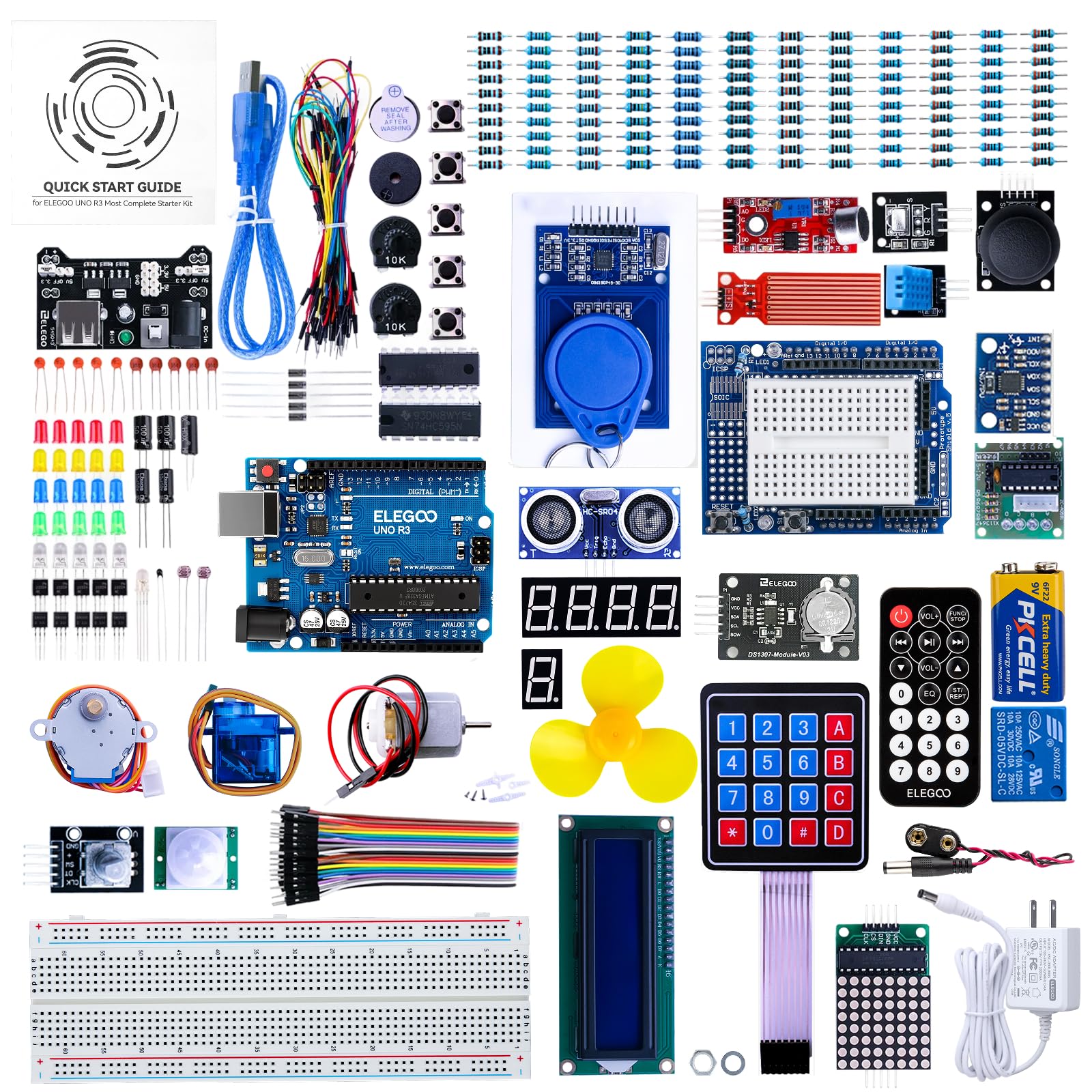
The budget-friendly Arduino classic with an all-in-one sensor shield that simplifies wiring for beginners.
This kit is the go-to for adults who want a low-cost, no-fuss introduction to Arduino without sacrificing component quality. It’s built around an ELEGOO UNO R3 board that’s 100% compatible with Arduino modules, and it includes the ELEGOO UNO ALL IN ONE Sensor Shield — an inline expansion board that makes wiring simpler and less error-prone, a real blessing for first-timers.
Your 65 items are packed in an attractive, convenient container, making it a great gift option. The kit adds 10 more female-to-female wires than the older version, and the PDF tutorials now include basic C language grammar, an improved FAQ for the common “lack of library” error, and even a guide for setting up development under Ubuntu. New fun projects like Dice roll, Retro Snaker, and Memory Game keep the learning playful.
Owners describe it as a well-packaged, comprehensive starter kit that’s ideal for both beginners and advanced users, with the included hardware praised as high quality for the price. The recurring gripe is the breadboard — owners call it “next to useless” because the internal connections are too tight, and suggest buying a cheap add-on breadboard. If you’re committed to building on a budget, this is your entry point.
Smart entry-level buy: a complete, well-organized hardware set at a budget-friendly price, with the sensor shield removing most wiring mistakes.
Expect to add: a replacement breadboard, since the included one has tight connection problems.
7. KEYESTUDIO IoT ESP32 Smart Home Kit
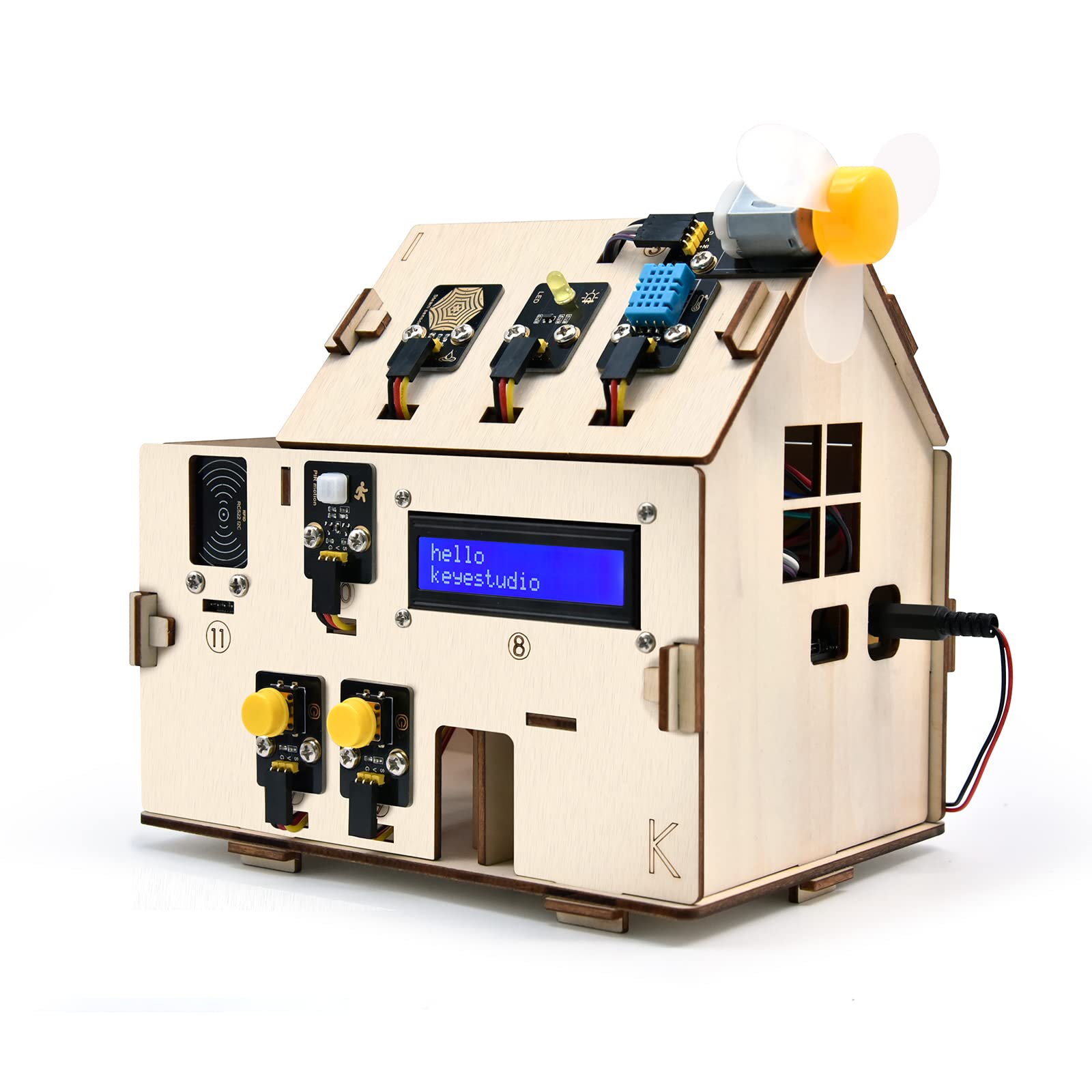
A build-it-yourself smart home in miniature, teaching you real IoT and home automation coding along the way.
This kit is for the adult who wants to see electronics do something practical — control a light, open a door, or trigger an alarm — not just blink in sequence. You assemble a wooden house and work through 13 progressive projects that start with an LED blink and build up to WiFi control and a mobile app remote, passing through PIR motion sensors, gas alarms, RFID door open up, and temperature monitoring along the way.
The standout is that you master two industry-standard languages: Arduino C++ and MicroPython, with 13 detailed tutorials for each. The ESP32 board gives you built-in WiFi, so you can control lights, fans, door servos, and SK6812 RGB lighting directly from your iOS or Android phone. Owners mention it’s “very concise and well documented,” with everything working within a couple of hours of assembly.
The trade-off is the instructions: they get mixed feedback, with some finding them easy to follow and others reporting gaps. A couple of owners hit sample-code errors — a missing brace and an analogWrite.h issue — that needed support or manual fixes. Note that 6x AA batteries are required and NOT included, so factor that into your first session.
Real-World Skills
- 13 progressive smart-home projects with WiFi control
- Learn both Arduino C++ and MicroPython
- Mobile app (iOS/Android) control included
Plan Around
- Instructions quality is inconsistent
- Requires 6x AA batteries, not included
Best for the future smart-home tinkerer: who wants to build functional automation projects and learn two coding languages on the same hardware.
Think twice if: you want a frustration-free zero-errors first build — the uneven instructions and sample-code bugs demand patience.
8. ACEBOTT Smart Robot Car Kit
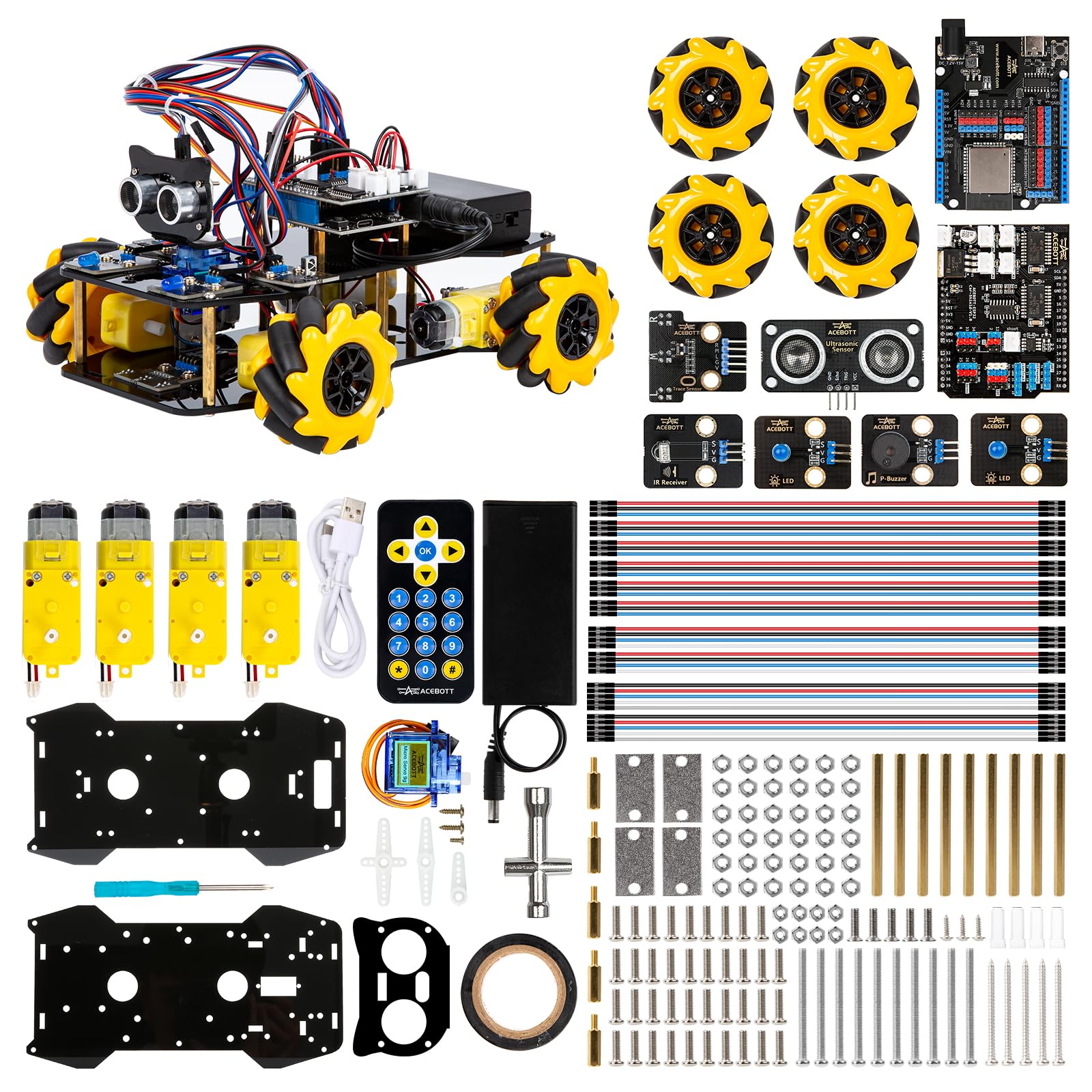
A six-wheeled mecanum car that glides in any direction and grows with camera, arm, and tank expansion packs.
This kit delivers instant satisfaction because the pay-off is a car that actually moves. The ACEBOTT smart robot car is controlled by an ESP32 board and rolls on 6cm omnidirectional Mecanum wheels, which let it move forward, sideways, diagonally, and rotate 360° — even perform drifts and squeeze through narrow spaces. You control it via an IR remote or the ACEBOTT App, making it feel more like piloting than programming.
For learning, it offers 16 story-rich tutorials that walk you through programming and electronic hardware principles, plus a suite of expansion packs — camera, robotic arm, tank, and solar — that you can add later for photo taking, image recognition, voice control, and multi-degree-of-freedom robotic arms. Owners call it a great project for any age, with one noting “it really did help learning on how to build a robot.”
The honest cons: batteries are not included, and they’re not basic ones, which frustrated a few buyers. There’s also a known flashing quirk — to load new code you must short GPIO 0 to GND and set the BAUD rate low in the ACEBOTT software. If you don’t mind some setup fiddling, the reward is a highly capable, expandable robot platform.
For the builder who wants motion: the mecanum-wheel movement and expansion options make this the most physically rewarding kit to finish.
Expect a learning curve: the bootloader flashing process requires patience, and specialty batteries are an extra purchase.
9. ACEBOTT Spider Robot Kit

An eight-legged walking robot with metal servos and app control that brings your code to life instantly.
This kit is all about a satisfying physical result: a spider that walks, crawls, and performs 9 preset actions across 6 movement modes, all controlled from the ACEBOTT App. It’s powered by an ESP8266 motherboard and uses MG90 metal servos for stable, durable movement, with uniform screws that make assembly straightforward — and you don’t even need to download a tutorial to enjoy the robot after building it.
Owners who love it describe it as a good starter robotics kit with a step-by-step online guide, and one noted the battery connector is included for an 18650 battery (not included), with no soldering required. It’s positioned as a teaching tool with 8 comprehensive lessons and a paper user manual, making it suitable for teens and adults into programming and hardware.
However, this is the pick with the most notable fit issues. Customers note the instructions are very long, some say missing parts arrive, and a battery that’s not included is required — a frustrating combo for beginners who expect a complete “unbox and play” robot. This kit is best for someone comfortable troubleshooting; it’s a genuine project, not a turnkey toy.
Best for the mechanical tinkerer: who enjoys assembly and wants a flashy walking robot, with the metal servos giving it real durability.
Not for the impatient: the long guides, missing-battery requirement, and occasional missing parts mean you must be ready to troubleshoot.
Understanding the Specs
Project Count vs. Component Count
A kit might list 300+ components, but what actually keeps you learning is the number of guided projects. More projects (like 50 or 164) usually mean more structured lessons, wiring diagrams, and a clear path from beginner to advanced. A high part count with few projects offers more freedom but less guidance.
The Controller Board
The controller board defines the kit’s capabilities and your learning ceiling. Arduino boards are great for learning C++ and controlling simple hardware like LEDs and motors, and they’re usually the most beginner-friendly. Raspberry Pi boards run a full operating system and support multiple languages like Python and Java, making them more powerful but also more complex. ESP32 boards include built-in WiFi and Bluetooth, so they’re the choice for internet-connected projects and smart-home builds.
FAQ
Do I need any electronics experience to start with these kits?
What is the difference between an Arduino kit and a Raspberry Pi kit?
Will these kits work with the computer or laptop I already own?
What extra items do I need to buy separately for these kits?
Which kit is better for learning multiple programming languages?
Are these kits suitable as gifts for adults who are new to coding?
How long does it take to complete the projects in these kits?
What is the difference between a genuine Arduino board and a compatible one?
Can I use these kits to build internet-of-things (IoT) smart home projects?
Final Thoughts: The Verdict
For most buyers, the electronics kits for adults winner is the SunFounder Elite Explorer Kit because it pairs an original Arduino Uno R4 WiFi board with 300+ components and 60+ video lessons, making it the most complete and guided learning path available. If you want a cinematic story-driven experience, grab the Adventure Kit: 30 Days Lost in Space. And for a budget-friendly Arduino classic that’s ideal for a first build, the ELEGOO UNO R3 V2.0 is the one to reach for.
How We Picked
We do not accept paid placement. Every pick is matched to a real buyer and a real use-case; we do not hands-on test units.
Sources & Methodology
Specifications: manufacturer listings and product documentation. Review insights: verified customer reviews, as of August 2026. Pricing: not shown on this page (it changes often); check the current price via the retailer link.
As an Amazon Associate, WellFizz earns from qualifying purchases. This does not affect which products we feature.
Related Guides

Mo Maruf
I created WellFizz to bridge the gap between vague wellness advice and actionable solutions. My mission is simple: to decode the research and give you practical tools you can actually use.
Beyond the data, I am a passionate traveler. I believe that stepping away from the screen to explore new environments is essential for mental clarity and physical vitality.